
LightningFlowComponents
 LightningFlowComponents copied to clipboard
 alexed1
Quick Lookup Component - "Cannot read properties of undefined (reading 'toLowerCase')"
I have a "Quick Lookup" Lightning Component installed, I set up two Parent-Child elements and they work perfectly, however, when the screen is displayed and I choose the first record, a message appears as if it were a system message, it says: "Cannot read properties of undefined (reading 'toLowerCase')", I configured the flow from zero, but the message shows again. The flow continues without a problem but the message is persistent and the user must close it.
Steps to reproduce
STEPS TO REPRODUCE THE BEHAVIOUR: Set up of Component 1: API Name: ScrCarr_CarreraLookUp Component ID: EscogeCarrera Default Value: I1_Object Name: Account I2_Display Which Field?: Name I3_Field Label: Escoja la Carrera de preferencia I4_Output Which Field as Value?: Id I5_'Parent', 'Child' or 'Both' Lookup?: Parent I6_Filter on which field?: I7_Filter Value: I8_Search this Field instead of Display Field: Icon: O1_Output Value: {!VarTxt_CarreraLookUp} (Variable's name, Empty as default) Parent ID: Required?: {!$GlobalConstant.True} Where Clause: {!FrxTxt_ClausulaWhereCarrera} (Formula that contains the Where condition, it works fine)
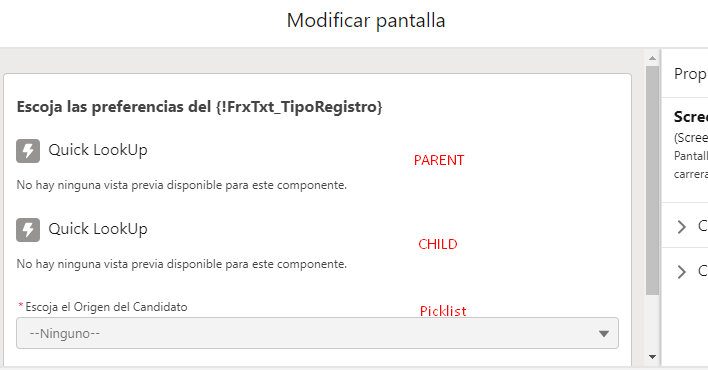
Set up of Component 2: API Name: ScrCarr_OfertaLookUp Component ID: Default Value: I1_Object Name: hed__Term__c (Object from EDA's package) I2_Display Which Field?: Frx_CampusSession__c I3_Field Label: Escoja la Sede y Jornada de preferencia I4_Output Which Field as Value?: Id I5_'Parent', 'Child' or 'Both' Lookup?: Child I6_Filter on which field?: Career__c I7_Filter Value: {!VarTxt_CarreraLookUp} (it works) I8_Search this Field instead of Display Field: Icon: O1_Output Value: {!VarTxt_OfertaLookUp} Parent ID: EscogeCarrera Required?: {!$GlobalConstant.True} Where Clause: {!FrxTxt_ClausulaWhereOferta} (Formula that contains the Where condition, it works fine)
Activate the Flow and configured it to be invoked from a button of a record.
Expected behaviour
The message "Cannot read properties of undefined (reading 'toLowerCase')" shouldn't appear.
Actual behaviour
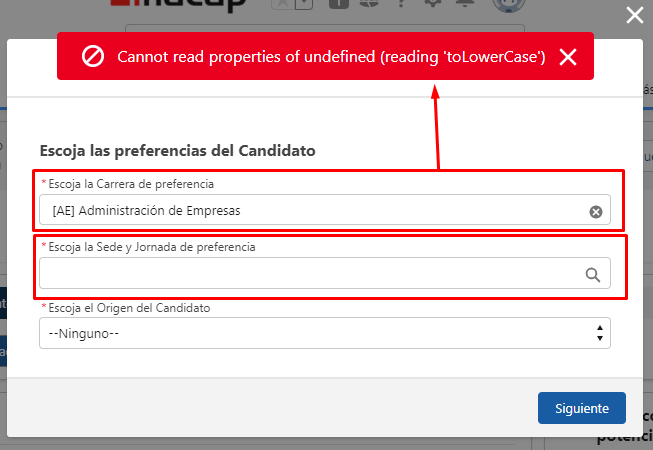
The message mentioned appears as the figure.
Screenshots
Debug Logs
Not applicable
Important Comment
The buttons "Run" or "Debug" from the Flow Builder don't show the message, only if the flow is activated and it's run from a record with an Action Button invoking the Flow.

Hello @ericrsmith35 and @RealEvanPonter,
I installed this package before and use it but only for a single search, this is the first time that I use it in a Parent-Child setup. The problem is in the description and is the persistent error with the message "Cannot read properties of undefined (reading 'toLowerCase')". I must open a case to Salesforce and they told me that is a JavaScript error.
I remember that this Lightning component has its Source Code published, so I reviewed it and I found that in this file https://github.com/alexed1/LightningFlowComponents/blob/master/flow_screen_components/quickLookup/force-app/main/default/aura/QuickLightningLookup/QuickLightningLookupHelper.js - there are two lines with that sentence:
In this one:
- 311 component.set("v.selectedValue", matchedListValue[index]);
- 312 if(matchedListDisplay[index].toLowerCase() != 'no records found!'){
- 313 component.set("v.selectedName", matchedListDisplay[index]);
And in this other one:
- 381 // Check name if parent or child in lowercase
- 382 if(name.toLowerCase() === 'parent'){
- 383 this.fireSaveFilter(name, '');
- 384 }
I don't know JavaScript language, but I can read code and one of them is the cause of the problem.
Can you fix it, please?
Thank you in advance and best regards Javier Hidalgo
Hi @Javier-Hidalgo-B I was struggling with the same problem for a while now, and I just discovered a workaround which seems to be working. In the "Child" lookup component I noticed that I left the "Component ID" empty. I've done the test, and I populated it with a random value. After saving the flow the "Cannot read properties of undefined (reading 'toLowerCase')" is not appearing anymore
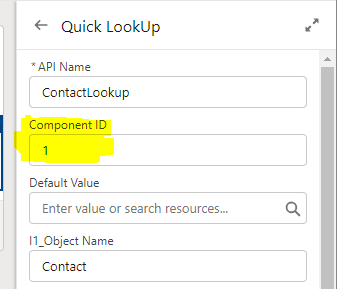
Fingers crossed it works for you as well!

@stronggoat it worked‼ 😀, still, it shouldn't show the error, otherwise, it should be in the documentation.
Thank you! Ran into the same issue and this helped. Probably should include a note in the docs about this.
