

 alexed1
*Datatable 4.0.12* - Picklist values are not translated in the editable columns
Steps to reproduce
Steps to reproduce the behavior:
- Create a picklist field with values
- Translate the values (Setup-> User Interface -> Translation Workbench -> Translate)
- Add a picklist field in the column of the Datatable component and make it editable
- The User selects the picklist value in the column (picklist values are translated in the scroll window)
- Once is selected the value is not translated
Expected behaviour
The selected value is translated
Actual behaviour
The selected value is not translated
Screenshots
The user is selecting the value (the values are translated correctly):
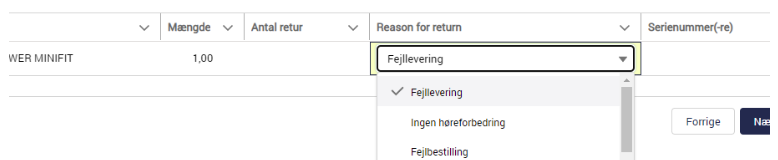
After selecting the value:


Because of the behavior of picklist fields, you will see the API name of the field instead of the translated label immediately after editing a value. When you later show the picklist field it will have the correct translated label.
Eric Smith
On Tue, Feb 28, 2023 at 8:44 AM Ra.Preziosi @.***> wrote:
Steps to reproduce
Steps to reproduce the behavior:
- Create a picklist field with values
- Translate the values (Setup-> User Interface -> Translation Workbench -> Translate)
- Add a picklist field in the column of the Datatable component and make it editable
- The User selects the picklist value in the column (picklist values are translated in the scroll window)
- Once is selected the value is not translated
Expected behaviour
The selected value is translated Actual behaviour
The selected value is not translated Screenshots
The user is selecting the value (the values are translated correctly):
[image: image] https://user-images.githubusercontent.com/74841513/221871537-518a3b44-b0f0-467f-b5d8-e7aaf0729bc3.png
After selecting the value:
[image: image] https://user-images.githubusercontent.com/74841513/221870851-0bd1005d-7a33-485f-994d-bfc4919818db.png
— Reply to this email directly, view it on GitHub https://github.com/alexed1/LightningFlowComponents/issues/1357, or unsubscribe https://github.com/notifications/unsubscribe-auth/AF4UHXZZFLIDXURP54A7TVLWZX6MFANCNFSM6AAAAAAVKX2JAU . You are receiving this because you are subscribed to this thread.Message ID: @.***>

Hi @ericrsmith35,
Thank you for your quick response. I have noticed that on the next screen component, containing a resume table with the same field, it displays the correct translated label.
However, this behavior is confusing for users, and it makes the UI look unprofessional.
Do you think is it possible to find a solution to show always the translated values?
Unfortunately this is a default built-in behavior of Salesforce that I am unable to change.
On Tue, Feb 28, 2023 at 9:06 AM Ra.Preziosi @.***> wrote:
Hi @ericrsmith35 https://github.com/ericrsmith35,
Thank you for your quick response. I have noticed that on the next screen component, containing a similar table, the field has the correct translated label.
However, this behavior is confusing for users, and it makes the UI look unprofessional.
Do you think is it possible to find a solution to show always the translated values?
— Reply to this email directly, view it on GitHub https://github.com/alexed1/LightningFlowComponents/issues/1357#issuecomment-1448238339, or unsubscribe https://github.com/notifications/unsubscribe-auth/AF4UHX7N6MK4XSYWJPYZPDDWZYA7LANCNFSM6AAAAAAVKX2JAU . You are receiving this because you were mentioned.Message ID: @.***>
What happens if you select the Hide Cancel/Save buttons option?
On Tue, Feb 28, 2023 at 9:12 AM Eric Smith @.***> wrote:
Unfortunately this is a default built-in behavior of Salesforce that I am unable to change.
On Tue, Feb 28, 2023 at 9:06 AM Ra.Preziosi @.***> wrote:
Hi @ericrsmith35 https://github.com/ericrsmith35,
Thank you for your quick response. I have noticed that on the next screen component, containing a similar table, the field has the correct translated label.
However, this behavior is confusing for users, and it makes the UI look unprofessional.
Do you think is it possible to find a solution to show always the translated values?
— Reply to this email directly, view it on GitHub https://github.com/alexed1/LightningFlowComponents/issues/1357#issuecomment-1448238339, or unsubscribe https://github.com/notifications/unsubscribe-auth/AF4UHX7N6MK4XSYWJPYZPDDWZYA7LANCNFSM6AAAAAAVKX2JAU . You are receiving this because you were mentioned.Message ID: @.***>
It was already selected. I tried to remove it, but I got the same result. Also after saving the change it shows me the untranslated label.
Selecting value:
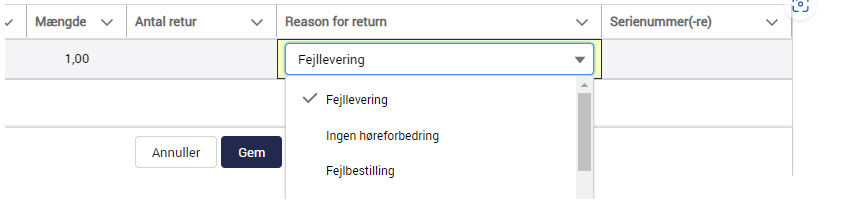
Before Save:
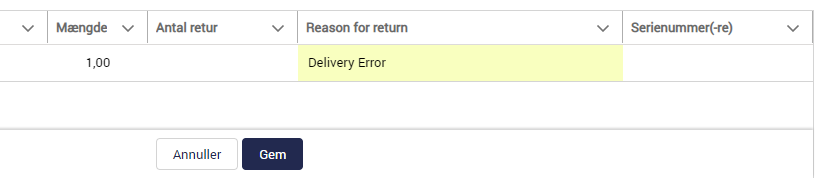
After save:

Should this be the expected behavior?
Hi @ericrsmith35, I hope you're doing well. Just wanted to check in and see if there have been any updates regarding the issue we discussed earlier. Is this behavior expected or should we be looking into it further? Thank you!