
desktop-wallet
 desktop-wallet copied to clipboard
 alephium
Cant install v1.3.0 release - Windows 64bit
Can't install v1.3.0 release for windows 64 bit, keep getting an error message that Alephium wallet is running and can't be closed. Even tried doing the install after rebooting to make sure it wasn't running.
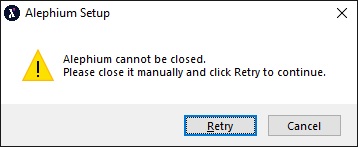
If I have the wallet running it does appear to shut it down, but the same error message pops back up to manually close and retry.
When I select "Cancel" I get the following additional error message about failing to uninstall the old version
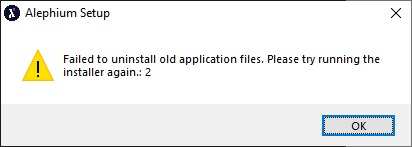
Additional Info: Current version installed is v1.2.0

Thanks for the bug report @mk564 , we'll investigate in the next couple of weeks, as we prepare for a 1.4.0 release. To resolve issues like this is time consuming and we're a small team. We appreciate if you find a solution and report back as well :heart:

@mk564 you mentioned you are running Windows 64bit. Which Windows version are you running? 10 or 11?

This issue might be related to this bug: https://github.com/electron-userland/electron-builder/issues/6865
@mk564 Any chance you can find another process that includes the word "Alephium" in its name? That would explain why you have this issue and not other windows users that we talked to.
@nop33, the only other process as far as I can tell with "Alephium" is the installer itself.
One more thing that was mentioned on our Discord that might help: Could it be that you did the initial install with the "administrator" windows user and the upgrades with the "normal" one?
Did you try to uninstall the existing version right after rebooting your computer? If you did, could you then install on a clean slate the new version?
So sorry you are going through this, this is really hard to debug.
I tried running the Uninstall of 1.2.0.0 version and it won't run since it thinks Alephium is still running. Even tried rebooting and Uninstaller says same thing.
On Fri, Oct 21, 2022, 7:24 PM Ilias Trichopoulos @.***> wrote:
One more thing that was mentioned on our Discord that might help: Could it be that you did the initial install with the "administrator" windows user and the upgrades with the "normal" one?
Did you try to uninstall the existing version right after rebooting your computer? If you did, could you then install on a clean slate the new version?
So sorry you are going through this, this is really hard to debug.
— Reply to this email directly, view it on GitHub https://github.com/alephium/desktop-wallet/issues/354#issuecomment-1287530247, or unsubscribe https://github.com/notifications/unsubscribe-auth/AY3OFMUYQETKHZQRMKAM2DTWEMQ4LANCNFSM6AAAAAAQGFW3OY . You are receiving this because you were mentioned.Message ID: @.***>
@mk564 sorry for keeping waiting so long! We just released version 1.5.0, which includes an automatic update system. Could you try installing that one? If that succeeds, you shouldn't have any problems from now on, since the updates happen through the app (no need to manually download and install from the next release on).
I'll close this due to inactivity, please feel free to open it again if you have issues with the v1.5.0 version as well!