
aleph
 aleph copied to clipboard
 aleph-viewer
Aleph is a 3D object viewer and annotation/measurement tool built with A-Frame, AMI, StencilJS, and Ionic

Aleph




Aleph is a 3D object viewer and annotation/measurement tool built with A-Frame, AMI, StencilJS, and Ionic


- Website
- Scope
- Getting Started
- Contributing
- Feedback
- Documentation
- License
Website
Visit the Aleph demo page to try it out.

Scope
- Usable as a web component within any page/framework and has a Universal Viewer integration
- Has a supporting Control Panel (a separate web component) showing associated settings for a given mesh or volume
- Straight-forward to debug, using a single source of truth and unidirectional data flow (redux)
- Themable to allow customised colour schemes (css variables)
- Encapsulates 3D rendering logic in a well-defined component model, with pre-existing community support/adoption (A-Frame)
- Utilises the component model to extensibly display 3D media file types (GLTF+DRACO, DICOM)
- Renders 3D scenes declaratively, decoupling the presentation layer from the application layer
- Permits annotation of points on a 3D mesh or volume with a title and description
- Permits measurement of lengths and angles, with the potential to be extended to areas and volumes
- Permits annotation/measurement data to be stored/retrieved as json
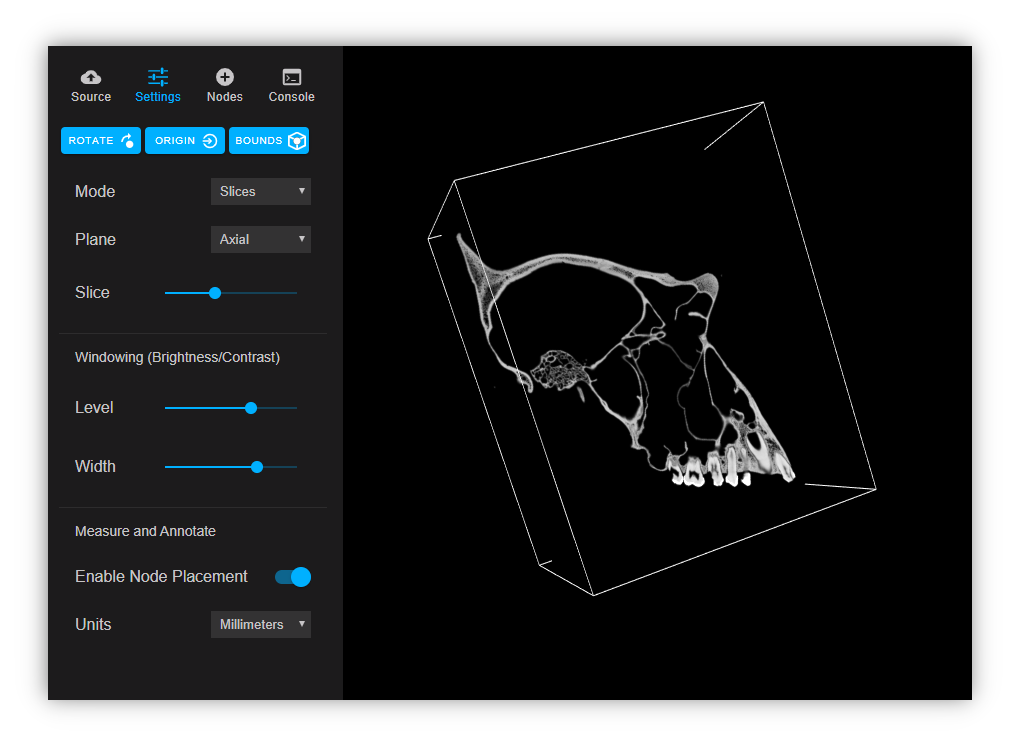
- Permits slice and volume views of volumetric data, with axis/slice selection and point cloud windowing controls
- Permits panning, rotating, and animated transitions between annotations/measurements
- Has "in-scene" annotation/measurement tools as opposed to overlaid, permitting future AR/VR/XR use cases
Getting Started
Clone the repository and run npm install
Dev Builds
For development with readable sources and hot reloading run:
npm run build:dev
Production Builds
For minified production builds run:
npm run build
View on localhost
npm start
Contributing
Read below to learn how to take part in improving Aleph:
- Fork the repository and run the examples from source
- Get familiar with Code of Conduct
- Read our guide to contributing
- Find an issue to work on and submit a pull request
- First time contributing to open source? Pick a good first issue to get you familiar with GitHub contributing process.
- First time contributing to Aleph? Pick a beginner friendly issue to get you familiar with codebase and our contributing process.
- Want to become a Committer? Solve an issue showing that you understand Aleph objectives and architecture. Here is a good list to start.
- Could not find an issue? Look for bugs, typos, and missing features.
Feedback
Read below how to engage with Aleph community:
- Join the discussion on Slack.
- Ask a question, request a new feature and file a bug with GitHub issues.
- Star the repository to show your support.
Documentation
Web Components
- al-angle-editor
- al-console
- al-control-panel
- al-edge-editor
- al-graph-editor
- al-node-editor
- al-node-list
- al-settings
- al-tabs
- al-url-picker
- al-viewer
Aleph can be used to display GLTF files and DICOM series. GLTF can be used in conjunction with DRACO compression.
To annotate/measure an object, open the "Settings" tab in the control panel and check "Enable Node Placement". Clicking on a 3D object will create a node which can be given a title and description. Nodes can be used as points of interest or can be connected via edges. With a node selected, SHIFT + Click to create an edge between that and another node. Edges can be used for measurement and can also be labeled with a title and description. Units of measurement can be changed in the control panel. SHIFT + Click between edges to measure angles.
The two top-level web components are <al-control-panel> and <al-viewer>. <al-control-panel> wraps a tabs-based interface containing <al-url-picker>, <al-settings>, <al-graph-editor>, and <al-console>. <al-viewer> contains the A-Frame scene and all 3D rendering logic. It also contains a Redux store that acts as single source of truth for the viewer and control panel. <al-viewer> can be used independently of <al-control-panel>, which can be lazy loaded to provide additional options.
License
- MIT
Metadata
Owner
 aleph-viewer
Metadata
Aleph is a 3D object viewer and annotation/measurement tool built with A-Frame, AMI, StencilJS, and Ionic