
SVG-to-PDFKit

SVG-to-PDFKit copied to clipboard
 alafr
alafr
Doesn't support "mask" attribute in some cases (maskUnits="objectBoundingBox")
Example:
<svg version="1.1" preserveAspectRatio="xMidYMid meet" viewBox="0 0 300 300" width="300" height="300">
  <defs>
    <pattern id="fillPattern" width="10" height="10" patternTransform="rotate(45)" patternUnits="userSpaceOnUse">
      <line x1="0" y1="0" x2="0" y2="10" stroke="blue" stroke-width="10"></line>
    </pattern>
    <mask id="mask" x="0%" y="0%" width="50%" height="100%" maskUnits="objectBoundingBox">
      <rect fill="white" x="0" y="0" width="100%" height="100%"></rect>
    </mask>
  </defs>
  <rect width="100" height="100" fill="red"></rect>
  <rect width="100" height="100" fill="url(#fillPattern)" mask="url(#mask)"></rect>
  <rect x="120" width="100" height="100" fill="green"></rect>
  <rect x="120" width="100" height="100" fill="blue" mask="url(#mask)"></rect>
</svg>
Chrome:
http://jsfiddle.net/3jauks5q/
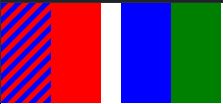
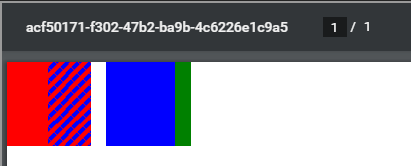
SVG to PDF:
 (used this demo https://alafr.github.io/SVG-to-PDFKit/examples/options.htm)
Edit:
Maybe the issue is that it doesn't support "maskUnits="objectBoundingBox""? Because when I set the mask rect coordinates to something specific like
<rect fill="white" x="50" y="0" width="50%" height="50%"></rect>
Then it seems to work, although not exactly the same way as the browser:
 Browser:
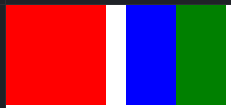
But maskUnits="objectBoundingBox" should be supported anyway

Was able to achieve consistent results between the browser and the PDF by using this code with my masks:
<mask id="mask" maskUnits="objectBoundingBox" maskContentUnits="objectBoundingBox">
  <rect fill="white" x="0" y="0" width="0.5" height="1"></rect>
</mask>