
Akira
 Akira copied to clipboard
 akiraux
Appimage package
Look forward to using your app once it comes out as i'm currently using balsamiq and pencil for UI designing and would suggest that you package it as an appimage to ensure it easily runnable on any linux distro.
https://github.com/AppImage/AppImageKit

Edit 2020: An AppImage for testing is available now at: https://github.com/probonopd/Akira/releases/tag/continuous

Thanks guys, I will definitely package it as an AppImage to make it available and usable in every distro. I'm working on the first pre-alpha draft, and actually, I decided to code it in Vala and Gtk, which I found myself more comfortable than Qt. I should be able to release something really basic, but usable, before the end of the month. Maybe some of you could contribute with a PR for the travis file to aut trigger the compiling of an appimage. That'd be neet. Cheers

Please see https://github.com/probonopd/linuxdeployqt, it has a template that you can literally copy and paste and go from there.
@probonopd Does this work with Vala and CMake apps as well? I'm not using Qt anymore.
Yes. See the CMake section on https://github.com/probonopd/linuxdeployqt.
Hi @probonopd, I'm trying to build an AppImage for Akira but it keeps failing. Here's the file: https://github.com/Alecaddd/Akira/blob/appimage/.travis.yml
By default is installing old versions of the required dependencies.
Is this related to the fact that I need to compile for trusty?
Found gtk+-3.0, version 3.10.8
--   Found granite, version 0.1.4
--   Found glib-2.0, version 2.40.2
--   Found gee-0.8, version 0.20.0
--   Found gobject-2.0, version 2.40.2
--   Found libxml-2.0, version 2.9.1
--   Found gtksourceview-3.0, version 3.10.2
Is there a way to specify an updated or specific version during the apt-get install process?
Yes. We recommend to build for the oldest still-supported LTS (Long Term Support) version which is 14.04 trusty at the moment, so that the resulting AppImage will be compatible with those systems, too. So you need to find versions of those dependencies that are new enough to work with Akira, but for 14.04. Maybe there are PPAs, maybe you need to compile them from source.
@probonopd I'm adding all the necessary PPAs and travis seems to install everything correctly, but the process exits with this error:
iconToBeUsed: "/home/travis/build/Alecaddd/Akira/appdir/usr/share/icons/hicolor/64x64/apps/com.github.alecaddd.akira.svg"
ERROR: Could not copy "/home/travis/build/Alecaddd/Akira/appdir/usr/share/icons/hicolor/64x64/apps/com.github.alecaddd.akira.svg" to "/home/travis/build/Alecaddd/Akira/appdir/com.github.alecaddd.akira.svg"
The icon is there and I'm copying everything. Do you know how I can troubleshoot this?
@Alecaddd smells like this might be a linuxdeployqt bug. Can you point me to a Travis CI build where I can see this?
There you go: https://travis-ci.org/Alecaddd/Akira/builds/320772567
Thanks for taking the time to check this
Triggered a build, let's see how it goes: https://travis-ci.org/probonopd/Akira/builds
Thanks for checking, be sure to build off of the appimage branch. I removed methods and features not supported by those packages version
Very strange. It seems like in the second run of linuxdeployqt it does not recognize the pre-existing icon here:
https://github.com/probonopd/linuxdeployqt/blob/c1ee04f1164021bc82cd46fff1476af20659ae41/tools/linuxdeployqt/main.cpp#L315-L318
It should recognize the pre-existing icon and not attempt to copy it (again):
https://github.com/probonopd/linuxdeployqt/blob/master/tools/linuxdeployqt/main.cpp#L324-L326
But for some strange reason this is not working as it should...
https://github.com/Alecaddd/Akira/blob/0d0aa391c4f43eeaa8a998daddb7167af559ae87/.travis.yml#L4
This is much too new. The resulting AppImage would only run on late-2016 and newer distributions, which kinda defeats the point. Please lower the build-time requirements to the oldest still-supported Ubuntu LTS version, which is at this point 14.04 trusty.
I am not even sure whether linuxdeployqt works properly on such new systems.
Lowered the target to trusty but I get the same error with the missing icon.
Looks like I am getting somewhere with my builds but the UI looks a bit off, maybe this needs to be tweaked for trusty?
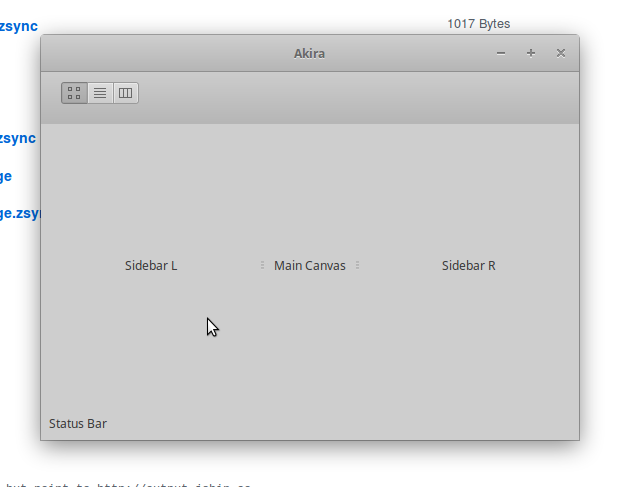
https://github.com/probonopd/Akira/blob/patch-1/.travis.yml
Oh wow, that's a good sign!
Can you make a PR to the appimage branch with the edits you made to make it work?
With that, I can start tweaking the app to make it compatible with Trusty and test everything locally.
EDIT: I saw you linked the travis file in the comment. I'll use that. Thank you so much! 👍
Ok, I'm getting super excited about this! The deployment via Travis works, just a couple of things are missing.
-
I need to use a couple of slightly more updated packages. Considering that I can build from source inside travis, is it ok for AppImage? It won't create any issue if the OS or the Distro doesn't have those packages, right? Is everything embedded into the app?
-
The AppImage comes without an icon, is there something I'm missing?
Cheers
I need to use a couple of slightly more updated packages. Considering that I can build from source inside travis, is it ok for AppImage?
Yes. As long as it is not one of the blacklisted libs (which we expect to come from the system) you should generally be fine.
The AppImage comes without an icon, is there something I'm missing?
Where exactly is the icon missing? Please use QApplication::setWindowIcon().
Look at the Bash script that I used to build Ricin when I was developing it. It's Vala/Gtk+3 based so you should have minor tweaks to apply :)
https://github.com/RicinApp/Ricin/blob/master/appimage.sh

@SkyzohKey this is a very manual way of doing things; in the meantime, using linuxdeployqt may be an easier route - although I haven't tried it on Vala/Gtk+3 apps specifically so far.
@probonopd Yeah but this project is no longer Qt driven. If I understand correctly it's now 100% GTYK+3/Vala. And the file you made for Ricin should be simple to adapt to Akira' usecase :)
EDIT: nvm, linuxdeployqt looks promising, great work guy!
Hi ! I've been trying to install akira on arch (using meson but also from a repo on yaourt) But in both cases there is a problem with the interface. I don't get any error message in my terminal, and I don't really know where to look for a log. I saw that @probonopd had a similar issue, I'm looking for clues :)


That looks like it's supposed to. Akira is still in early development, and the screenshot in the readme file it's just a mockup. Still, a long way to go and many hours of coding before it'll be usable. Cheers
Ho sorry ! well then it's working perfectly. Good luck with your project, I can't wait to test it :)
Hello, I can't run the appimage on open suse tumbleweed, it complains about libthai, At the moment the libthai version on open suse tumbleweed is 0.1.27-2.1.
''' $./Akira-d74196b-x86_64.AppImage akira: /tmp/.mount_Akira-2YuEj3/usr/lib/libthai.so.0: version `LIBTHAI_0.1.25' not found (required by /usr/lib64/libpango-1.0.so.0) '''

As per https://github.com/AppImage/AppImages/blob/master/excludelist, libthai should not be bundled inside the AppImage.
Is there any workaround to run the appimage in suse tumbleweed? I'm sorry for the off-topic question, I'm not a developer.