

 akermu
How to click and open files (or urls) in vterm?
Is there any way to make links in vterm clickable?
Suppose I run a linter and see some errors, I would like to ctrl-click or press RET in normal mode, on the file links to open them in a new buffer.
How can I accomplish this?
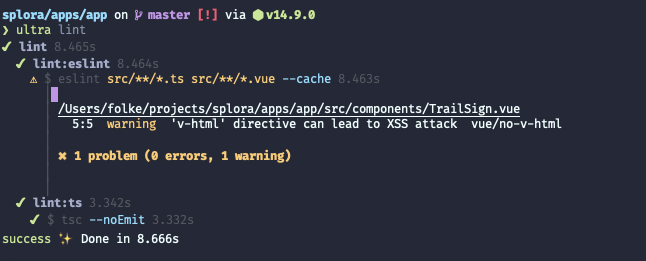


Tried that, but it doesn't work. I'm assuming the ansi control characters mess it up.
I use browse-url for that:
      (defun sbozzolo/browse-url (url)
        "Browse url starting with what is at the point"
        (interactive (list
                      (read-string (format "URL (%s): " (thing-at-point 'url))
                                   (thing-at-point 'url) nil (thing-at-point 'url))))
        (browse-url url))
But I agree, it would be nice to be able to just click on the link.

@Sbozzolo thank you for the suggestion, but that also doesn't seem to work.
The ansi color sequences are messing up with the file detection regex.
When I run npm run lint --no-color, then ffap does work, but then of course I don't have any colors in the output :)
I'm fairly new to Elisp, but will see if I can find a way to get the vterm buffer; strip all ansi control characters somehow; and then run ffap-menu on the result.
I understand this is out of scope for libvterm, so feel free to close this issue.
I forgot to mention that I run the command in vterm-copy-mode. Can you try with that?
How about using goto-address-mode?
I just enabled it myself and the first impression is good.
Edit: For URLs at least... Not for files.

I am searching a solution on this issue as well, @folke have you found a workaround?

ffap kind of works, but it doesn't work if a file name wraps. Is there a way to detect line continuation in vterm? i.e. differentiate it from an actual newline in the terminal?
