

 ajayyy
Segments don't appear on the timeline
Colored segments used to appear on the video timneline, now even after they are loaded they don't appear anymore, there is no setting to enable or disable this function.


So, I've been getting sponsored content, despite me having this on. If I create my own segment, it skips, if I do not, there's just nothing. I'm guessing it's due to the server being down but, I checked on Chrome, Edge and Vivaldi, and it's all the same thing.
A connection error has occurred. Error code 502
Not sure if these are connected, but I haven't seen another issue concerning this specifically.

I'm having the same issue in Firefox 105.0.3 and Chromium 105.0.5195.127 in Windows and Firefox 106.0.1 on Ubuntu
This particular video is definitely causing this issue for me: https://www.youtube.com/watch?v=ccCvThI7uVc
Leaving the video open for a few minutes before starting it appears to be a workaround

Also having this issue, segments do skip perfectly fine, but do not show up in the timeline linking my debug options, a video link and a screenshot of it to show the issue, don't mind the french
https://www.youtube.com/watch?v=LDF0ILdSyAw
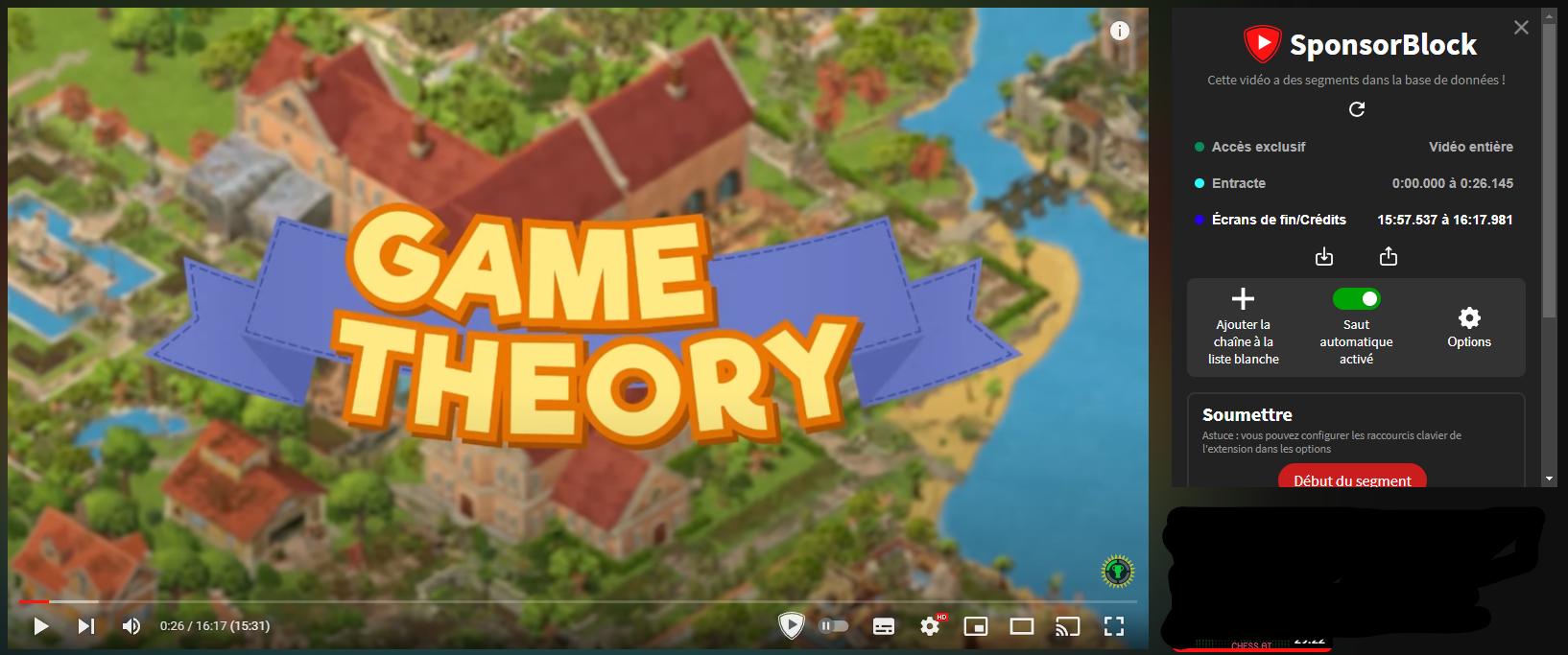
EDIT: Intresting tidbit of info, it's now working fine, except in theater mode where the issue still happens, no clue what's going on, but, might be helpful ? sponsorblock_debug_2.txt

I am also having this issue. I have found that if I add videos to the queue from the front page (making them appear in the miniplayer first) then hit i to expand the player, the segments actually appear on the miniplayer only, and not on the expanded video. On the other hand, if I just click on a video normally or open it in a new tab, the segments do appear on the timeline (but are missing from the miniplayer if I press i). I am on v. 5.4.26.

I am also having this issue. I have found that if I add videos to the queue from the front page (making them appear in the miniplayer first) then hit
ito expand the player, the segments actually appear on the miniplayer only, and not on the expanded video. On the other hand, if I just click on a video normally or open it in a new tab, the segments do appear on the timeline (but are missing from the miniplayer if I pressi). I am onv. 5.4.26.
still an issue on microsoft edge (5.5.9)

I am also having this issue. I have found that if I add videos to the queue from the front page (making them appear in the miniplayer first) then hit
ito expand the player, the segments actually appear on the miniplayer only, and not on the expanded video. On the other hand, if I just click on a video normally or open it in a new tab, the segments do appear on the timeline (but are missing from the miniplayer if I pressi). I am onv. 5.4.26.still an issue on microsoft edge (5.5.9)
Not really a fix, but reloading after expanding the "miniplayer" should fix segments not showing. If you've used the Add to queue feature, the queue playlist should still have all videos in order.
