

 airsdk
Context3D.drawToBitmapData sometimes flips / offsets output on Windows
Problem Description
In Starling, I'm using Context3D.drawToBitmapData() to support drawing a display object into a BitmapData instance. When an object is bigger than the stage / the back buffer, I'm doing this in multiple steps. I'm drawing the object from several "tiles" to get all its contents, using the destPoint argument to get the positions right.
On macOS, this works just fine. However, on Windows and iOS, the output is sometimes jumbled. (I couldn't try this on Android yet). It's best shown in an image.
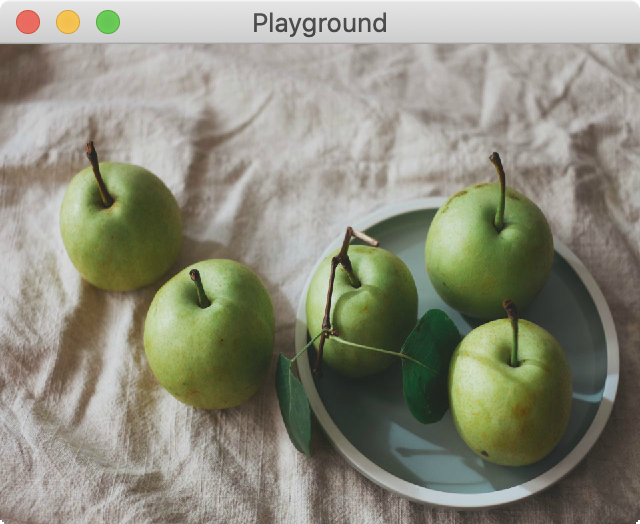
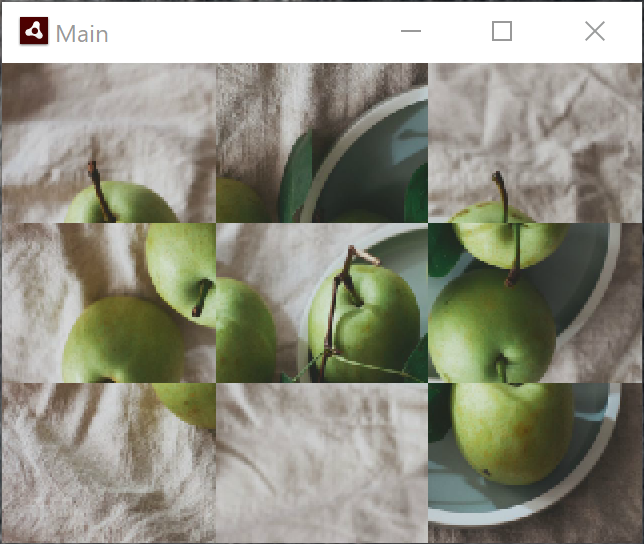
As you can see, the Windows output gets a few of the tiles right, but some are mixed up, others flipped.
- I used AIR SDK 33.1.1.190
- I tested this with Windows 10 version 1909.
- I received reports about this from several Starling users; it seems that all Windows users are affected.
- It happens both with DirectX 9 and 11.
- Interestingly, it also happens in render mode "software".
- It happens on iOS 13.6, too.
Steps to Reproduce
I created a minimal example that only uses pure Stage3D and the AGALMiniAssembler. Here's the code:
package
{
    import com.adobe.utils.AGALMiniAssembler;

    import flash.display.Bitmap;
    import flash.display.BitmapData;
    import flash.display.Sprite;
    import flash.display3D.Context3D;
    import flash.display3D.Context3DMipFilter;
    import flash.display3D.Context3DProfile;
    import flash.display3D.Context3DProgramType;
    import flash.display3D.Context3DTextureFilter;
    import flash.display3D.Context3DTextureFormat;
    import flash.display3D.Context3DVertexBufferFormat;
    import flash.display3D.Context3DWrapMode;
    import flash.display3D.IndexBuffer3D;
    import flash.display3D.Program3D;
    import flash.display3D.VertexBuffer3D;
    import flash.display3D.textures.RectangleTexture;
    import flash.display3D.textures.TextureBase;
    import flash.events.Event;
    import flash.geom.Matrix3D;
    import flash.geom.Point;
    import flash.geom.Rectangle;

    [SWF(width = "320", height = "240", backgroundColor = "#808080", frameRate = "30")]
    public class DrawToBitmapDataBug extends Sprite
    {
        [Embed(source = "apples.jpg")]
        private static const TextureBitmap:Class;

        private var _texture:TextureBase;
        private var _context3D:Context3D;
        private var _program:Program3D;
        private var _vertexBuffer:VertexBuffer3D;
        private var _indexBuffer:IndexBuffer3D;
        private var _frameIndex:int = 0;

        public function DrawToBitmapDataBug()
        {
            if (stage) onAddedToStage(null);
            else addEventListener(Event.ADDED_TO_STAGE, onAddedToStage);
        }

        private function onAddedToStage(e:Event):void
        {
            stage.stage3Ds[0].addEventListener(Event.CONTEXT3D_CREATE, initStage3D);
            stage.stage3Ds[0].requestContext3D("auto", Context3DProfile.BASELINE);

            addEventListener(Event.ENTER_FRAME, onRender);
        }

        private function initStage3D(e:Event):void
        {
            var stageWidth:int = stage.stageWidth;
            var stageHeight:int = stage.stageHeight;

            _context3D = stage.stage3Ds[0].context3D;
            _context3D.configureBackBuffer(stageWidth, stageHeight, 1, false);

            trace(_context3D.driverInfo);

            var vertices:Vector.<Number> = Vector.<Number>([
                -1.0,  1.0, 0, 0, 0, // x, y, z, u, v
                 1.0,  1.0, 0, 1, 0,
                -1.0, -1.0, 0, 0, 1,
                 1.0, -1.0, 0, 1, 1]);

            _vertexBuffer = _context3D.createVertexBuffer(4, 5);
            _vertexBuffer.uploadFromVector(vertices, 0, 4);

            var indices:Vector.<uint> = Vector.<uint>([0, 1, 2, 1, 3, 2]);

            _indexBuffer = _context3D.createIndexBuffer(6);
            _indexBuffer.uploadFromVector (indices, 0, 6);

            _texture = createBitmapTexture();

            var vertexShaderAssembler : AGALMiniAssembler = new AGALMiniAssembler();
            vertexShaderAssembler.assemble( Context3DProgramType.VERTEX,
                "m44 op, va0, vc0\n" + // pos to clipspace
                "mov v0, va1" // copy UV
            );

            var fragmentShaderAssembler : AGALMiniAssembler= new AGALMiniAssembler();
            fragmentShaderAssembler.assemble( Context3DProgramType.FRAGMENT,
                "tex ft1, v0, fs0 <2d>\n" +
                "mov oc, ft1"
            );

            _program = _context3D.createProgram();
            _program.upload( vertexShaderAssembler.agalcode, fragmentShaderAssembler.agalcode);
        }

        private function createBitmapTexture():TextureBase
        {
            var bitmap:Bitmap = new TextureBitmap();
            var texture:RectangleTexture = _context3D.createRectangleTexture(
                bitmap.bitmapData.width, bitmap.bitmapData.height,
                Context3DTextureFormat.BGRA, false);
            texture.uploadFromBitmapData(bitmap.bitmapData);
            return texture;
        }

        private function onRender(e:Event):void
        {
            if ( !_context3D )
                return;

            _frameIndex += 1;

            if (_frameIndex == 60) drawContextToBitmap();
            else renderAt();
        }

        private function renderAt(x:Number = 0, y:Number = 0, scale:Number=1.0, present:Boolean = true):void
        {
            _context3D.clear();
            _context3D.setVertexBufferAt (0, _vertexBuffer, 0, Context3DVertexBufferFormat.FLOAT_3);
            _context3D.setVertexBufferAt(1, _vertexBuffer, 3, Context3DVertexBufferFormat.FLOAT_2);
            _context3D.setTextureAt(0, _texture);
            _context3D.setProgram(_program);
            _context3D.setSamplerStateAt(0, Context3DWrapMode.CLAMP,
                Context3DTextureFilter.LINEAR, Context3DMipFilter.MIPNONE);

            var m:Matrix3D = new Matrix3D();
            m.appendScale(scale, scale, 1.0);
            m.appendTranslation(x, y, 0);

            _context3D.setProgramConstantsFromMatrix(Context3DProgramType.VERTEX, 0, m, true);
            _context3D.drawTriangles(_indexBuffer);

            if (present)
                _context3D.present();
        }

        private function drawContextToBitmap():void
        {
            trace("Drawing to bitmap ...");

            var stageWidth:int = stage.stageWidth;
            var stageHeight:int = stage.stageHeight;
            var bitmapWidth:int = stageWidth * 3;
            var bitmapHeight:int = stageHeight * 3;
            var bitmapData:BitmapData = new BitmapData(bitmapWidth, bitmapHeight);

            for (var x:int = 0; x < 3; ++x)
            {
                for (var y:int = 0; y < 3; ++y)
                {
                    var offsetX:Number = -2 * (x - 1);
                    var offsetY:Number =  2 * (y - 1);
                    renderAt(offsetX, offsetY, 3.0, false);
                    _context3D.drawToBitmapData(bitmapData,
                        new Rectangle(0, 0, stageWidth, stageHeight),
                        new Point(x * stageWidth, y * stageHeight));
                }
            }

            var bitmap:Bitmap = new Bitmap(bitmapData);
            bitmap.scaleX = bitmap.scaleY = 1.0 / 3.0;
            addChild(bitmap);
        }
    }
}
That's the texture used in the project (but you can use any other texture, too):

Run this as an AIR project on (say) macOS. It starts by rendering the texture via Stage3D. After 2 seconds, it renders to a BitmapData object and draws that on top of the stage. You don't see much of that, because it works correctly. ;-)
Now, try the same on Windows. The BitmapData object will look quite different.
What I'm doing here is draw a textured quad that's 3 times the size of the stage. Then I'm moving it around and use context3d.drawToBitmapData to assemble the full image inside a BitmapData object.
Known Workarounds
It sometimes helps to use copyPixels to get around the issue. Here's a pull request that shows such an attempt. However, forum reports say that this doesn't always help, either.

Interesting one! I thought at first it may be related to another bitmapdata issue we've seen that's caused by a transformation matrix that can't be inverted due to the numbers being too large, but with a small stage like this, we shouldn't be hitting that limit..
Looking at the image though .. is it always like that? We have (col,row): 0,0 -> correct 0,1-> upside down 0,2 -> correct 1,0 -> upside down version of 1,2 1,1 -> correct 1,2 -> upside down version of 1,0 2,0 -> correct 2,1-> upside down 2,2 -> correct
Sounds like some matrix multiplications are going wrong somewhere..

So this is a side-effect of when they added the support for the destination rectangle/point offset into the API.. the operation happens in two stages: (a) copy from the Stage3D render target, and (b) invert this because of the different direction of the y axis.
The first block we draw, all works fine. If you draw a second block, then the first one will suddenly be flipped across the horizontal line along the middle of the image. etc etc.. interesting effects you get when playing around a bit with that test app!
A quick patch to the SW rendering routine and we are flipping as we copy .. we'll look at how best to address this for the GPU modes.
thanks
Thanks so much for your blazing-fast reply and for having already looking into it, Andrew! Yeah, the results when playing around with that test app are really surprising. 😉 That it could be a result of the left-hand vs. right-hand coordinate systems of the underlying graphics APIs definitely sounds reasonable.
If there's anything I can do to help, don't hesitate to ping me.
@pol2095 it's more that it doesn't work if you call the method multiple times. If you just make a single call to this function, then the destPoint value seems to work.
@PrimaryFeather actually you could probably create a workaround if you know how it works, by doing a similar manipulation on the graphic within 'renderAt' to move/flip this so that then it's in the right place.. Or maybe by calling the drawToBitmapData method twice for each segment.. something like the below although I'm sure this could be made more efficient..
			for (var x:int = 0; x < 3; ++x)
			{
				for (var y:int = 0; y < 3; ++y)
				{
					var offsetX:Number = -2 * (x - 1);
					var offsetY:Number =  2 * (y - 1);
					renderAt(offsetX, offsetY, 3.0, false);
					_context3D.drawToBitmapData(bitmapData,
						new Rectangle(0, 0, stageWidth, stageHeight),
						new Point(x * stageWidth, y * stageHeight));
					// get it to flip again
					_context3D.drawToBitmapData(bitmapData,
						new Rectangle(0, 0, 1, 1), new Point(0, 2 * stageHeight));
				}
			}
			// final flip
			renderAt(2, -2, 3.0, false);
			_context3D.drawToBitmapData(bitmapData,
				new Rectangle(0, 0, stageWidth, stageHeight), new Point(0, 0));

			var bitmap:Bitmap = new Bitmap(bitmapData);
			bitmap.scaleX = bitmap.scaleY = 1.0 / 3.0;
			addChild(bitmap);
Anyway, we'll look at getting a fix in for this soon.... I like nice easy reproducible bugs like this :-)
thanks
@ajwfrost Any update on this, please? I'm currently encountering the same issue, where parts of the image (BitmapData) are flipped, like shown in the screenshot from the first post. This is currently blocking an important feature of the app I'm developing.
EDIT: For me, this is actually happening on Android only! The function does correctly work on Windows 10 (same app/codebase)

ajwfrost on Jul 18, 2020 Anyway, we'll look at getting a fix in for this soon.... I like nice easy reproducible bugs like this :-)
@ajwfrost: Could you please shortly get back to this issue here and give me some information on it?
Interesting @2jfw - yes it looks like this was fixed on Windows but is (still?) having the same issue on Android, maybe due to the different rendering model. Will take a look back at what we'd done previously here...
Interesting @2jfw - yes it looks like this was fixed on Windows but is (still?) having the same issue on Android, maybe due to the different rendering model. Will take a look back at what we'd done previously here...
This would be really great, as I'm really stuck with this functionality (/drawing functionality inside an app and accessing the bitmap data for sharing) and cannot seem to work around it . I was already thinking about making a second invisible canvas outside of starling to perform the same drawing on it; but a working solution in starling would be preferred 😃
(Maybe it worked on Android before and the Windows fix did mess things up on Android now ? 😅✌🏼)
Many thanks!
We had tried the workaround suggestion from above, which adds an extra draw stage each time to reverse the flip that's happened.. but actually, looking at the code, it appears we just had omitted the OpenGL ( + ES) implementations, but had done it for all the DirectX and SW variants! Apologies..
We'll get a fix in to the next AIR release; what SDK version are you using currently, as we maybe could do a patch update if it's urgent?
thanks
Thanks for checking this and finding the actual issue 🍻 🎉 Very much appreciated!
I'm using 51.1.3.6, and I would appreciate a fix in the 51.1 "branch", if possible. No need to hotfix that specific version though!
Thanks!
@2jfw if you're able to extract the below on top of 51.1.3.x (it may work on top of .6 although it's built on top of .10...) then it should update the runtime to fix this. Please let us know if it works in your particular use case though, it's sometimes tricky to capture every condition and bit of code flow..
https://transfer.harman.com/message/BRua6Oy99euBmdL0GmqX6Z
thanks
Many thanks for the fast response on this!
I'm unable to package with the following error:
unexpected failure: Mismatch between ADT and runtime classes
java.lang.IllegalStateException: Mismatch between ADT and runtime classes
at com.adobe.air.apk.AABOutputStream.addCaptiveRuntimeLibsForArch(AABOutputStream.java)
at com.adobe.air.apk.AABOutputStream.addCaptiveRuntimeLibs(AABOutputStream.java)
at com.adobe.air.apk.AABOutputStream.addApplicationDescriptor(AABOutputStream.java)
at com.adobe.air.ApplicationPackager.addSpecialFiles(ApplicationPackager.java)
at com.adobe.air.ApplicationPackager.createPackage(ApplicationPackager.java)
at com.adobe.air.apk.AABPackager.createPackage(AABPackager.java)
at com.adobe.air.ADT.parseArgsAndGo(ADT.java)
at com.adobe.air.ADT.run(ADT.java)
at com.adobe.air.ADT.main(ADT.java)
Hmm - are you able to check the adt.log / SDK Manager Troubleshooting, to see what the versions there are? It should only validate the first three sections (51.1.3) so if you've taken this one (51.1.3.11) on top of 51.1.3.6 or similar, it should have worked... unless we had the wrong build information in there!
I updated to 51.1.3.10 with AIR SDK Manager (did not find a 51.1.3.11) and placed the files on top of that. Still the same error.
adt.log
Version in APK = 51.2.1.4, version of ADT = 51.1.3.10
Unexpected failure: Mismatch between ADT and runtime classes
Full Log attached.
Version in APK = 51.2.1.4, version of ADT = 51.1.3.10
This sounds like we packaged up the wrong thing!! Let me do that again...
Can you please try with https://transfer.harman.com/message/FpNtPNJQDJSb457vCfihgy thanks
Building the APK with debug does now work and I can confirm the issue is resolved on my Android phone 🎉!
Many thanks for the quick fix on this, Andrew 🍻!
Great, thanks for confirming - will get this into our next release..
Thank you, too!