
Adobe-Runtime-Support
 Adobe-Runtime-Support copied to clipboard
 airsdk
Issue on Android with File.copyTo, working on 795, doesnt work on 929
Problem Description
I noticed, a folder placed in File.applicationDirectory that needs to be copied with all the contents to File.documentsDirectory, is not working in 929 (creates the folder but the copy command doesn't do anything).
First I thought it could be some permission issues, or the new way of making builds trough Android studio is not including the folder in applicationsDirectory, but unpacked the APK and its there. Also logging in the directoryListing of the folder and subfolder, confirms that it is there before copy.
Same code, when packed in 795, works without issues and copyTo command copies all folders and subfolders with files. My conclusion is someting broke the copyTo function between those two air versions.
Steps to Reproduce
I have this piece of code that basically needs to copy from File.applicationDirectory to File.documentsDirectory. The contents is a folder with subfolders and files.
var _destination:File = File.documentsDirectory.resolvePath("MyApp/pdfviewer");
var _source:File = File.applicationDirectory.resolvePath("pdfviewer");
_source.copyTo(_destination, true);
logger.debug("Source exists: "+_source.exists+" fileURL: "+_source.url+" is folder: "+_source.isDirectory);

Is it on android 11? If so, there are restrictions regarding access to the file. You can see, access to the folder outside the app folders: https://github.com/airsdk/Adobe-Runtime-Support/issues/1994

I think it happend also on android 8, I have device with android 12 and tablet with android 8 (once I tested android 8 to see if it was also problem there, and it happened there too.) I havent tested it fully though, I will check now.
I also have the Permission ane, we got it recently for solving the Allow all files and folders on Android 12, but the thing is that PDF files are successfully downloaded in the documentsDirectory (ex. MyApp/Documents/xxxx.pdf) but the copyTo does not copy the files from applicationDirectory to the documentsDirectory (ex. MyApp/pdfviewer/...)
I only see the folder created but no file copied.
It may be more about the API level that's set in the APK, as much as the Android version of what it's running on. But yes, lots of changes recently, and you can't just have access to folders and files that your app didn't create - without one of (a) a master/global permission, which only 'file manager' type apps should have; or (b) the user explicitly granting you permission via a file/folder picker.
The fundamental thing here is: why do you need these files in the documentsDirectory? Applications should just use applicationStorageDirectory really..
thanks

Ok, experimented a bit, and there is new findings:
I was going backwards with Air SDK versions, so last working one was 856. But what I haven't noticed was that the build that I was getting on this, and on 795, was APK generated directly from the intelliJ successfully (not using the AAB process trough Android studio).
But on the same codebase for example on Air SDK 856, if I used the Android studio build method and made APK, the same process of copyTo files is not working (files dont get copied). This was irrelevant of the Allow all files permission. I have the Permissions ane, and in the app I get the Allow all files access to the app, and even though it is allowed, the files are not copied, where in the APK generated directly from IntelliJ, this has no issue at all, and the permissions ane is also working too there.
So, direct APK from IntelliJ is working good with copyTo, but APK generated from same Air SDK from Android studio, is not working.
Are you able to compare the APKs? (or send them to us and we can take a look) -> you can inspect them in Android Studio, and then take a look at the API levels. I would expect there to be a difference in that, if you're seeing different functionality. I suspect the IntelliJ route may be resulting in a build that's falling back to the manual creation of APKs rather than using the Android gradle plug-in for building, and this may work in the short term for debugging, but means you wouldn't be able to use this on the Play Store..
It work fine for me on Android 11, I also tested on old device also worked.
slightly change in documentsDirectory class. As Harman's is working in fixing this issue. var _destination:File = File.documentsDirectory.resolvePath("Documents").resolvePath("MyApp/pdfviewer"); var _source:File = File.applicationDirectory.resolvePath("pdfviewer"); _source.copyTo(_destination, true); logger.debug("Source exists: "+_source.exists+" fileURL: "+_source.url+" is folder: "+_source.isDirectory);

I made a sample project in IntelliJ, where there is only a button, when pressed, it has the code that is not working (in apk made in android studio), and its working (in apk made in IntelliJ). I tried comparing both apk, but could not see any big difference except that one is made with gradle and other not.
In there, there is both APKs one that creates the folder in Documents/CopyTo/testfolder with 2 files inside, and one that doesnt do that (you will need to delete these files from device when you install one or the other build manually).
This is built with air 856, with this cfg:
DefaultArch=armv8
JavaXmx=2048m
DebugOut=true
KeepAndroidStudioOutput=true
AndroidPlatformSDK=/Users/daniel/Library/Android/sdk
UseNativeCodesign=true
https://drive.google.com/drive/folders/1Wyrs3SRNvGgq6Gv_AoHmDQLR6rXJh721?usp=sharing
Interesting -> so they're actually both made with gradle, the only difference I could see was a slight change in the compressed size of the classes.dex, and the signature/meta-information being different.
Working:
androidGradlePluginVersion=7.0.1
Not working:
androidGradlePluginVersion=7.1.3
The digests actually show that there are differences in the classes.dex files too. I'm wondering though if there's an issue with the latest Gradle plug-in .. not sure why that might be the case though!
Can you try the Android Studio build, but set the Android gradle plug-in version explicitly? If you open up the top-level build.gradle file, it should have something like:
classpath "com.android.tools.build:gradle:7.0.1"
and you may also need to downgrade the Gradle version in the gradle-wrapper.properties file:
distributionUrl=https\://services.gradle.org/distributions/gradle-7.3-bin.zip
thanks
I just tried that, and its again not working. Confirmed it in both files you suggested, before making the APK. Uploaded that build also on the Google Drive if you like to check it.
Okay so this is quite weird ,the file looks pretty much identical. A check of the manifest files (as extracted by Android Studio) show them to be the same .. but the signature shows that they're different. The code all looks the same, permissions etc and all assets. The only different that's visible in the Android Studio 'analyse apk' thing is the signing certificate, but I'm really not sure how that could impact the behaviour here...
The weird thing is that to create the APK from IntelliJ, it would be calling ADT and the first thing this does is to generate an Android Studio project structure, and then it just calls Gradle on it....
So maybe: can you please try setting the "KeepAndroidStudioOutput" to true in your adt.cfg file and also the "DebugOut=true", (if you hadn't already done that!) and then try two different things:
a) the build from Android Studio, presumably you're doing "Make Project" or "Build APK(s)"? or is this from "Generate Signed Bundle/APK..."? -> check at the start of the build output, it should say that it's executing a task such as :app:assembleDebug
b) then look in your c:\users\username\adt.log file and find out what the Gradle build command was (near the end of the loc file), and copy/paste this onto the command-line to build it from there. The last bit should be the build command, which you can then change to be the same as you had used in step (a) above..
I'll ask one of the team here to check this sort of thing as well.....
thanks
Yes, its both DebugOut=true, and KeepAndroidStudioOutput=true.
a)Regards Android studio, I use Generate Signed Bundle/APK... and there it uses :app:assembleRelease
b) here is adt.log screenshot:
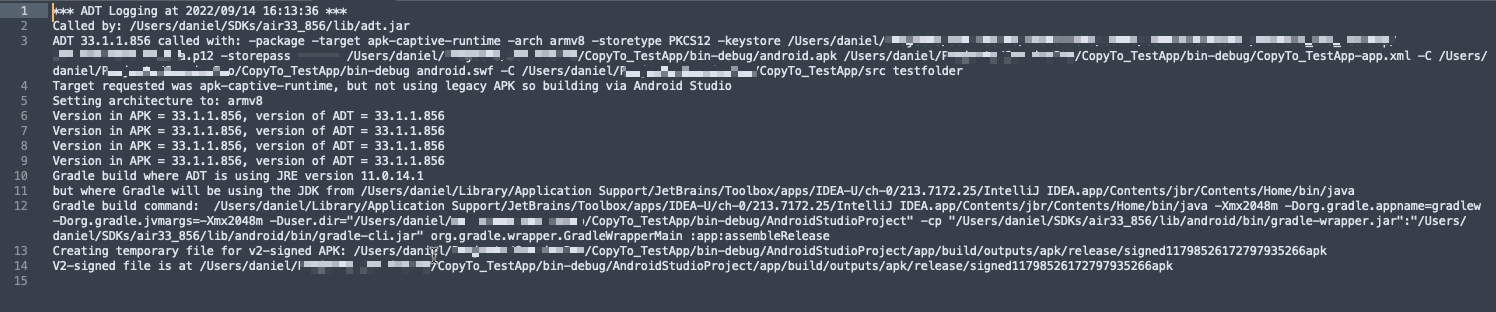
I tried also updating to JDK 17, but also same issues there with copyTo. (works from IntelliJ build, not from Android studio).
Only thing it changed with JDK 17 is that from IntelliJ, I can now build APK also from 929 version.