

 aimhubio
AimLogger closes its run after training ends, causing any subsequent logging after testing to hang in an infinite loop
https://github.com/aimhubio/aim/blob/0dbcf41834cb6fe928aa93b547d98f1ba58874a3/aim/sdk/adapters/pytorch_lightning.py#L140-L143
Typically in Lightning loggers, the finalize() callback does not explicitly close or "finish" any runs, as that is left to the user to explicitly do. However, in Aim's Lightning logger, its finalize() callback explicitly closes the run associated with the logger. This has the unintended side-effect where if you were to run trainer.fit() then trainer.test() then logger.log("test") (where import logging; logger = logging.getLogger(__name__)), the program will experience an infinite loop within the call to log("test").
More explanation can be found in this PR as well as showing how to reproduce it.

I've verified a fix by simply removing those offending lines and placing them at the very end of my training script, meaning that only a single Run object is used for both training and testing before being closed.
Hey @tesfaldet! Thanks for pointing the issue.
The logging adapter was designed to support this 🤔. In fact, the implementation of experiment property (used to log results in Aim) should re-open the closed Run. So this is clearly a bug.
Will include it in our roadmap to ship with one of the upcoming patch releases.

Yes, so the experiment property does successfully re-use self_run_hash upon starting testing, but for some reason that in combination with the previous closing of self_run in finalize() causes any downstream python logging to experience an infinite loop where logging is performed invisibly (i.e., logs go to console but the terminal doesn't show it) and the console buffer is grown infinitely with flushing having no effect.
More info can be found in this comment https://github.com/ashleve/lightning-hydra-template/pull/534#issuecomment-1445184624
@tesfaldet, thanks for the additional details! This really gives some clue on what's happening 🙌
Hopefully this can be helpful. So below is a screenshot showing the print() function of the Rich library's console submodule. The problem highlights itself here, where this call to log.info(), which uses the print() function I mentioned, does not actually print "Best ckpt path: ... to console despite the buffer containing the line. I would recommend playing breakpoints where I have placed them in the screenshot below and to activate them right before the test loop ends (i.e., right before the call to log.info() in the example I provided).
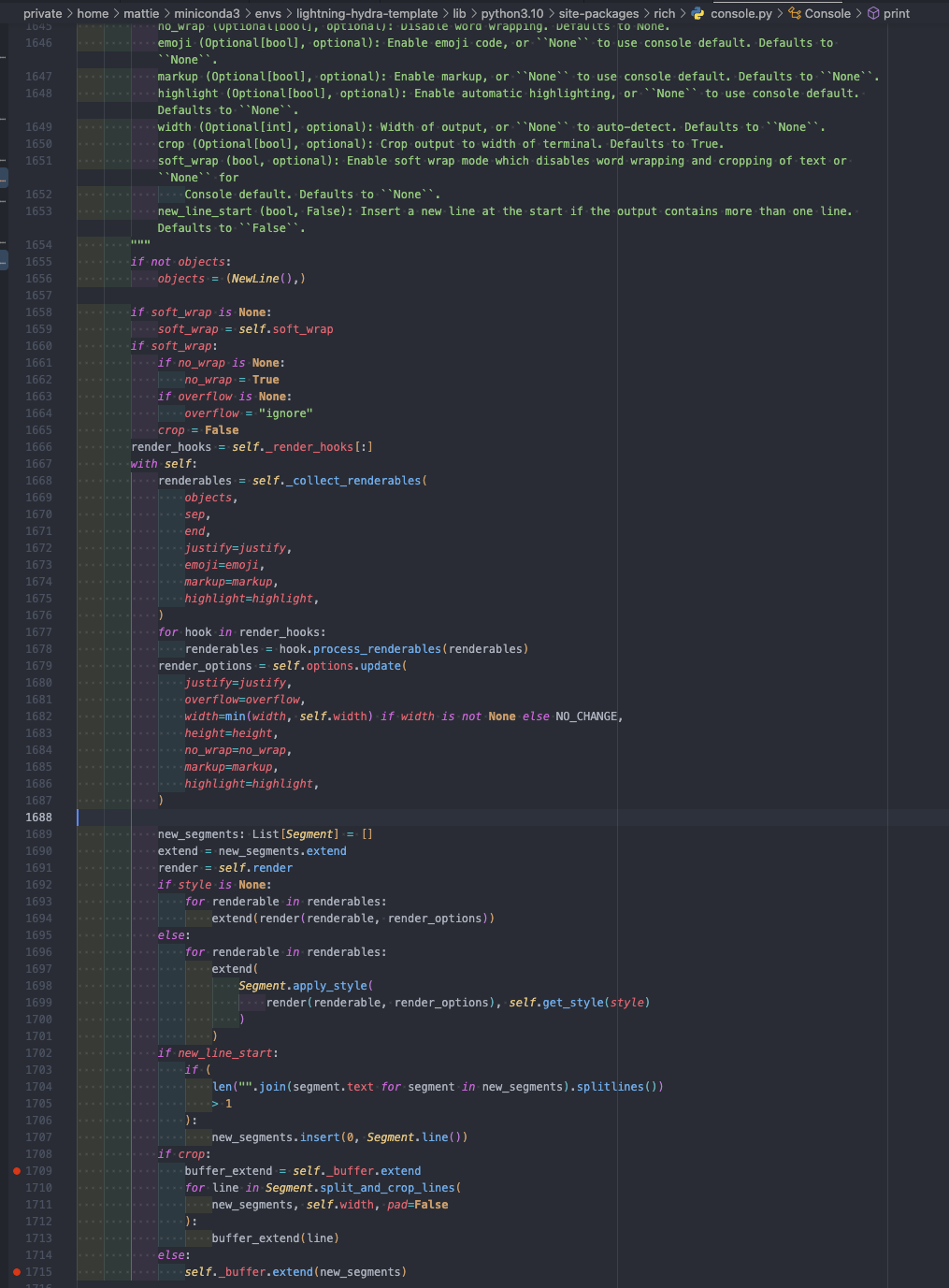
The infinite loop happens here in the Rich library's file_proxy submodule, which calls the print() function above. You can place a breakpoint at console.print(output) and similarly activate it right before testing ends in the example I provided.
I verified that this has something to do with these lines which close the run at the end of trainer.fit() here. Removing those lines allows the call log.info(f"Best ckpt path: {ckpt_path}") to successfully log to console without any infinite loop occuring.
Btw to easily replicate the issue, clone https://github.com/tesfaldet/lightning-hydra-template/tree/aim_logger, follow the instructions to install the package requirements, then run
python src/train.py experiment=example logger=aim
hey @tesfaldet! Thanks a lot for detailed report, I was already using that to reproduce the issue :)
So I guess I found the root cause of the issue. When disabling terminal logs capturing for aim.Run objects everything works fine actually. We do some manipulations with sys.stdout.write and sys.stderr.write to be able to capture the logs going to terminal. I guess Rich library is doing some sort of magic there as well, so when we close our run and put everything back in place, they might have some references to our replacement functions instead of original stdout/stderr.write and that's causing it to get stuck. I'll dig more to pinpoint exact point of failure and try to fix it.

That's exactly what I'm seeing as well :) I'm stepping through the various functions as we speak haha.
Yeah wow, I'm having a lot of trouble trying to fully understand the issue myself 😅 I just spent the last hour trying to figure out the exact point of failure so that I can devise a quick fix for myself (as it's a bit of a project blocker right now) but I should've just waited until you figured something out haha. On that note, is there a clean and easy way to disable terminal logs capturing for aim.Run? In other words, a way of doing that without modifying aim code. I just want a quick compromise, knowing that it's not going to be the final sustainable solution.
There's an argument actually for aim.Run objects that disables the console log tracking, but unfortunately that argument isn't exposed for the adapters.
https://github.com/aimhubio/aim/pull/2553
I've opened this PR, to expose the capture_terminal_logs argument for the AimLogger so that will unblock you currently. We'll ship this today or tomorrow.
In the meanwhile I'll try to come up with an actual fix for this.
Hey @tesfaldet! The 3.16.2 version of aim is shipped. Now you can provide capture_terminal_logs=False argument to AimLogger object and it'll disable the console log capturing, and will solve the issue temporarily. In the meantime I'm still looking at the core cause of the issue, found out what's happening actually, but the fix is not trivial at all, will post here any further updates :)
