

 ahmedfgad
Drawing different plot in one graph
HI ! I am trying to solve my problem with pygad :) I want to see the difference of fitness values by increasing population in one graph.
For example, like the figure below.

Please let me know if there is any fuctions in pygad. Thank a lot 👍

Hi @xoyeon,
Yes, you can do that! Here are the steps:
- Set the
save_best_solutionsparameter toTrue. This will save the fitness values of the best solutions in thebest_solutions_fitnessproperty.
This is a sample code.
import numpy
import pygad

function_inputs = [4,-2,3.5,5,-11,-4.7]
desired_output = 44

def fitness_func(solution, solution_idx):
    output = numpy.sum(solution*function_inputs)
    fitness = 1.0 / numpy.abs(output - desired_output)
    return fitness

ga_instance = pygad.GA(num_generations=50,
                       num_parents_mating=3,
                       fitness_func=fitness_func,
                       sol_per_pop=5,
                       num_genes=6,
                       save_best_solutions=True,
                       keep_elitism=3)

ga_instance.run()
ga_instance.save("ga1")
The code saves the GA instance in a file named ga1.
Rerun this code after making the necessary changes in the parameters and save the GA instance in a different file.
import numpy
import pygad
...
ga_instance.save("ga2")
Do that more times as needed but change the name of the output file.
import numpy
import pygad
...
ga_instance.save("ga3")
- Load all of these saved instances.
import numpy
import pygad
import matplotlib

function_inputs = [4,-2,3.5,5,-11,-4.7]
desired_output = 44

def fitness_func(solution, solution_idx):
    output = numpy.sum(solution*function_inputs)
    fitness = 1.0 / numpy.abs(output - desired_output)
    return fitness

loaded_ga_instance1 = pygad.load("ga1")
loaded_ga_instance2 = pygad.load("ga2")
loaded_ga_instance3 = pygad.load("ga3")
- Plot the
best_solutions_fitnessproperty of each instance.
matplotlib.pyplot.plot(loaded_ga_instance1.best_solutions_fitness)
matplotlib.pyplot.plot(loaded_ga_instance2.best_solutions_fitness)
matplotlib.pyplot.plot(loaded_ga_instance3.best_solutions_fitness)
This is the output figure which have the fitness of all 3 instances plotted on the same figure.
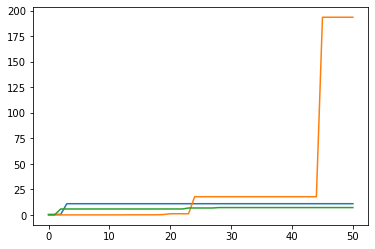

I should change the marker but it did work ! I made it !
Thank you so much for detailed explanation 👍
