

 ageitgey
Failure to detect faces
- face_recognition version:
- Python version:3.5
- Operating System: raspbian stretch
i did everything correctly with the library .... run it and it was it was okay, it detected faces .. but after days am trying to run it again its failing , not by giving me any errors but by not detecting any face

We can't help unless you give us some sample images where faces aren't detected that should be. Otherwise I have no way to know what's happening :)
Okay , thanks for replying quickly let me attach the sample code am trying to run but instead of detecting more that one face and do the face match it seems the face locations are returning 0 faces detected
motionState = False
picPath = "/home/pi/Desktop/iss/images/unknown_people/"
last_epoch = 0
email_update_interval = 600

def captureImage(currentTime, picPath):
    # Generate the picture's name
    picName = currentTime.strftime("%Y.%m.%d-%H.%M.%S") + '.jpg'
    with picamera.PiCamera() as camera:
        camera.resolution = (1280, 720)
        camera.hflip = True
        camera.vflip = True
        camera.capture(picPath + picName)


    print("We have taken a picture.")
    return picName

def getTime():
    # Fetch the current time
    currentTime = datetime.now()
    return currentTime

def timeStamp(currentTime, picPath, picName):
    # Variable for file path
    filepath = picPath + picName
    # Create message to stamp on picture
    message = currentTime.strftime("%Y.%m.%d - %H:%M:%S")
    # Create command to execute
    timestampCommand = "/usr/bin/convert " + filepath + " -pointsize 36 \
    -fill red -annotate +700+650 '" + message + "' " + filepath
    # Execute the command
    call([timestampCommand], shell=True)
    print("We have timestamped our picture.")

def main():
    known_image = face_recognition.load_image_file("/home/pi/Desktop/iss/images/known_people/panashe.jpg")
    known_face_encoding = face_recognition.face_encodings(known_image)[0]

    face_locations = []
    unknown_face_encodings = []

    while True:
        motionState = P3picam.motion()
        print(motionState)
        if motionState:
            currentTime = getTime()
            picName = captureImage(currentTime, picPath)
            timeStamp(currentTime, picPath, picName)
            filepath = picPath + picName

            unknown_image = face_recognition.load_image_file(filepath)
            face_locations = face_recognition.face_locations(unknown_image)
            print("Found {} faces in image.".format(len(face_locations)))
            unknown_face_encodings = face_recognition.face_encodings(unknown_image, face_locations)

            for unknown_face_encoding in unknown_face_encodings:
                results = face_recognition.compare_faces([known_face_encoding], unknown_face_encoding)
                name = "<Unknown Person>"

                if results[0] == True:
                    name = "Panashe Ngorima"
                    print("I see someone named {}!".format(name))
                else:
                    print("Alert!! THERE IS AN UNRECOGNIZED FACE IN THE PARKING BAY")

                    try:
                        if(time.time() - last_epoch) > email_update_interval:
                            last_epoch = time.time()
                            print ("Sending email and Sms...")
                            send_an_email(unknown_image)
                            send_an_sms()
                            print ("done!")

                    except:
                        print ("Error sending email: ")


while True:
    main()
the above code is what am trying to run am facing the above problem i tuned
Can you simplify the problem?
Take one of your timestamped image files that you have already captured and saved to disk. Verify that the captured image looks correct with an image viewer. Then just write a 3 line test program:
unknown_image = face_recognition.load_image_file("the_image_you_verified.jpg")
face_locations = face_recognition.face_locations(unknown_image)
print("Found {} faces in image.".format(len(face_locations)))
If that still returns 0, then share the test image so we can help you figure it out.
The issue might be that you are using hflip and vflip with picamera. I wonder if that flag rotates the actual image data or if it only sets the EXIF rotation flags and you need to rotate the image data yourself. But the best place to start is with a test image we know doesn't work.
so i have tried to use different images , others taken by the camera ,some from my phone storage and others i have downloaded from the internet
unknown_image = face_recognition.load_image_file("the_image_you_verified.jpg") face_locations = face_recognition.face_locations(unknown_image) print("Found {} faces in image.".format(len(face_locations)))
so the pictures are as following ,
pictures taken by the raspberry pi cam


 2people and panashe are recognised but panashe1 is not ..meaning nt all images taken by the pi are located
second batch is from my phone only 2 are detected that is chibabe1.jpg and timetime.jpg


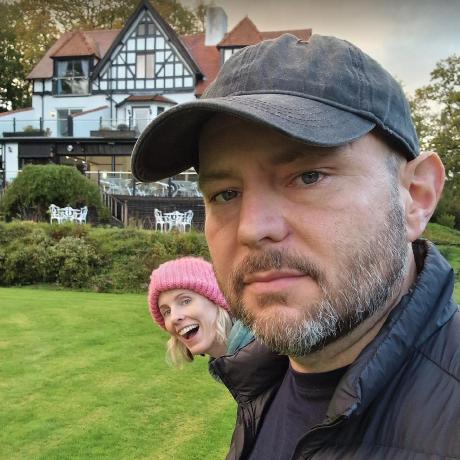
I'll add my 2c to this. It couldn't detect my face in this image:

I'm guessing because of the hat casting a shadow over the right eye?

i had the same issue when trying to detect face of my picture which is captured by my phone but it didn't work , i tried with another camera of another phone it worked .

this package seems has low accuracy in detecting faces... getting same problem also
