

 ageitgey
reason: CUDNN_STATUS_NOT_SUPPORTED
- face_recognition version: 1.3.0
- Dlib 19.21.1
- Python version: 3.6
- Operating System: Ubuntu 18.04
- RTX 3090, 24GB GPU Memory
- Tensorflow tf-nightly-gpu 2.5.0.dev20201207
Description
Running Darknet, Deepsort, Face_Recognition When the image_size is bigger than 240 * 240, getting this error.
    face_locations = face_recognition.face_locations(frame, model="cnn")
  File "/home/troica/anaconda3/envs/test_36/lib/python3.6/site-packages/face_recognition/api.py", line 119, in face_locations
    return [_trim_css_to_bounds(_rect_to_css(face.rect), img.shape) for face in _raw_face_locations(img, number_of_times_to_upsample, "cnn")]
  File "/home/troica/anaconda3/envs/test_36/lib/python3.6/site-packages/face_recognition/api.py", line 103, in _raw_face_locations
    return cnn_face_detector(img, number_of_times_to_upsample)
RuntimeError: Error while calling cudnnGetConvolutionForwardWorkspaceSize( context(), descriptor(data), (const cudnnFilterDescriptor_t)filter_handle, (const cudnnConvolutionDescriptor_t)conv_handle, descriptor(dest_desc), (cudnnConvolutionFwdAlgo_t)forward_algo, &forward_workspace_size_in_bytes) in file /tmp/pip-install-p7ke4hs2/dlib_5e1a223c72b742d8a632bfbb7f0f2e5a/dlib/cuda/cudnn_dlibapi.cpp:1026. code: 9, reason: CUDNN_STATUS_NOT_SUPPORTED
As the GPU memory size is 24GB, i think it is enough to run Yolov4 and Face_Recognition..
I am not sure why getting this error.

I reduce the allocated GPU memory size by Tensorflow like this.
        gpu_options = tf.compat.v1.GPUOptions(per_process_gpu_memory_fraction=0.2)
        self.session = tf.compat.v1.Session(config=tf.compat.v1.ConfigProto(gpu_options=gpu_options))
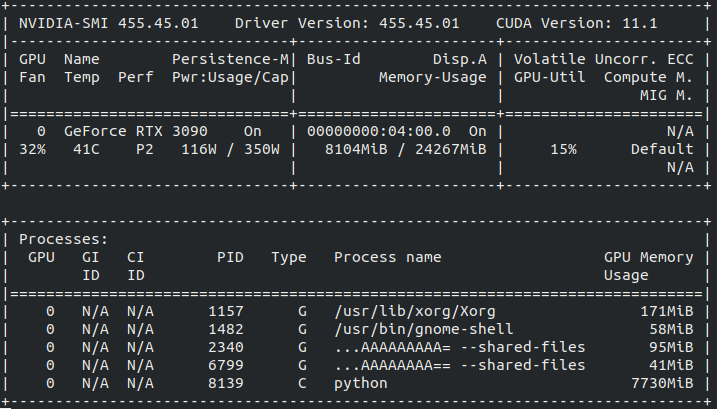
But I am still getting above CUDNN_STATUS_NOT_SUPPORTED error.
Were you able to resolve this issue? Im getting the same error on a similar rtx3090 build.

Turns out in my case it was due to cuda out of memory. I reduced the batch size and it worked.

Turns out in my case it was due to cuda out of memory. I reduced the batch size and it worked.
where is the location in code file? Could you please tell me? many thanks


Can someonne help me please?? I am stuck with this error since one week :(

