

 ageitgey
I keep getting errors while installing dlib and face_recognition.
- face_recognition version:
- Python version :3.8 and 2.7
- Operating System:UBUNTU 18.04 and Windows 10
### Description
Describe what you were trying to get done. I want to use face_recognition to recognize faces from my webcam but i can't install face_recognition and dlib.i even reinstalled python and deleted packages.I keep getting errors.
Please look at the pictures for the errors and tell me how to fix them.


i reinstalled python,deleted packages but same errors.

You don't have cmake installed. Even your screenshots tells you about that issue.
https://cmake.org/download/

@mowshon the errors remain the same inspite of installing cmake. Neither would upgrading python or pipi resolve that I think.

@shanksghub I suggest you to find a compiled dlib wheel for you specific python version to install, just google it. And some libs may not support 3.8 well now, suggest to use 3.7 for this moment.

@shanksghub, the problem is still in your cmake. I think the problem is in your PATH, you didn't set him.
Also, I think you have been ignore this step: Choose: "Add CMake to the system PATH for all users"
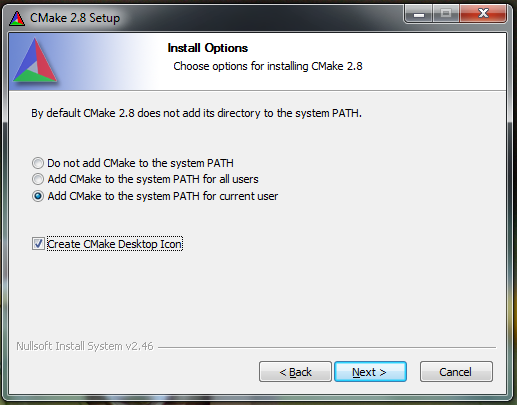
Remove your cmake, and reinstall: https://tulip.labri.fr/TulipDrupal/?q=node/1081
@mowshon Okay.thank you..i'll do as you told..I have been installing cmake by doing pip install cmake till now

@SiyangXie till now i did pip install cmake,i uninstalled it and dowloaded the zip file from the link given above..let's see how this goes

I don't know what to do after the i reach here in the above picture..i am going to use open cv manual installation..hope that works fine
@SiyangXie till now i did pip install cmake,i uninstalled it and dowloaded the zip file from the link given above..let's see how this goes
I wouldn't recommend to install opencv from scratch. It's always a pain in the ass... Another easy way to produce this environment is to use Anaconda. You can install cmake from Anaconda and go pip install opencv-python after then. Don't forget to set up Anaconda as your project environment.

if you are still getting the error. here is what worked for me on windows using command line(I'm assuming you have python already installed);
Download the latest version of visual studio. Select and download C++ Clang compiler(should be under the compiler sub-section) in the individual component header section.
Do these installs from cmd using pip:
pip install opencv-python
pip install cmake
pip install boost
pip install face_recognition
NB: it took about 5-6 mins for dlib package to install through face_recognition on my computer, just fyi.

Try this solution: https://stackoverflow.com/questions/49731346/compile-dlib-with-cuda/57592670#57592670

- pip install CMake.
- Install VS community and under individual components -choose Visual C++ tools for CMake. Click here to download VS installer
 3. pip install face_recognition.
I know this method install's cmake twice but it works.
ps: pip install face_recognition will take a lot of time so be patient

Download the dlib files Link - https://drive.google.com/file/d/11Hip8-llWEm5GN3_u4ibI09unL7xCw0g/view?usp=drivesdk And just copy the path of that file and paste it into the terminal. Stable version is 10 among all files that you have been downloaded from the link
In terminal you just need copy the path of that particular file; there are 4 files the choose one which is suitable for your computer work on windows.
