ag-grid
Material Theme is not working when we change the theme
It refreshes the header only it not set the rows in ag-theme-material. I use this code.
gridOptions.api.resetRowHeights();
gridOptions.api.refreshCells();
gridOptions.api.refreshHeader();


Hi,
changing the themes works as expected in this demo - https://www.ag-grid.com/example.php. The refresh we do is here - https://www.ag-grid.com/example.js (search for onThemeChanged). Is there any chance you have the rowHeight property set?

Hi, I haven't use rowHeight property within the js file. what is another solution?
Hi, On the first time, the setting material theme is working fine. on changing back to the material theme from dark, fresh or any other theme then it will show like a previous screenshot. I have used these content. to refresh the height Still, It doesn't work.
gridOptions.api.resetRowHeights(); gridOptions.api.refreshCells(); gridOptions.api.refreshHeader();
This ticket is flagged as managed_by_the_comunnity, this means that ag-grid staff is not going to be actively looking into it, and it will get closed if inactive for more than one month, the community is welcome to help with this question/support issue
===============
If you are an ag-Grid Enterprise Customer, please raise this in our Zendesk support system - contact [email protected] for access. This is our primary channel for Support.
Bugs Raised Here:
We will do a periodic review of GitHub issues for any bugs raised and these can be tracked on our pipeline page: https://www.ag-grid.com/ag-grid-pipeline
Feature Requests/Support Raised Here:
We are reviewing how we process Feature Requests that come from GitHub. We currently have a very full pipeline of work which will be our priority for the coming months.
As a result, we don’t have capacity to take feature requests from GitHub.e
We will review this as we move through our current backlog.
Thanks for your understanding. ag-Grid Team.

Dear Sir,
Thanks for asking. but the issue is not resolved.
-- Thank & Regards Varun Dev Front-end Developer Anviam Solution
@vanviam I ran into the same problem and I think it is that the new class isn't applied to the grid when you call
gridOptions.api.resetRowHeights();
gridOptions.api.refreshCells();
gridOptions.api.refreshHeader();
I had set the class through the NgClass directive (probably the same with class binding) which means that Angular would pick up the change sometime later and change the class but the methods on the api are executed immediately and they used the rowHeight value of the old theme. The demo which petyosi referenced does work because the class is directly modified without Angular and so the api methods can use the value of the new theme.
My solution was to just manipulate the class directly on the grid before calling the api methods:
document.getElementsByTagName('ag-grid-angular')[0].className = 'ag-theme-material'
I think a better solution would be to have some kind of "themeChanged" event or that the grid adjusts the rowHeight itself when the theme is changed.

You could wrap api calls with setTimeout
    // give angular some time to update ag-grid class via binding
    setTimeout(() => {
      this.gridApi.resetRowHeights();
      this.gridApi.refreshCells();
      this.gridApi.refreshHeader();
    });```

I am seeing this issue as well in an Angular project using the scss mixin.
To work normally:
- Import the scss mixin file.
.ag-theme-material {
    @include ag-theme-material();
}
- Add class to ag-grid-angular
- Everything works!
issue that should be addressed:
- import scss mixin file
.light-theme {
  @include ag-theme-material();
}
- Add the ag-grid-angular component with
class="light-theme" - Get results that are exactly like the OP's screenshot.
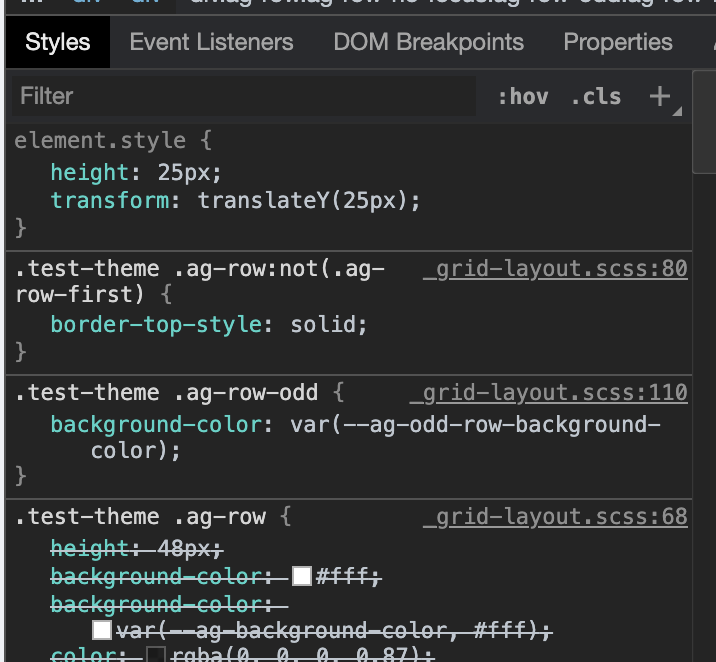
I investigated a little bit. The class is properly added and it looks like the styles are being applied, however, it looks like the styles are being overwritten by hardcoded in-line styles on the DOM. (see screenshot).. This should work IMO. I am not sure why the name of the class here would result in different outcomes.