

 afzafri
Fix UI Freeze when loading large comic file
This app works okay with small sized comic file (~12mb), but it will become slow when loading a large comic file (~30mb). The UI will start to freeze, and the loading animation will also freeze. But, the comic files will still rendered, only the performance is the issue. Need to find a way to overcome this. Quite difficult because JS does not have multi threading capability. But there is HTML5 Web Workers. Need to find a way to implement this feature.

Temporary fixed for now is by implementing setTimeout(), meaning to add delays for each iteration when fetching the pages. This can minimize the browser from freezing.
Hi Afif Zafri, greetings from Colombia.
I am a beginner in the subject of web programming, I have seen your comic reader and I liked it very much, congratulations.
I had a doubt about it, it is possible to generate the reading of the comic by means of a button that says for example read now! and that this button has an url loaded internally with the address of the comic, if this is possible what parameters should you enter?
thanks kinds regards

Hi Afif Zafri, greetings from Colombia.
I am a beginner in the subject of web programming, I have seen your comic reader and I liked it very much, congratulations.
I had a doubt about it, it is possible to generate the reading of the comic by means of a button that says for example read now! and that this button has an url loaded internally with the address of the comic, if this is possible what parameters should you enter?
thanks kinds regards
Hi, thank you for the kind word. Great suggestion!
I actually have been thinking about reading internal file before and I have found a solution. You can refer to a new sample branch: https://github.com/afzafri/Web-Comic-Reader/tree/sample
This branch I modified the original codes to able to load comics from internal or local file path. However the comic listing need to be done manually, you can refer the structure in index.html file. If you want the web to list all comics automatically, you will need to combine with server side language such as PHP to scan the /comics directory, and output the list to the index page.
Hi Afif Zafri, thanks for your contribution.
Last night I observed your answer and the changes you made in the code, I found your solution great since I managed to test it by opening files stored on the local server, today I carried out tests with the demo, but I see that problems are occurring when opening a file stored on the server, there is an error message "Error: The archive type is unknown".
I wanted to ask you also, if there is the possibility of opening a file that is located in an external storage, for example firebase or amazon web service, through its url, I will leave you a url of a comic stored in my server external to perform the example.
url:
https://firebasestorage.googleapis.com/v0/b/comics-16be0.appspot.com/o/The%20New%2052%2FVoodoo-Vol2-Esp%2FVoodoo-Vol2-Esp-%236.cbr?alt=media&token = e64aa3ff-2a8d-43d4-83b6-aa674460ec8e
Thank you very much for everything Afif Zafri Kinds regards.
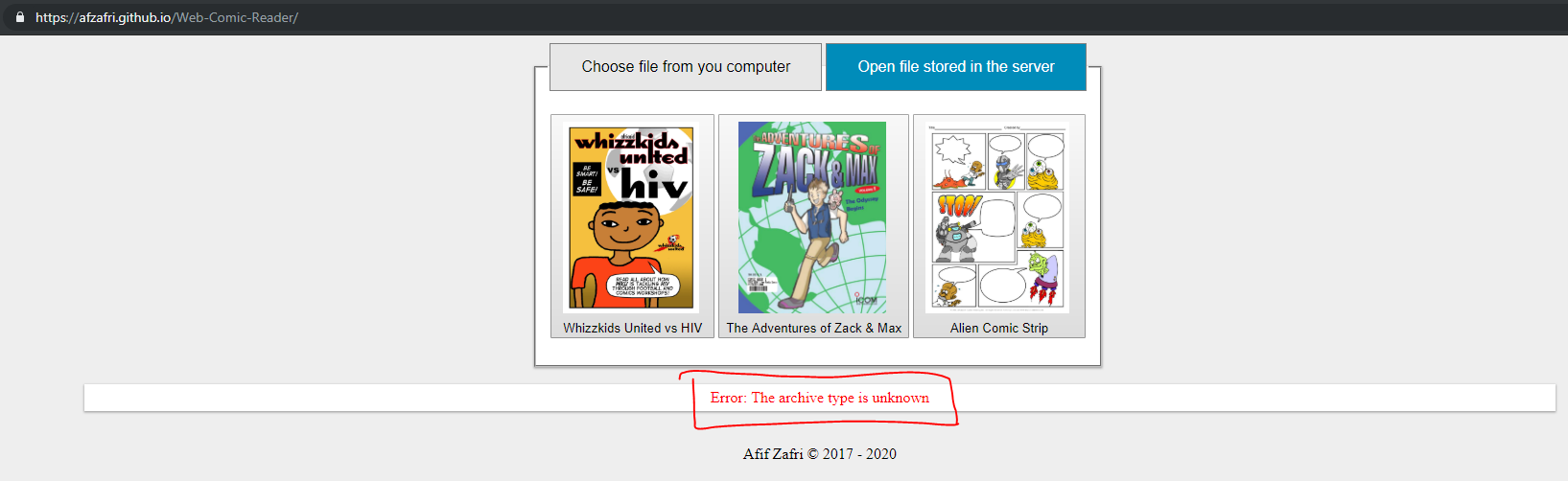
ening a file that is located in an external storage, for example firebase or amazon web service, through its url, I will leave you a url of a comic stored in
It is not possible to read file from external storage and url with Javascript because Javascript is a client side language. Due to security reason, Javascript is unable to fetch and read external file. If you want to read external file, my suggestion is to use any server side language such as PHP to do the file fetching and downloading to local directory, and then use my project to read the file.
hello afif zafri, I hope you find well
I understand the client side language and the use of php for the application that I mentioned.
Could you help me on this issue in using php to search and download the file in the local directory? Another suggestion that I want to make, is that for some reason, the comic reader presents errors when trying to read the comic stored on the local server, did you review this problem?
Thanks again for everything.
kinds regads
hello afif zafri, I hope you find well
I understand the client side language and the use of php for the application that I mentioned.
Could you help me on this issue in using php to search and download the file in the local directory? Another suggestion that I want to make, is that for some reason, the comic reader presents errors when trying to read the comic stored on the local server, did you review this problem?
Thanks again for everything.
kinds regads
Hi, sorry I cannot help you with that I am already busy. You need to figure it out yourself. I am unable to reproduce your problem, it is working fine for me. Make sure to check if the comic file is correct. Check with the sample I provided.
Also, please stop commenting on this issue, because you are commenting on unrelated issue. Open a new issue instead.