

 aframevr
Negative scale doesn't work since v0.8.0
Description:
- v.0.8.0 - v1.2.0:
- Platform / Device: Glitch; Linux Manjaro
- Reproducible Code Snippet or URL:
<a-scene>
    <a-entity camera look-controls wasd-controls scroll-controls position="0 0 3">
    </a-entity>
    <a-entity geometry="primitive: box; radius: 3"
        material="color:#FF0099"
        scale="-2 2 2">
        <a-sphere color="#FF0000"
                  scale="0.2 0.2 0.2">
        </a-sphere>
    </a-entity><
</a-scene>
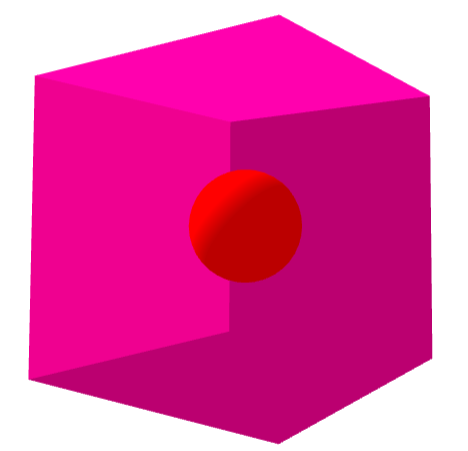
v0.7.0 gives the following result:
v1.2.0 gives the following result:
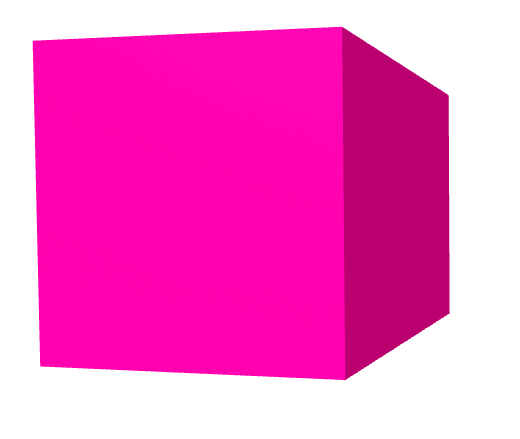
The documentation for v1.2.0 still says: "scaling factors can be negative, which results in a reflection."
It only worked when I dropped my version number to 0.7.0

Forgot to mention the browser - it's Google Chrome 89.0.4389.114 on Linux Manjaro

Old issue, but in case someone comes across it while searching. The mentioned change in behaviour is due to a change made in Three.js at the time (https://github.com/mrdoob/three.js/pull/12787). Negative scales still produce reflections, but flip what the front and back side of a face is, as this is the behaviour a lot of uses expect.
In case the desired result of seeing the inside of a model/shape is wanted, one should change the side property of the material component. For example:
<a-entity geometry="primitive: box; radius: 3"
-        material="color:#FF0099"
+        material="color:#FF0099; side: back"
        scale="-2 2 2">
        <a-sphere color="#FF0000"
                  scale="0.2 0.2 0.2">
        </a-sphere>
    </a-entity>
@dmarcos This issue can be closed
