

 adrianhajdin
Unhandled Runtime Error
Hi guys, I'm having this error in the process of implementing updateUser()
really need your help, cause I have checked the typo and found no differents

Hi could you drop a screenshots of these:
- implement of the updateUser()
- updateUser() method

Hi, here is some code snippets:
- Here is where I use the updateUser():
- Here is where I implement the updateUser(): Which need the
Uservariable imported from user.model.ts - Here is the user.model.ts where the error occurred:
- I then when on to fix the bug in the user.model by using the optional chaining (?.) operator which as follow:
- I then process to continue with no error until I hit the submit button, then I encounter another 2 new errors:
And
Another finding is on the Onboarding Form, If I don't choose the img to set my profile image, I hit the submit button but nothing happen
Hi, here is some code snippets:
* Here is where I use the updateUser(): 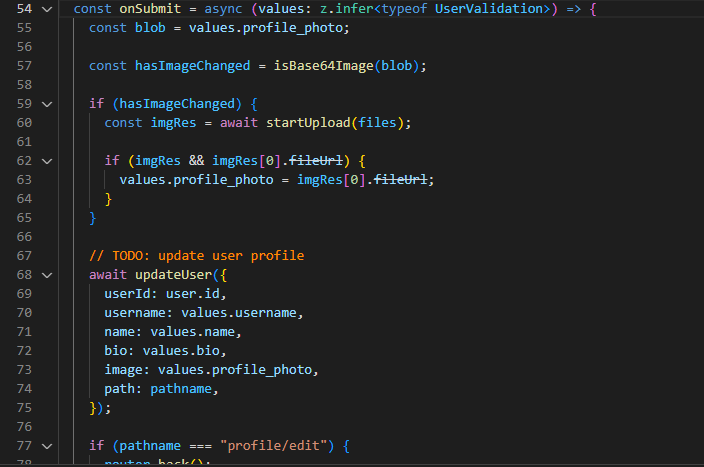 * Here is where I implement the updateUser(): Which need the `User` variable imported from user.model.ts 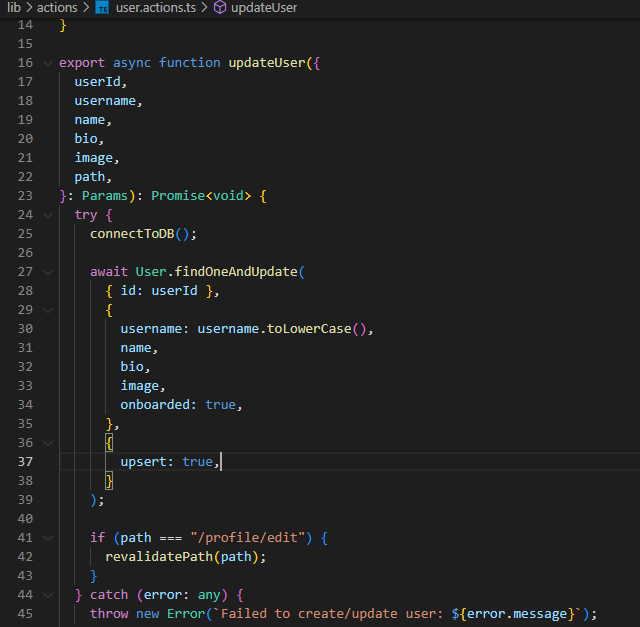 * Here is the user.model.ts where the error occurred: 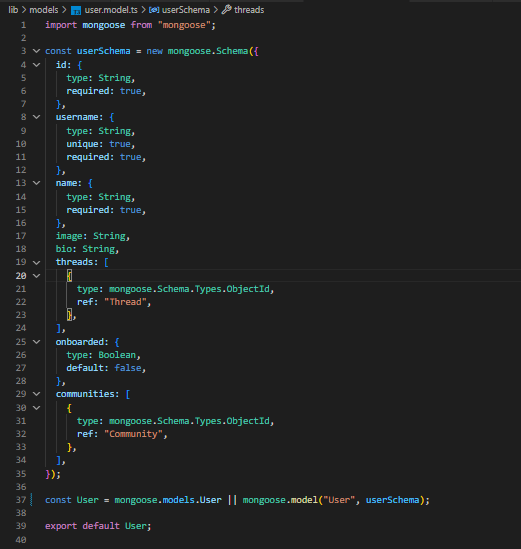
for this you can try changing from: imgRes[0].fileUrl -> imgRes[0].url due to deprecation.
And you don't need to add nullable expression (?) to the { mongoose.models.User || mongoose.model("User", UserSchema). It will detect automatically whether the model exists or not, if not it will create one.
Another finding is on the Onboarding Form, If I don't choose the img to set my profile image, I hit the submit button but nothing happen
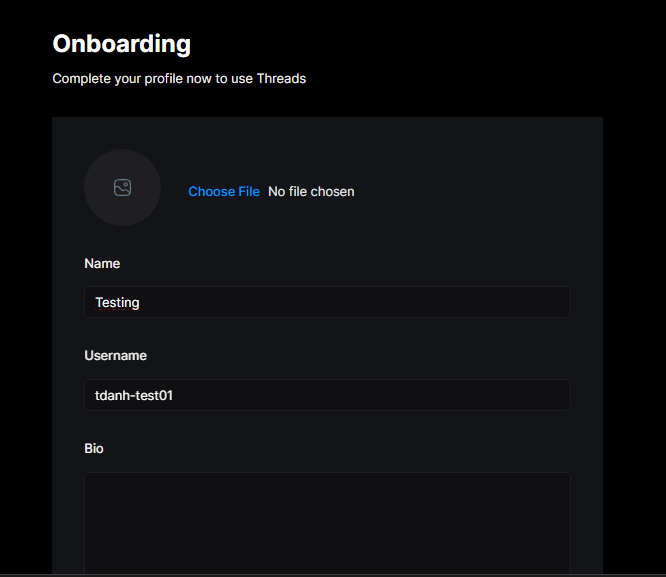
for this issue, have you try setting the condition for the userData prop in the onboarding component? This will decide whet
Example:
const userData = { id: user?.id, objectId: userInfo?._id, username: userInfo ? userInfo?.username : user?.username, name: userInfo ? userInfo?.name : user?.firstName || "", bio: userInfo ? userInfo?.bio : "", image: userInfo ? userInfo?.image : user?.imageUrl, };
Hi, here is some code snippets:
* Here is where I use the updateUser():  * Here is where I implement the updateUser(): Which need the `User` variable imported from user.model.ts  * Here is the user.model.ts where the error occurred: for this you can try changing from: imgRes[0].fileUrl -> imgRes[0].url due to deprecation.
And you don't need to add nullable expression (?) to the { mongoose.models.User || mongoose.model("User", UserSchema). It will detect automatically whether the model exists or not, if not it will create one.
Hi, I try the following solution and it doesn't work, error bellow still insists
Inadition to the error, I also found a long list of Module not found: error in my VS code terminal when running the application on /onboarding route. Here are some screen shot
I met the same error.
Try to add 'use server' to lib/actions/user.actions.ts file to enable the server action,
add
experimental: {
    serverActions: true
}
to next.config.js file, it worked for me.

I met the same error. Try to add
'use server'tolib/actions/user.actions.tsfile to enable the server action, addexperimental: { serverActions: true }to
next.config.jsfile, it worked for me.
Thanks, it worked like charm. But then I counter another problem with the mongoose as follow when hit the submit button.
I'm using the latest next.js and I don't need the serverComponentsExternalPackages config, seems the errors are on browser, maybe you can try to add it to your next.config.js file, it would be like this
experimental: {
    serverActions: true,
    serverComponentsExternalPackages: ["mongoose"],
},
I'm using the latest next.js and I don't need the
serverComponentsExternalPackagesconfig, seems the errors are on browser, maybe you can try to add it to yournext.config.jsfile, it would be like thisexperimental: { serverActions: true, serverComponentsExternalPackages: ["mongoose"], },
Thanks for quickly response, I've already included these line on my next.config.js file when the problem occured
In my case once use server is added to the top of my user action file everything works fine, the error still looks like your codes run on client side, maybe you can try to clean nextjs cache (remove .next folder under project root) and run again, and if use server directive works, you don't need the nullable expression for mongoose.models.User, eliminate the question mark and see if it reports error.
I don't have enough information about your repo state, I'm not sure about the root cause.
In my case once
use serveris added to the top of my user action file everything works fine, the error still looks like your codes run on client side, maybe you can try to clean nextjs cache (remove.nextfolder under project root) and run again, and ifuse serverdirective works, you don't need the nullable expression for mongoose.models.User, eliminate the question mark and see if it reports error. I don't have enough information about your repo state, I'm not sure about the root cause.
Thanks for your support, after trying all the mentioned solutions, errors still persist, I guess I might start all over and see if such errors keep coming up.