

 adoptium
EPIC: Add Windows Installer tests
We currently build MSI packages, but do not have automated tests added as part of the build pipeline. Red Hat is in the process of open-sourcing some Windows Installers tests that we should evaluate and potentially integrate into our installer pipeline.
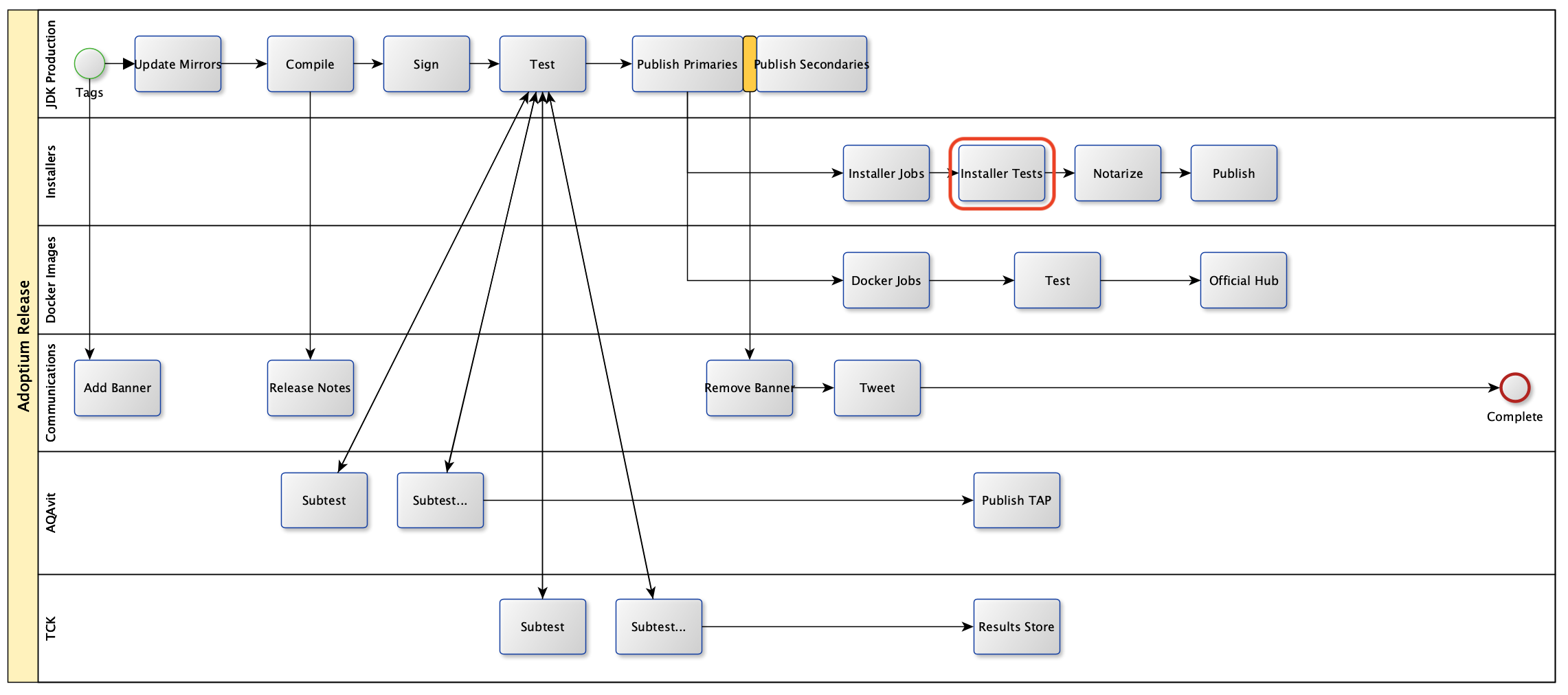
- [x] Evaluate the Red Hat MSI tests, determine if they can be used directly or need any updates for Temurin installers
- [x] Write new tests if they are needed (based on results of evaluation above)
- [x] Add create_windows_installer script to source control (in this repo)
- [ ] Update the create_windows_installer job to trigger installer tests (as per the high-level diagram above)
- [ ] Update documentation to reflect the new testing


@douph1 - hi Philippe, once we get these tests open-sourced, we would love your input to them (in how they can be updated/refined for use to test Temurin MSI installers)
get these tests open-sourced, we would love your input to them (in how they can be updated/refined for use to test Temurin MSI installers)
The tests have been upstreamed for more than a month now.
I'm updating them to be able to run with Temurin MSI installers. Once it is finished I'll share the details in this thread.
I've finished the first part and the code is prepared for incorporation into the testing in Adoptium pipelines. The code is currently in https://github.com/RadekCap/WindowsTPS and will be part of rh-* or some Adoptium repo if needed/possible.
There are failures due to the needed configuration for registry settings and for the feature implementation. Otherwise the tests are running properly.
I've implemented sample values from our documentation - https://github.com/adoptium/installer/blob/master/wix/README.md#features-available
The test properly installs & uninstalls default values and repeat the same for the "install all" variant.
The next steps will need clarification about implementation. Tests for RH are green and I'm prepared to fill the proper configuration for Temurin installer as well. (Here: https://github.com/RadekCap/WindowsTPS/blob/19a2e7bf6e7670a2cfe22ace005fa9f5092a8934/wrapper/configure-vendor-specific-settings.sh#L12)
Tested on Windows 11 vms. Tested versions: OpenJDK11U-jdk_x64_windows_hotspot_11.0.18_10.msi Used environment: cygwin
How to run tests
git clone https://github.com/RadekCap/WindowsTPS.git
cd WindowsTPS
mkdir inputs
wget https://github.com/adoptium/temurin11-binaries/releases/download/jdk-11.0.18%2B10/OpenJDK11U-jdk_x64_windows_hotspot_11.0.18_10.msi
./wrapper/run-tps-win-vagrant.sh
The results will be stored in the results folder by default. For every test, there is a folder with detailed results. At RH we include them in build artifacts. There is a results.txt file with a summary of the results. For the automation, there is a tps.jtr.xml (see tps.jtr.xml.txt - I had to add .txt suffix to add it here) file containing results in the standard format.
Currently, configurable properties are
# propagate RESULTS_FOLDER_NAME_INPUT for the custom path for storing tests results here
# otherwise results folder will be used
export RESULTS_FOLDER_NAME="${RESULTS_FOLDER_NAME_INPUT:-results}"

# propagate JDK_VERSION_INPUT for definition of which subset of tests should run
# otherwise version 11 will be used
export OTOOL_JDK_VERSION="${JDK_VERSION_INPUT:-11}" #todorc: implement detection of java version

# propagate MSI_VENDOR_INPUT variable>
# this will ensure vendor-specific parts of tests will be applied
# otherwise RH will be used
# Possible implemented values are Adoptium and RH
# You can configure specifics in configure-vendor-specific-settings.sh
export MSI_VENDOR="${MSI_VENDOR_INPUT:-RH}"

# propagate INPUT_PATH_INPUT to the folder containing one msi used for tests
# otherwise ../input folder will be used
export INPUT_FOLDER=$SCRIPT_DIR"${INPUT_PATH_INPUT:-/../input}"

# propagate CURRENT_USER_INPUT
# this should contain user used for testing
# by default tester is used
export CURRENT_USER_NAME="${CURRENT_USER_NAME_INPUT:-tester}"
For our purposes (Adoptium) the call should like like this
RESULTS_FOLDER_NAME=XYZ MSI_VENDOR=Adoptium INPUT_FOLDER=XYZ ./wrapper/run-tps-win-vagrant.sh
We will see which part will need adjustments, please let me know.
The repo has been moved here: https://github.com/rh-openjdk/WindowsTPS
This is the final destination of it.
@RadekCap installer tests job grinder has been enabled with my personal branch https://github.com/sophia-guo/installer.git: wintps . https://ci.adoptium.net/view/Test_grinder/job/Windows_Installer_Test/22/console.
The branch wintps set up the wintps as part of funcitonal.dev tests same way as other aqa-tests. Tests can be run by testCase WinTPSTests. From the console output feels like it's configuration problem. Could you please take a look?

@sophia-guo Nice, thank you!
Yes, it looks like a configuration issue.
From the output - https://ci.adoptium.net/view/Test_grinder/job/Windows_Installer_Test/22/console
I can see an issue with the input folder:
ls: cannot access '/cygdrive/d/jenkins/workspace/Windows_Installer_Test/aqa-tests/functional/wintps/WindowsTPS/wrapper/../input': No such file or directory
On this path is the MSI installer expected. That's the reason why everything fails.
From the output, I can't see which repo has been cloned. Please use the main branch from https://github.com/rh-openjdk/WindowsTPS
And, from the log, I can see
Fetch the MSI file
but it's not visible on which path it was fetched. This path (folder) should be in $INPUT_FOLDER
Maybe, this could help: we configured GH Actions in rh-openjdk repo and I adjusted the tests to be green with all Adoptium MSI versions. See: https://github.com/rh-openjdk/WindowsTPS/actions/runs/4253020838
It still needs configuration (I'm going to do it) but tests are runnable there with many passed tests.
For better detection we add a results folder into artifacts, is it possible?
Seems to me, that a pair debugging here could be a good idea. What do you think?
I have updated the installer branch https://ci.adoptium.net/view/Test_grinder/job/Windows_Installer_Test/30/console
It turns out the customize path or variable are using different name. ie RESULTS_FOLDER_NAME_INPUT --> RESULTS_FOLDER_NAME JDK_VERSION_INPUT. --> JDK_VERSION INPUT_PATH_INPUT --> INPUT_FOLDER ..etc.
Wondered if we could just update https://github.com/rh-openjdk/WindowsTPS/blob/main/wrapper/run-tps-win-vagrant.sh for those configuation variables to use the same configuration for custom defined variable to make it clear and simple. For example :
export RESULTS_FOLDER_NAME="${RESULTS_FOLDER_NAME_INPUT:-results}"  -->
export RESULTS_FOLDER_NAME="${RESULTS_FOLDER_NAME:-results}"
https://github.com/rh-openjdk/WindowsTPS/blob/main/wrapper/run-tps-win-vagrant.sh#L22
The current failure in https://ci.adoptium.net/view/Test_grinder/job/Windows_Installer_Test/30/console
export 'RESULTS_FOLDER=/cygdrive/e/workspace/Windows_Installer_Test/aqa-tests/functional/wintps/WindowsTPS/wrapper/../E:/workspace/Windows_Installer_Test/aqa-tests/\TKG\output_16775375532924\WinTPSTests_0/result'
shows the RESULTS_FOLDER can only be some folder under the script folder. ie, is that a must?
*/*/wintps/WindowsTPS/wrapper/${RESULTS_FOLDER_NAME}
RESULTS_FOLDER
shows the RESULTS_FOLDER can only be some folder under the script folder. ie, is that a must?
There isn't any must in implementation. I tested it locally and it was sufficient. The implementation will be updated to support absolute paths and I'll remove *_INPUT variables as you suggested.
https://github.com/rh-openjdk/WindowsTPS/issues/28 https://github.com/rh-openjdk/WindowsTPS/issues/29
Thank you.
@sophia-guo absolute paths should work now, can you re-rerun the job?
I tried it, but it could happen, that I miss some configuration needed there. See https://ci.adoptium.net/view/Test_grinder/job/Windows_Installer_Test/31/console
It's failing with:
C:/Users/Jenkins/workspace/Windows_Installer_Test/aqa-tests///..//jvmtest\functional\wintps\runInstallerTests.sh: line 25: ./wrapper/run-tps-win-vagrant.sh: No such file or directory
Just a note. After fix, variables are INPUT_FOLDER and RESULTS_FOLDER and everything should now work according to README.

@RadekCap I updated my branch in installer correspondingly. Here is the run https://ci.adoptium.net/view/Test_grinder/job/Windows_Installer_Test/34/, which shows successful though it didn't. The result is different from the github action https://github.com/rh-openjdk/WindowsTPS/actions/runs/4323915462/jobs/7548082853
10:08:04  + echo 'Failed: 44'
10:08:04  Failed: 44
10:08:04  + exit 0
As shell script returns 0 after the failure TKG would think the tests pass and then jenkins job is set as 'pass'.
Seems like CURRENT_USER_NAME is empty for some reason. (seems like fallback to $USER does not work in adoptium infra, maybe something like id -un would work)
Good, so the fix for absolute paths is working in your environment.
From the log, I can see that tests are trying to log into LOG_DIR_WIN='C:\Users\\install_log'
From output
16:07:43 ++ LOG_DIR_WIN='C:\\Users\\\\install_log' 16:07:43 ++ mkdir -p 'C:\\Users\\\\install_log' 16:07:43 mkdir: cannot create directory 'C:\\\\Users/\\\\\\install_log': Permission denied
Corresponding code is
JAVA_INSTALL_DIR="C:\Users\$CURRENT_USER_NAME\java" LOG_DIR_WIN="C:\Users\$CURRENT_USER_NAME\tps"
It should be filled from $USER variable, the code is
export CURRENT_USER_NAME="${CURRENT_USER_NAME:-$USER}"
This looks like $USER isn't defined. This variable should contain the username of the current user. It's because this is the only place where can we be sure, that msi will be installed properly. Originally, in our infrastructure we use another disk mapped into RAMdisk. The other possibility is add this as another variable if needed for installation and run.
I'm going to update README about this information and I'll continue in Monday.
Can you please check $USER variable, I can't see it in the log.
Yes, I didn't realize that CURRENT_USER_NAME has been updated without default tester. Can we keep that?
Any permission requirement for this User? For now I can setup as jenkins for testing only.
Also as I mentioned when tests failed it exit 0, which won't work well with TKG. So could we update that?
See CURRENT_USER_NAME as jenkins and run https://ci.adoptium.net/view/Test_grinder/job/Windows_Installer_Test/35/console
New failures
11:50:34  + echo 'Failed: 21'
11:50:34  Failed: 21
Can we add a results folder to the artifacts?
Yes, the most of the results is printed into output but it's kind of punishment to search there.
Yes, I didn't realize that CURRENT_USER_NAME has been updated without default
tester. Can we keep that? Any permission requirement for this User? For now I can setup as jenkins for testing only.
I'm going to re-reintroduce the default tester value, np. Permission needed: this is the location where is the java installed. So full rights are expected here. we can extract this into a separate variable but this has to lead to the folder with the full access rights for the current user. Please let me know, what is more, suitable for you. Currently, I'm going to update README about this information. Thank you.
The failure mentioned https://github.com/adoptium/installer/issues/559#issuecomment-1453823030 is a known issue according to https://docs.google.com/document/d/1rbk0VttZt1qsHewqfY2W_fMFZvFwPBylkpVZ3MsGhZY/edit#
FAILED 0021_SDK_registry_version_match.sh - temurin and redhat has different registry values: TODO update test code?
@RadekCap I have found one other issue (in console of adoptium run higher):
17:50:28 +++ [[ '' -eq 2012 ]]
Variable OTOOL_OS_VERSION is undocumented. Seems like there is some special handling of Windows version 2012. Based on Adoptium test machine name, this version happens to be used for testing. Testing in GH uses more recent version.
Edit: But it could be some leftover code which is not really necessary anymore.
However the main problem (in adoptium run) seems to be:
17:49:51  + msiexec /i OpenJDK11U-jdk_x64_windows_hotspot_11.0.18_10.msi 'INSTALLDIR=C:\\Users\\jenkins\\java' ADDLOCAL=FeatureMain,FeatureJavaHome,FeatureJarFileRunWith /quiet '/Lv*' 'C:\\Users\\jenkins\\install_log\javainstall-1677862177549218500.log'
17:49:51  The Windows Installer Service could not be accessed. This can occur if the Windows Installer is not correctly installed. Contact your support personnel for assistance.
Obviously something went wrong with that installation. (In GitHub actions msi installation of Adoptium installer works with no output to the console by msiexec.)
@RadekCap @smlambert I have updated the configuration of https://ci.adoptium.net/view/Test_grinder/job/Windows_Installer_Test/ to make it archive the test results even when job passes. See job https://ci.adoptium.net/view/Test_grinder/job/Windows_Installer_Test/38/.
Mainly it's to change KEEP_REPORTDIR to be boolean and add ARCHIVE_TEST_RESULTS as a boolean parameter, both default are true. So no any other action needed when trying the build. @RadekCap Though I check the file is quite large and I haven't downloaded it completely to see if the results are the one expected.
Finally I download it there are input and results, maybe change the input dir so the result will not include the msi? The msi is the one large.
A full set of artifacts is nice! Thank you. :+1:
We do not need to add to the artifacts input folder with the MSI installer. It is downloadable so it isn't necessary to have it there. Do you know how to exclude it?
results folder is everything that is needed here. There are logs for every test, and mainly logs for installation and uninstallation.
From it is clearly visible installation error:
MSI (c) (28:B8) [15:00:14:446]: Client-side and UI is none or basic: Running entire install on the server.
MSI (c) (28:B8) [15:00:14:450]: Grabbed execution mutex.
MSI (c) (28:B8) [15:00:14:468]: Failed to connect to server. Error: 0x80070005
I quickly googled this error and it's simply "Access denied". We do not have sufficient access rights for installation. I'm going to debug if it's just a type of account or if it's because of location. It seems to me as a good idea to enrich test suite to check necessary access rights and print them to the results.
I created https://github.com/rh-openjdk/WindowsTPS/issues/40 for it.
I will push another change in https://github.com/adoptium/installer/pull/630 to move the input folder out of project REPORTDIR.
@RadekCap jenkins junit shows the results (*.jtr.xml), https://ci.adoptium.net/view/Test_grinder/job/Windows_Installer_Test/42/testReport/
A full set of artifacts is nice! Thank you. +1
We do not need to add to the artifacts input folder with the MSI installer. It is downloadable so it isn't necessary to have it there. Do you know how to exclude it?
results folder is everything that is needed here. There are logs for every test, and mainly logs for installation and uninstallation.
From it is clearly visible installation error:
MSI (c) (28:B8) [15:00:14:446]: Client-side and UI is none or basic: Running entire install on the server.MSI (c) (28:B8) [15:00:14:450]: Grabbed execution mutex.MSI (c) (28:B8) [15:00:14:468]: Failed to connect to server. Error: 0x80070005I quickly googled this error and it's simply "Access denied". We do not have sufficient access rights for installation. I'm going to debug if it's just a type of account or if it's because of location. It seems to me as a good idea to enrich test suite to check necessary access rights and print them to the results.
I created rh-openjdk/WindowsTPS#40 for it.
Just look at the last run log : https://ci.adoptium.net/view/Test_grinder/job/Windows_Installer_Test/42/consoleFull
I Can see in the log
17:14:10 + msiexec /i OpenJDK11U-jdk_x64_windows_hotspot_11.0.18_10.msi 'INSTALLDIR=C:\Users\jenkins\java' ADDLOCAL=FeatureMain,FeatureJavaHome,FeatureJarFileRunWith /quiet '/Lv*' 'C:\Users\jenkins\install_log\javainstall-1678464850071379100.log' 17:14:10 The Windows Installer Service could not be accessed. This can occur if the Windows Installer is not correctly installed. Contact your support personnel for assistance.
Which remind me of some restriction to test/validate MSI https://github.com/adoptium/installer/issues/66 MSI Validation and installation don't work with non admin user. Per user msi install support has been droped. So MSI install is only available per-machine which need Administrator privilege
Jenkins run log show that ( for good security reason ) the job is not run as administrator but as
17:12:25 USERNAME=jenkins
Just my two cents, I think msi installation/test can't work on Jenkins with non-admin user : #66

However the main problem (in adoptium run) seems to be:
17:49:51  + msiexec /i OpenJDK11U-jdk_x64_windows_hotspot_11.0.18_10.msi 'INSTALLDIR=C:\\Users\\jenkins\\java' ADDLOCAL=FeatureMain,FeatureJavaHome,FeatureJarFileRunWith /quiet '/Lv*' 'C:\\Users\\jenkins\\install_log\javainstall-1677862177549218500.log'
17:49:51  The Windows Installer Service could not be accessed. This can occur if the Windows Installer is not correctly installed. Contact your support personnel for assistance.
Obviously something went wrong with that installation. (In GitHub actions msi installation of Adoptium installer works with no output to the console by msiexec.)
https://github.com/adoptium/installer/issues/66#issuecomment-654097096