

 adobe
adobe
feat(RangeCalendar): Added anchorDate functionality
Description
Added anchor date functionality where user can pass anchorDate prop to the RangeCalendar component and it will fix that particular date for date range selection.
Usage
<RangeCalendar
      aria-label='Interval selection'
      value={dateRange}
      maxValue={parseDate(format(new Date(), 'yyyy-MM-dd'))}
      anchorDate={parseDate(format(new Date(), 'yyyy-MM-dd'))}
      onChange={setDateRange}
/>


Build successful! 🎉

Thanks for the PR! would you mind including an issue as well, that way you can describe the usecase you are solving for?
I think there is something here we could use. However, I don't think it's going to be the anchorDate prop. Stately already exposes a setAnchorDate, so it'd be strange if we had both a prop controlling that value and a function to update it. Which one would win?
Maybe it'd be good to include some examples in our storybook? I tried it out locally, and either I'm using it wrong in our Spectrum components, or this isn't working as intended. https://github.com/adobe/react-spectrum/blob/main/packages/%40react-spectrum/datepicker/stories/DateRangePicker.stories.tsx
Thanks for the PR! would you mind including an issue as well, that way you can describe the usecase you are solving for?
I think there is something here we could use. However, I don't think it's going to be the
anchorDateprop. Stately already exposes a setAnchorDate, so it'd be strange if we had both a prop controlling that value and a function to update it. Which one would win?Maybe it'd be good to include some examples in our storybook? I tried it out locally, and either I'm using it wrong in our Spectrum components, or this isn't working as intended. https://github.com/adobe/react-spectrum/blob/main/packages/%40react-spectrum/datepicker/stories/DateRangePicker.stories.tsx
Hi @snowystinger,
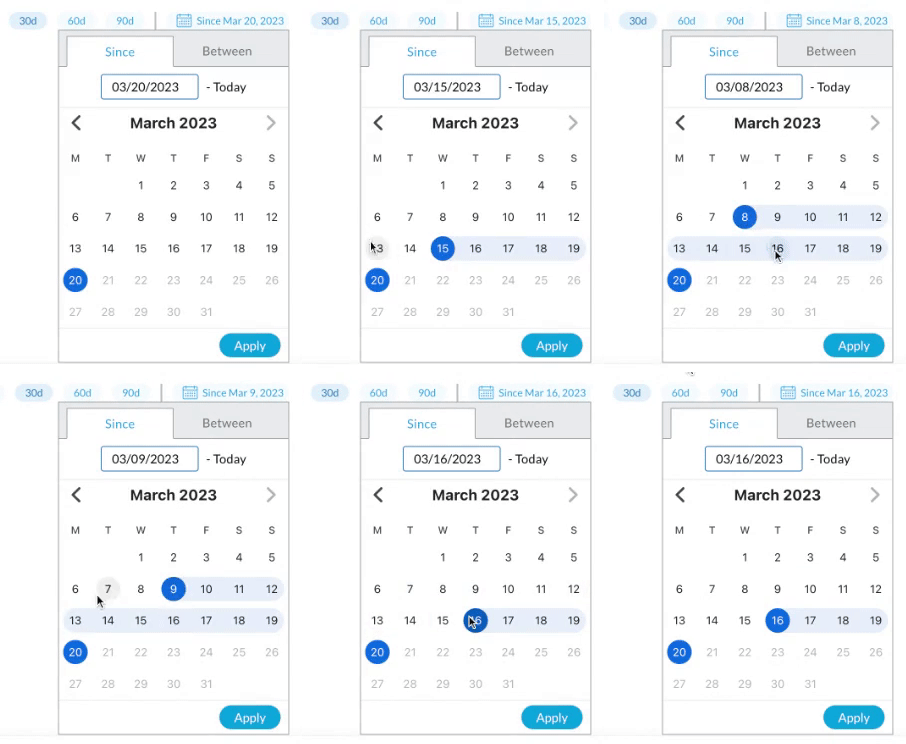
To handle the scenario where we would want either the start date or end date of the dateRange to be fixed, we've added the support for anchorDate prop.
For instance, consider a scenario where we want to show data for date ranges that are in the form of "Last X days" (Last 7 days, Last 30 days, Last 90 days...)
For this, we want the endDate to be set to Today.
This scenario can now be handled, if we pass anchorDate as Today to RangeCalendar component.
<RangeCalendar
      aria-label='Interval selection'
      anchorDate={parseDate(format(new Date(), 'yyyy-MM-dd'))}
      onChange={setDateRange}
/>
Hey, sorry, we're in the middle of making a release and have not had time to look at this. Apologies for the delay, it'll be a few more days probably.
Hey, sorry, we're in the middle of making a release and have not had time to look at this. Apologies for the delay, it'll be a few more days probably.
Hi @snowystinger @devongovett Can you please assign someone else to review these changes? My team is working on a strict timeline project, and we're currently blocked on this use-case.
Hey, there unfortunately isn't anyone else right now. If you are working on a strict timeline, I advise that you make use of a tool such as patch-package in order to use the functionality now. Then when we support something that can meet your needs here, you can remove the patch.
You could also probably implement this in your own component using the React Stately hooks by calling state.setAnchorDate from there in the meantime.

Build successful! 🎉
## API Changes
unknown top level export { type: 'identifier', name: 'Column' } unknown top level export { type: 'identifier', name: 'Column' } unknown type { type: 'link' } unknown type { type: 'link' } unknown type { type: 'link' } unknown type { type: 'link' } unknown type { type: 'link' } unknown type { type: 'link' }
@react-aria/calendar
AriaCalendarProps
 AriaCalendarProps<T extends DateValue> {
+  anchorDate?: CalendarDate
   autoFocus?: boolean = false
   defaultFocusedValue?: DateValue
   errorMessage?: ReactNode
   focusedValue?: DateValue
   isDisabled?: boolean = false
   isReadOnly?: boolean = false
   maxValue?: DateValue
   minValue?: DateValue
   onFocusChange?: (CalendarDate) => void
   pageBehavior?: PageBehavior = visible
   validationState?: ValidationState
 }
AriaRangeCalendarProps
 AriaRangeCalendarProps<T extends DateValue> {
   allowsNonContiguousRanges?: boolean
+  anchorDate?: CalendarDate
   autoFocus?: boolean = false
   defaultFocusedValue?: DateValue
   errorMessage?: ReactNode
   focusedValue?: DateValue
   isDisabled?: boolean = false
   isReadOnly?: boolean = false
   maxValue?: DateValue
   minValue?: DateValue
   onFocusChange?: (CalendarDate) => void
   pageBehavior?: PageBehavior = visible
   validationState?: ValidationState
 }
CalendarProps
 CalendarProps<T extends DateValue> {
+  anchorDate?: CalendarDate
   autoFocus?: boolean = false
   defaultFocusedValue?: DateValue
   errorMessage?: ReactNode
   focusedValue?: DateValue
   isDisabled?: boolean = false
   isReadOnly?: boolean = false
   maxValue?: DateValue
   minValue?: DateValue
   onFocusChange?: (CalendarDate) => void
   pageBehavior?: PageBehavior = visible
   validationState?: ValidationState
 }
RangeCalendarProps
 RangeCalendarProps<T extends DateValue> {
   allowsNonContiguousRanges?: boolean
+  anchorDate?: CalendarDate
   autoFocus?: boolean = false
   defaultFocusedValue?: DateValue
   errorMessage?: ReactNode
   focusedValue?: DateValue
   isDisabled?: boolean = false
   isReadOnly?: boolean = false
   maxValue?: DateValue
   minValue?: DateValue
   onFocusChange?: (CalendarDate) => void
   pageBehavior?: PageBehavior = visible
   validationState?: ValidationState
 }
@react-spectrum/calendar
Calendar
changed by:
- Calendar
 SpectrumCalendarProps<T extends DateValue> {
+  anchorDate?: CalendarDate
   autoFocus?: boolean = false
   defaultFocusedValue?: DateValue
   errorMessage?: ReactNode
   focusedValue?: DateValue
   isDisabled?: boolean = false
   isReadOnly?: boolean = false
   maxValue?: DateValue
   minValue?: DateValue
   onFocusChange?: (CalendarDate) => void
   pageBehavior?: PageBehavior = visible
   validationState?: ValidationState
   visibleMonths?: number = 1
 }
it changed:
- AnyCalendarDate
- Calendar
- AnyDateTime
RangeCalendar
 SpectrumRangeCalendarProps<T extends DateValue> {
   allowsNonContiguousRanges?: boolean
+  anchorDate?: CalendarDate
   autoFocus?: boolean = false
   defaultFocusedValue?: DateValue
   errorMessage?: ReactNode
   focusedValue?: DateValue
   isDisabled?: boolean = false
   isReadOnly?: boolean = false
   maxValue?: DateValue
   minValue?: DateValue
   onFocusChange?: (CalendarDate) => void
   pageBehavior?: PageBehavior = visible
   validationState?: ValidationState
   visibleMonths?: number = 1
 }
Hey there, we're still a bit confused by the use case for this. Would you be willing to share some other popular libraries which implement this feature?
Some concerns we have are:
- Focused date isn't the anchorDate, this is confusing because it's not apparent that one date in the range is already selected.
- The anchorDate and range is invisible but becomes suddenly selected when the user selects their first date. It should show up from first mouse over. This is also confusing for the same reason as the first one, it doesn't look like part of the range is already determined.
- Why can one date be pinned, but users can select in either direction? What does it mean to have a date anchor? This is where other libraries as examples will help.
Hi @snowystinger,
To answer your question related to use case of this functionality,
We had a scenario where we wanted user to be able to select a date range like between November 1 to November 9, but we also wanted to allow the user to just select the start date of the date range and end date would be fixed to today, so the date selection would look like Since Nov 8.
To handle this scenario, we had to keep today fixed, which means we had to set today as our anchorDate.
We have been using this feature in our application using patch file from last 10 months, and have seen no issues. In case, you see any issues that these changes can cause, then please highlight.
