
aem-core-cif-components
 aem-core-cif-components copied to clipboard
 adobe
adobe
[Accessibility][Mini Cart] Kebab menus cannot be dismissed with keyboard
Steps to Reproduce
- Press TAB key to move focus to Kebab icon button.
- Press Enter to activate the menu.
- Press the ESC key to try to dismiss the menu.
- Observe the menu cannot be dismissed with keyboard alone without making a selection from the menu.
Current Behavior When a kebab menu is expanded (e.g. the Edit Item / Remove Item options next to the item name, or the Remove Coupon option next to the "Coupon [coupon name] applied" text), it cannot be dismissed without selecting an option. Sighted keyboard users cannot see the content that is beneath the expanded menu.
Expected behavior/code The menu should be dismissible with the ESC key and should disappear once focus moves away from the component.
Environment Chrome 91, Windows 10, NVDA 2020.4 AEM Core Components v. 2.17
Affected Users Sighted keyboard-only users
WCAG SC 2.1.1 Keyboard
Screenshot
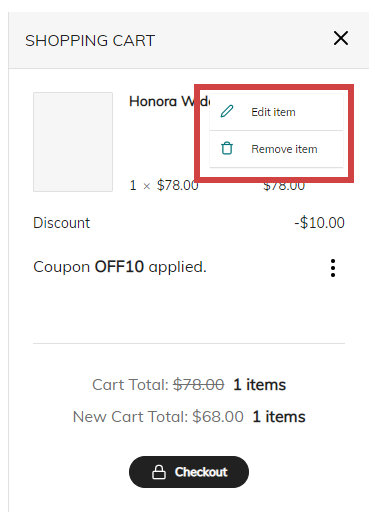
Possible Solution Consider using the WAI-ARIA Authoring Practices Menu Button design pattern (https://www.w3.org/TR/wai-aria-practices-1.1/#menubutton), implementing all expected roles, states, properties, and keyboard interactions.


:white_check_mark: Jira issue SITES-2530 is successfully created for this GitHub issue.

