
afdko
 afdko copied to clipboard
 adobe-type-tools
[buildcff2vf] IndexError: list index out of range
buildcff2vf command is failing on some particular glyph shapes.
For interpolation purposes of roundness axis in wavefont, I need to have the following glyph shapes for different masters:
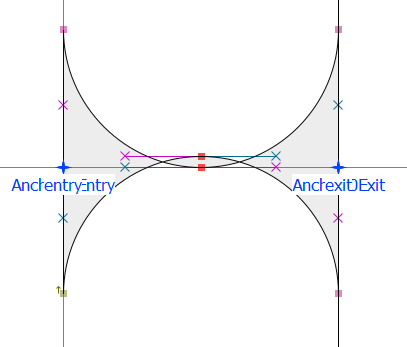
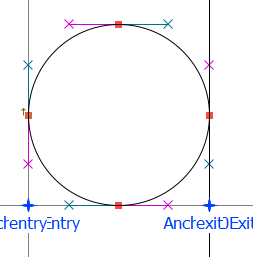
fontmake successfully compiles such font, but afdko errors with the following:
PS C:\projects\wavefont\masters> buildmasterotfs -d ./wavefont.designspace                                              makeotf [Note] Using features file at 'C:\projects\wavefont\masters\1_0_0.ufo\features.fea'.
makeotfexe [WARNING] <Wavefont> Negative internal leading: win.ascent + win.descent < unitsPerEm
Built release mode font 'C:\projects\wavefont\masters\1_0_0.otf' Revision 1.000
tx: --- C:/projects/wavefont/masters/1_0_0.otf
tx: (cfw) unhinted <_1>
tx: (cfw) unhinted <_1.clip>
makeotf [Note] Using features file at 'C:\projects\wavefont\masters\25_0_0.ufo\features.fea'.
makeotfexe [WARNING] <Wavefont> Negative internal leading: win.ascent + win.descent < unitsPerEm
Built release mode font 'C:\projects\wavefont\masters\25_0_0.otf' Revision 1.000
tx: --- C:/projects/wavefont/masters/25_0_0.otf
tx: (cfw) unhinted <_1>
tx: (cfw) unhinted <_1.clip>
PS C:\projects\wavefont\masters> buildcff2vf -c -k -d wavefont.designspace -o ./font/wavefont.otf                       Reading source fonts...
Checking outline compatibility in source fonts...
Traceback (most recent call last):
  File "c:\users\dfcre\appdata\local\programs\python\python39\lib\runpy.py", line 197, in _run_module_as_main
    return _run_code(code, main_globals, None,
  File "c:\users\dfcre\appdata\local\programs\python\python39\lib\runpy.py", line 87, in _run_code
    exec(code, run_globals)
  File "C:\Users\dfcre\AppData\Local\Programs\Python\Python39\Scripts\buildcff2vf.exe\__main__.py", line 7, in <module>
  File "c:\users\dfcre\appdata\local\programs\python\python39\lib\site-packages\afdko\buildcff2vf.py", line 564, in main
    do_compatibility(vf, font_list, ds_data.base_idx)
  File "c:\users\dfcre\appdata\local\programs\python\python39\lib\site-packages\afdko\buildcff2vf.py", line 332, in do_compatibility
    region_charstring.draw(compat_pen)
  File "C:\Users\dfcre\AppData\Roaming\Python\Python39\site-packages\fontTools\misc\psCharStrings.py", line 982, in draw
    extractor.execute(self)
  File "C:\Users\dfcre\AppData\Roaming\Python\Python39\site-packages\fontTools\misc\psCharStrings.py", line 300, in execute
    rv = handler(index)
  File "C:\Users\dfcre\AppData\Roaming\Python\Python39\site-packages\fontTools\misc\psCharStrings.py", line 590, in op_rlineto
    self.rLineTo(point)
  File "C:\Users\dfcre\AppData\Roaming\Python\Python39\site-packages\fontTools\misc\psCharStrings.py", line 524, in rLineTo
    self.pen.lineTo(self._nextPoint(point))
  File "C:\Users\dfcre\AppData\Roaming\Python\Python39\site-packages\fontTools\pens\basePen.py", line 259, in lineTo
    self._lineTo(pt)
  File "C:\Users\dfcre\AppData\Roaming\Python\Python39\site-packages\fontTools\varLib\cff.py", line 576, in _lineTo
    self.add_point('rlineto', pt_coords)
  File "c:\users\dfcre\appdata\local\programs\python\python39\lib\site-packages\afdko\buildcff2vf.py", line 111, in add_point
    cmd = self._commands[self.pt_index]
IndexError: list index out of range
I have reproduced minimal designspace and ufo setup in the archive.
Versions:
buildcff2vf --version                                                                  2.0.2
buildmasterotfs --version                                                              1.10.0
That's afdko==3.6.2a1

@dy I believe the root of the problem is in the 1_0_0 master with the "1" ("_1") glyph (and probably 1.clip as well). It is only 1 unit wide and has all sub-1-unit fractional coordinates:
$ tx -dump -3 1_0_0.ufo
[...]
glyph[5] {_1,U+0101,
  1 width
  0 0.50 move
  0 0.78 0.22 1 0.50 1 curve
  0.50 1 line
  0.78 1 1 0.78 1 0.50 curve
  1 0.50 line
  1 0.22 0.78 0 0.50 0 curve
  0.50 0 line
  0.22 0 0 0.22 0 0.50 curve
  endchar}
[...]
In buildcff2vf, there are several steps where coordinates get rounded to integer values which would result in all of these coordinates ending up as 0 or 1 which causes failures when matching up with the 25_0_0 master coordinates.
Could you try scaling all glyphs of both masters up by, say, 10x or 100x?

Thank you for having a look @josh-hadley, rescaling to 2048 units per em improved quality and fixed errors. I think to avoid such situations it's recommended to run some linter/validator or follow best practices.
Rescaling doesn't seem to have helped. Here's an example of the same error with 2048 upm. All values are integers more than 1. wavefont.zip
It has something to do with points order in glif.
In the original order the first point is line, moving that first point to the end fixes the issue.
<outline>
    <contour>
-     <point x="0" y="-184" type="line"/>
      <point x="0" y="-72"/>

      <point x="92" y="20"/>
      <point x="205" y="20" type="curve" smooth="yes"/>
      <point x="205" y="20" type="line"/>
      <point x="317" y="20"/>

      <point x="410" y="-72"/>
      <point x="410" y="-184" type="curve" smooth="yes"/>
      <point x="410" y="205" type="line"/>
      <point x="410" y="92"/>

      <point x="317" y="0"/>
      <point x="205" y="0" type="curve" smooth="yes"/>
      <point x="205" y="0" type="line"/>
      <point x="92" y="0"/>

      <point x="0" y="92"/>
      <point x="0" y="205" type="curve" smooth="yes"/>
+     <point x="0" y="-184" type="line"/>
    </contour>
</outline>
Yet another old issue – this seems to have been a simple point compatibility problem.
Some tools don’t flag an off-curve start point to be incompatible with a start point on the following on-curve.
Here’s some background: https://github.com/roboDocs/ScaleFast/issues/5
