
browser-github-release-downloads
 browser-github-release-downloads copied to clipboard
 addshore
Chrome extension for displaying github release downloads
GitHub release downloads

A browser extension that displays release download counters.
How to install?
Download it from:
- Chrome: https://chrome.google.com/webstore/detail/github-release-downloads/ncgomhdgmkicjeclohgokhciihpfdlhi
- Mozilla: https://addons.mozilla.org/en-US/firefox/addon/github-release-download-count/ (pending review)
- Edge: https://microsoftedge.microsoft.com/addons/detail/dafnpnmnbcjmjanjmcffnihflihgchaj (pending review)
- Safari: Use GitHubCounter from @aonez, which is based on this extension.
How it works?
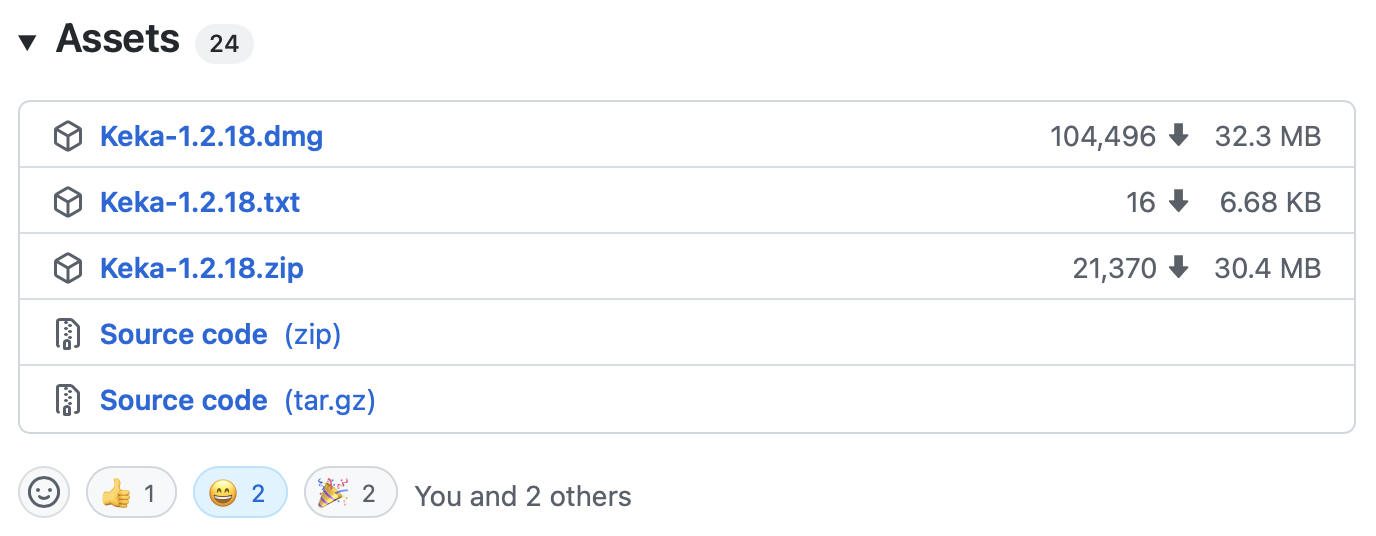
It just shows the downloads count near each release in GitHub. No toolbar elements, no bars, nothing else.
An example:
Icon
- Icon taken from the Safari version. Based on Nick Roach. Original icon can be found here.
Development
This extension uses webextension-toolbox
$ npm install
ERR_OSSL_EVP_UNSUPPORTED
If you get this error, try the following...
export NODE_OPTIONS=--openssl-legacy-provider
https://stackoverflow.com/questions/69394632/webpack-build-failing-with-err-ossl-evp-unsupported
While developing
npm run dev chrome
npm run dev firefox
npm run dev opera
npm run dev edge
For builds
npm run build chrome
npm run build firefox
npm run build opera
npm run build edge
For releasing
- Bump the version number in:
- package.json
- manifest.json
- Update the CHANGELOG.md
- Tag the change on Github (vx.x.x), DO NOT make a Github Release, this is done by Github Actions
- Wait for the Github actions to build the files
- See the STORE_NOTES.md file for helpful details on uploading...
Environment
The build tool also defines a variable named process.env.NODE_ENV in your scripts.
 addshore