
react-data-grid
 react-data-grid copied to clipboard
 adazzle
Remove lineHeight and use flex to vertically align items
Blocker: overflow: hidden; text-overflow: ellipsis; does not work with display: flex without extra spans

Codecov Report
Merging #2794 (7271a13) into main (f864291) will decrease coverage by
0.00%. The diff coverage is100.00%.
@@            Coverage Diff             @@
##             main    #2794      +/-   ##
==========================================
- Coverage   96.16%   96.16%   -0.01%
==========================================
  Files          37       37
  Lines        1226     1224       -2
  Branches      383      382       -1
==========================================
- Hits         1179     1177       -2
  Misses         47       47
| Impacted Files | Coverage Δ | |
|---|---|---|
| src/DataGrid.tsx | 94.26% <ø> (ø) |
|
| src/GroupRow.tsx | 100.00% <ø> (ø) |
|
| src/HeaderRow.tsx | 100.00% <ø> (ø) |
|
| src/Row.tsx | 100.00% <ø> (ø) |
|
| src/SummaryRow.tsx | 100.00% <ø> (ø) |
|
| src/style/cell.ts | 100.00% <ø> (ø) |
|
| src/style/row.ts | 100.00% <ø> (ø) |
|
| src/utils/index.ts | 91.66% <100.00%> (-1.20%) |
:arrow_down: |
![codecov[bot] avatar](https://avatars.githubusercontent.com/in/254?v=4 "Published by a pub.dev verified publisher")
We can also center text vertically by removing the line-height on rows, and adding an empty pseudo-element in each cell like this.
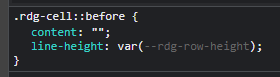
This works because the pseudo-element will have the full height of the cell, and its text will be centered vertically, then the remaining text will be aligned on the baseline by default, thus following the centered text (if there was any). I'm not sure how well this works with multi-line cells though.
Downside is that all cells must have an extra pseudo-element, and users might want to have their own instead.
