

 adafruit
Crashing on file write using ESP-01 w/SPIFFS
I am trying to convert the use of the example to write to a file in SPIFFS on an esp8266 instead of an SD card. I would really like to see if I could get the serial camera working on an ESP-01 due to it's small size and the fact the camera only needs the two data pins.
I'm using the ESPSoftwareSerial which appears to work fine as the code recognizes my camera. I changed the file open command to the SPIFFS variation, adding '/' in front of the filename and replacing the FILE_WRITE with "w". But when the .write(buffer, len) is called, it crashes. I think this is to do with the fact the buffer is unbounded. (is not a fixed length array) This got me to examining how the adafruit code worked and they seem to be passing a pointer to an internal unbounded array out of the code. Isn't that a no-no in C++? i.e. shouldn't you accept a pointer 'into' the function then populate it locally so that the 'buffer' is sure to be memory resident when it returns to the main program?
Any suggestions or help to get this working would be appreciated. As written, I can't seem to get it to to work.
My relevant code:
    // Create an image with the name Image.jpg
    String filename = "/Image.jpg";
    Serial.println("Writing file to SPIFFS: " + filename);
    if (!SPIFFS.exists(filename))
        SPIFFS.remove(filename);

    // Open the file for writing
    File imgFile = SPIFFS.open(filename, "w");

    // Get the size of the image (frame) taken
    uint16_t jpglen = cam.frameLength();
    byte wCount = 0; // For counting # of writes
    // read 64 bytes at a time;
    uint16_t minByte = 64;

    Serial.print("Storing ");
    Serial.print(jpglen, DEC);
    Serial.print(" byte image.");

    int32_t time = millis();

    // Read all the data up to # bytes!
    while (jpglen > 0) {
        uint8_t *buffer;
        uint8_t bytesToRead = min(minByte, jpglen);
        // reads data from a jpeg camera on SoftwareSerial 64 bytes at a time
        buffer = cam.readPicture(bytesToRead);
        Serial.print("-> Read ");  Serial.print(bytesToRead, DEC); Serial.println(" bytes");
        // **** ------>>>>  throwing exception at the following line <<<<------ ****
        imgFile.write(buffer, bytesToRead);
        Serial.print("Wrote -> ");  Serial.print(bytesToRead, DEC); Serial.println(" bytes");
        jpglen -= bytesToRead;
    }
    imgFile.close();

I have the same issue... I was able to get a bit more details about the issue as I'm trying to send the captured image via an HTTP POST request so I'm not writing to an SD card but similar idea... I'm trying to get this working with a feather esp32 Here's my code:
https://gist.github.com/taf2/e1cbaebdfd93ecacb4ebed903da7aac4
Here's the error I am getting with some core dump details:
Guru Meditation Error: Core  1 panic'ed (LoadProhibited). Exception was unhandled.
Core 1 register dump:
PC      : 0x4000c2e0  PS      : 0x00060430  A0      : 0x800d13d5  A1      : 0x3ffb1f00
A2      : 0x3ffcb7dc  A3      : 0x00000000  A4      : 0x00000020  A5      : 0x3ffcb7dc
A6      : 0x00ff0000  A7      : 0x00000002  A8      : 0x00000000  A9      : 0x3ffb1eb0
A10     : 0x00000000  A11     : 0x00000025  A12     : 0x0000000a  A13     : 0x0000000a
A14     : 0x00000005  A15     : 0x00000001  SAR     : 0x0000000a  EXCCAUSE: 0x0000001c
EXCVADDR: 0x00000000  LBEG    : 0x4000c2e0  LEND    : 0x4000c2f6  LCOUNT  : 0x00000001
I'm crashing whenever trying to access the buffer returned by readPicture... e.g.
    const uint8_t *imgbuf     = cam.readPicture(bytesToRead);

    snprintf(outbuffer, 1024, "Uploading Bytes: %d\n", bytesToRead);
    Serial.println(outbuffer);
    // we crash here when trying to access imgbuf
    Serial.printf("CamBytes: read %d bytes: %02x %02x %02x %02x %02x %02x %02x %02x\n",bytesToRead,
                                      imgbuf[0],imgbuf[1],imgbuf[2],imgbuf[3],imgbuf[4],imgbuf[5],imgbuf[6],imgbuf[7]);

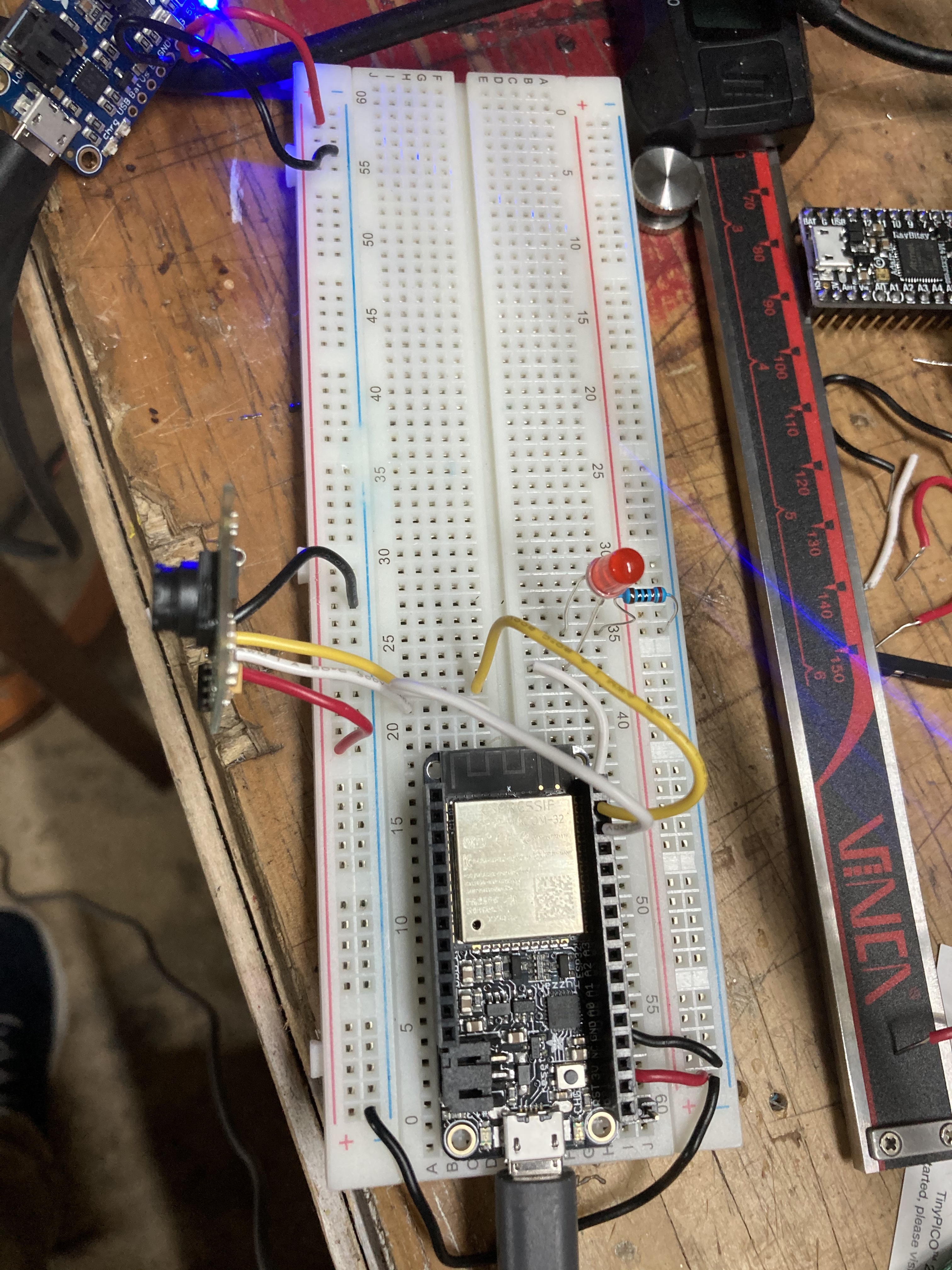
Here is a picture of how I've wired the camera to the board. The yellow wire is my RX and the white wire is my TX and they are connected into my Feather ESP32 board in the respective RX,TX pins (I believe this means I'm using hardware serial)
I have a power boast providing 5v to the camera and confirmed that motion detection in this configuration is working great - but I'm unable to capture the image that triggered the motion alarm... I am curious if there is another way to work around this. Thanks!!
So one thing I've learned from reading through the code is the examples are perhaps wrong in assuming the requested bytesToRead variable would actually be the amount of bytes "available". It would appear you should use the "available()" method to get the total number of bytes that are in the buffer that are safe to read... Now my issue is the buffer does not appear to be filling which might be a mistake in a modification I made to memset the buffer... going to revert that and test some more...
Okay I modified
uint8_t Adafruit_VC0706::readResponse(uint8_t numbytes, uint8_t timeout) {
to log if it's breaking out of the while loop because of reading the requested bytes or not and it appear sin my case at least it's timing out ... added this logic to the end of the while loop
  if (bufferLen != numbytes) {
    Serial.println("timed out buffer not full!");
    Serial.println(bufferLen);
    Serial.println(numbytes);
  }
Ah ha! I've adjusted the 32 in the readPicture to 16 and am definitely seeing better results!
  while (jpglen > 0 && client.connected()) {
    // read 32 bytes at a time;
    const uint8_t bytesToRead = min((uint16_t)16, jpglen); // change 32 to 64 for a speedup but may not work with all setups!
    const uint8_t *imgbuf     = cam.readPicture(bytesToRead);
    const uint8_t bytesAvailable = cam.available();
So it would seem the timeout for the read response as well as the buffer size to read might be nice things to be able to adjust... and definitely seems board specific.
Okay I have finally come back to this and it does appear in my case at least with the feather esp32 I had to adjust the value of
CAMERADELAY from 10 to 32
I added the following to readResponse in Adafruit_VC0706.cpp
  if (bufferLen != numbytes) {
    Serial.println("timed out buffer not full!");
    Serial.println(bufferLen);
    Serial.println(numbytes);
  }
This way I could see when it was failing in the readPicture loop. I tweaked CAMERADELAY a few times before I got it working. It seems like this might be nice if it was a variable being passed in the cam.readPicture...
I've updated my gist https://gist.github.com/taf2/e1cbaebdfd93ecacb4ebed903da7aac4
Additionally I've added the two modified supporting files in case it helps anyone else...
I left the memset in readResponse, not sure that is necessary but it does make it easier to understand whether or not I've overflowed the buffer... probably should remove that line
Thanks @taf2
I ran into a similar problem and switching my CAMERADELAY from 10 to 32 fixed it.
I like your suggestions of adding a helpful error and making the delay settable through the API. I have created pull request #35 to make these changes
