
Adafruit-GFX-Library
 Adafruit-GFX-Library copied to clipboard
 adafruit
Add fillTextRect() function for alignment, clip and bg fill.
Added new method fillTextRect().
It handles the following:
- Aligns text horizontally and vertically: centered / left / right / top / bottom.
- Clips any part of text that would go outside rectangle.
- Fills background with minimal flicker, with correct handling for overlapping parts of custom fonts.
Risks / limitations / drawbacks:
- No modification to existing functions.
- Does not currently handle text scaling or wrapping. These would be possible to add in the future as an overload if someone needs them.
- Quite large function in code size (about 1kB on ARM), but if it is not called it gets optimized away.
Example test:
display.setFont(&FreeSans18pt7b);
display.fillTextRect("Top left\nLong line is longer than long cat\nShort", 10, 10, 190, 140, Adafruit_GFX::TOP_LEFT, 0xFFFF, 0x3333);
display.fillTextRect("Mid center\nLong line is longer than long cat\nShort", 10, 160, 190, 140, Adafruit_GFX::MID_CENTER, 0xFFFF, 0x3333);
display.fillTextRect("Bottom right\nLong line is longer than long cat\nShort", 210, 160, 190, 140, Adafruit_GFX::BOT_RIGHT, 0xFFFF, 0x3333);
display.setFont(&Z003_MediumItalic20pt7b);
display.fillTextRect("Overlap\nworks also", 210, 10, 190, 140, Adafruit_GFX::MID_CENTER, 0xFFFF, 0x3333);
gives the following output:
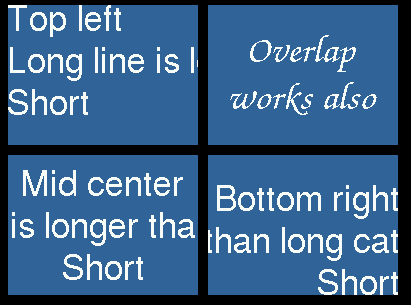
Regarding issue #223: This function handles the problem of overlapping glyph parts by tracking the largest x and y of glyphs rendered so far. The background is written only in new area. Flicker only occurs in the overlapping parts of glyphs, otherwise each pixel is only written once.

If there are any concerns or questions about this, feel free to ask me. I think this could be quite useful to get into the code.
@makermelissa Just a ping, would you be interested in taking a look at this pull request? If I understand correctly, you work at Adafruit and had previously commented on issue #223.