

 actions
Reusable workflow doesn't output the individual job `result`
Describe the bug
When using a reusable workflow and outputting the result of a job, the value resolves to an empty string.
To Reproduce Create a caller workflow
name: Caller Workflow
on: [pull_request]

jobs:
  call:
    uses: ./.github/workflows/reusable.yml
  print_result:
    needs: call
    if: always()
    runs-on: ubuntu-latest
    steps:
      - name: Run
        run: |
            echo "${{ toJSON(needs.call.outputs.pass) }}"
            echo "${{ toJSON(needs.call.outputs.fail) }}"
Create a reusable workflow reusable.yml
name: Reusable
on:
  workflow_call:
    outputs:
      pass:
        value: ${{ jobs.pass.result }}
      fail:
        value: ${{ jobs.fail.result }}

jobs:
  fail:
    runs-on: ubuntu-latest
    steps:
      - run: exit 1
  pass:
    runs-on: ubuntu-latest
    steps:
      - run: exit 0
Expected behavior The result to always be outputted from the reusable workflow.
Actual behaviour The outputs (or results) resolve as empty strings.
Workaround Oddly enough, it appears you can get the results to resolve when adding another mock output that uses a toJSON() expression, such as:
on:
  workflow_call:
    outputs:
      pass:
        value: ${{ jobs.pass.result }}
      fail:
        value: ${{ jobs.fail.result }}
      mock:
        value: ${{ toJSON(jobs.fail).result }}
Which results in the following being printed:
success
failure
Note that we are not even consuming that mock output.
Alternatively, you can wrap an output with toJSON and fromJSON and it will resolve:
    pass:
        value: ${{ fromJSON(toJSON(jobs.pass)).result }}
Feels like an async process isn't being awaited unless the outputs need to convert with an expression.
Runner Version and Platform
Version of your runner? GitHub Enterprise Cloud OS of the machine running the runner? OSX/Windows/Linux/...ubuntu-latest
What's not working?
Without the toJSON output
 With the toJSON output


Hey @landon-martin, here is how you can set up caller and reusable files
name: Caller Workflow
on: workflow_dispatch

jobs:
  job1:
    uses: ./.github/workflows/reusable.yml

  job2:
    runs-on: ubuntu-latest
    needs: job1
    steps:
      - run: echo ${{ needs.job1.outputs.firstword }} ${{ needs.job1.outputs.secondword }}
name: Reusable
on:
  workflow_call:
    # Map the workflow outputs to job outputs
    outputs:
      firstword:
        description: "The first output string"
        value: ${{ jobs.example_job.outputs.output1 }}
      secondword:
        description: "The second output string"
        value: ${{ jobs.example_job.outputs.output2 }}

jobs:
  example_job:
    name: Generate output
    runs-on: ubuntu-latest
    # Map the job outputs to step outputs
    outputs:
      output1: ${{ steps.step1.outputs.firstword }}
      output2: ${{ steps.step2.outputs.secondword }}
    steps:
      - id: step1
        run: echo "firstword=hello" >> $GITHUB_OUTPUT
      - id: step2
        run: echo "secondword=world" >> $GITHUB_OUTPUT
Also you can read more about it here.
If you have any more questions let me know and I'll try to help.

Hi @ruvceskistefan, it appears your response doesn't acknowledge the functionality in question here. I am thoroughly aware of how reusable workflows and their outputs work, this is addressing the issues of returning a job result as an output from the reusable workflow instead of your typical job output. Note the use of ${{ jobs.pass.result }} instead of ${{ jobs.pass.outputs.var}}. This context information found from here.
While it doesn't explicitly have this use case in the documentation, I believe it to be a very viable one. Knowing the result of each job within a reusable workflow has many use cases, one of which I'm currently dealing with. I suggested a theory, that it feels like an async process isn't being awaited until an expression is executed on the outputs of the workflow, which makes the result resolve to an actual value. This would explain why ${{ fromJSON(toJSON(jobs.pass)).result }} actually works as expected.
Hey @landon-martin, here is how you can set up caller and reusable files
name: Caller Workflow
on: workflow_dispatch

jobs:
  job1:
    uses: ./.github/workflows/reusable.yml

  job2:
    runs-on: ubuntu-latest
    needs: job1
    steps:
      - run: echo ${{ needs.job1.outputs.firstword }} ${{ needs.job1.outputs.secondword }}
name: Reusable on: workflow_call: # Map the workflow outputs to job outputs outputs: firstword: description: "The first output string" value: ${{ jobs.example_job.outputs.output1 }} secondword: description: "The second output string" value: ${{ jobs.example_job.outputs.output2 }} jobs: example_job: name: Generate output runs-on: ubuntu-latest # Map the job outputs to step outputs outputs: output1: ${{ steps.step1.outputs.firstword }} output2: ${{ steps.step2.outputs.secondword }} steps: - id: step1 run: echo "firstword=hello" >> $GITHUB_OUTPUT - id: step2 run: echo "secondword=world" >> $GITHUB_OUTPUTAlso you can read more about it here.
If you have any more questions let me know and I'll try to help.
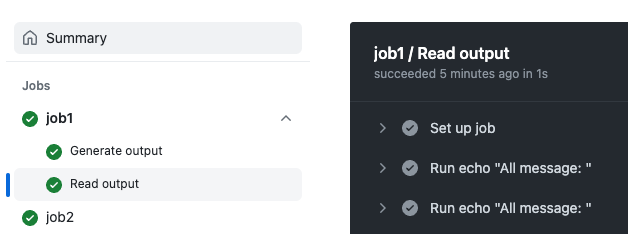
HI @ruvceskistefan Testing your code, I have one issue sharing variables in reusable workflows. If I add a new Job second_job, I am not able to read outputs from job example_job. Not sure what i am doing wrong , but please take a look and tell me how if exist any workaround to share variables between Jobs in a reushable workflow.
name: Reusable
on:
  workflow_call:
    # Map the workflow outputs to job outputs
    outputs:
      firstword:
        description: "The first output string"
        value: ${{ jobs.example_job.outputs.output1 }}
      secondword:
        description: "The second output string"
        value: ${{ jobs.example_job.outputs.output2 }}

jobs:
  example_job:
    name: Generate output
    runs-on: ubuntu-latest
    # Map the job outputs to step outputs
    outputs:
      output1: ${{ steps.step1.outputs.firstword }}
      output2: ${{ steps.step2.outputs.secondword }}
    steps:
      - id: step1
        run: echo "firstword=hello" >> $GITHUB_OUTPUT
      - id: step2
        run: echo "secondword=world" >> $GITHUB_OUTPUT
second_job:
name: Read output
runs-on: ubuntu-latest
steps:
- id: step3 # Outputs not available
run: |
echo "All message: ${{needs.example_job.outputs.firstword}} ${{needs.example_job.outputs.secondword}}"
- id: step4 # Outputs not available
run: |
echo "All message: ${{ needs.job1.outputs.firstword }} ${{ needs.job1.outputs.secondword }}"
Echo is emply:

I am experiencing the same as described by @landon-martin Any resolution?

"Hello. I'm still having an issue, so is there anyone who knows a solution to this problem?"


Just wanted to share a workaround that works today (as of 2025):
While we still can't return outputs from reusable workflows, you can control downstream jobs based on their success or failure using the built-in success() or failure() functions:
jobs:
  call-build:
    uses: ./.github/workflows/build-and-test.yml

  deploy:
    needs: call-build
    if: ${{ success() }}
    runs-on: ubuntu-latest
    steps:
      - name: Deploy
        run: echo "Build succeeded, now deploying"
This won’t give you dynamic values from call-build, but it does allow conditional logic based on status, which is often good enough for chaining workflows.
Hope this helps someone!
