

 actions
cgroupv2 is not respecting dockerdContainerResources
Resource Definitions
apiVersion: actions.summerwind.dev/v1alpha1
kind: RunnerDeployment
metadata:
  name: ghrunner
spec:
  replicas: 1
  template:
    spec:
      dockerdContainerResources:
        limits:
          cpu: "4"
          memory: 1000Mi
        requests:
          cpu: 50m
          memory: 1000Mi
      ephemeral: true
      image: ""
      labels:
      - Linux
      - X64
      - self-hosted
      - mylabel
      organization: xyz
      resources:
        limits:
          cpu: "4"
          memory: 800Mi
        requests:
          cpu: 50m
          memory: 800Mi
To Reproduce
Execute following in a workflow or directly on the runner:
docker info // make sure it has "Cgroup Version: 2" and "Cgroup Driver: cgroupfs"*
docker run -it ubuntu bash
cat /dev/zero | head -c 2000000000 | tail
*which is the default, when dind is started on a kind v0.17.0 (k8s v1.25.3) cluster on Ubuntu 22.04.1 LTS.
Describe the bug
You can consume more memory than in the limits specified.
And kubectl top <runner pod> is missing the memory/cpu of the nested containers.
Describe the expected behavior
The dind container/process should have been killed. (this works fine if the node has support for cgroup v1, e.g. with kind on ubuntu 18)
EDIT: killing works fine again with newer Docker versions, but kubectl top still shows the wrong data. Please see linked issues.

We are seeing the same, it is possible to see the issue by describing the pod - the docker container does not have resources set.

@robwhitby I'm sorry, but what you mentioned is not the issue I described.
I'm still wondering, am I really the only person having this problem? Is nobody else using cgroupv2?
Hey @erichorwath!
Execute following in a workflow or directly on the runner
This is where I got confused- dockerdContainerResources sets the resources for the docker sidecar of the runner pod, not the runner container where non-container workflow job steps are run.
In other words, I presume at least resources for the runner container, and optionally dockerContainerResources if you're going to use non-dind runner (i.e. runner with the dockerd sidecar, which is what you might be using with the given config).
Could you confirm? Thanks in advance for your cooperation!

@erichorwath Thanks for your prompt reply!
Could you also tell me how you exactly did this?
Execute following in a workflow or directly on the runner:
kubectl exec commands you used and/or the workflow definitions you used might be super helpful for reproduction. Thanks!
When creating a container inside dind, then a cgroup folder is created under /sys/fs/cgroup/docker/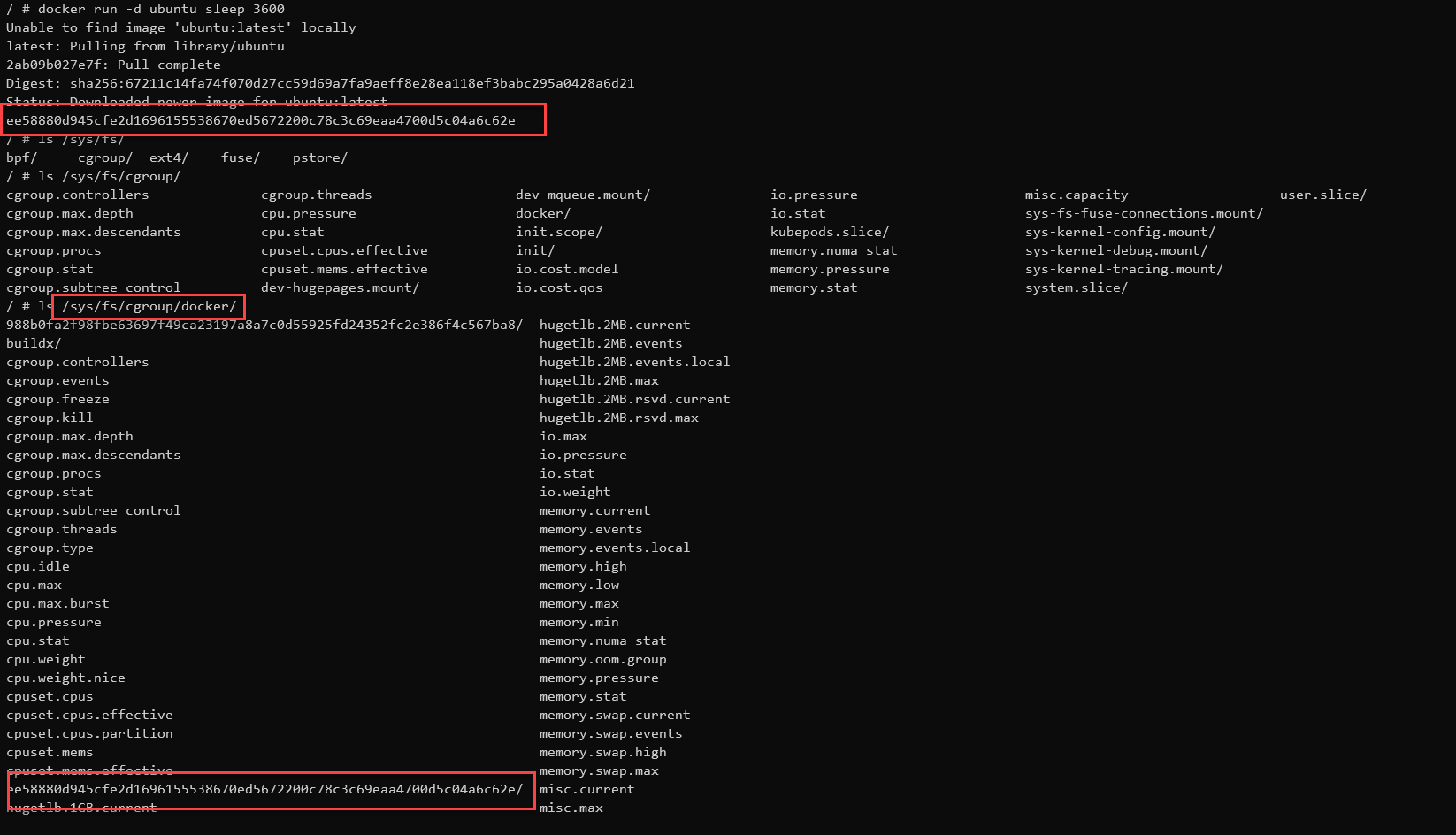 Which matches this docu: https://docs.docker.com/engine/reference/commandline/dockerd/
The --cgroup-parent option allows you to set the default cgroup parent to use for containers. If this option is not set, it defaults to /docker for fs cgroup driver and system.slice for systemd cgroup driver. If the cgroup has a leading forward slash (/), the cgroup is created under the root cgroup
While /sys/fs/cgroup/ is actually showing the K8s node cgroup folder (so actually the VM, probably because dind is started as privileged container):
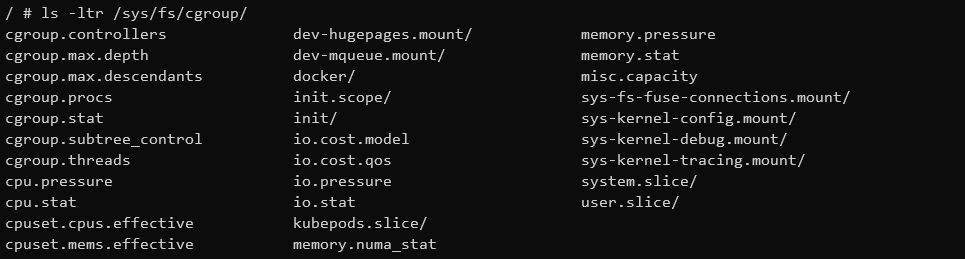 In there, I can see all the cgroups of all pods on that K8s node:
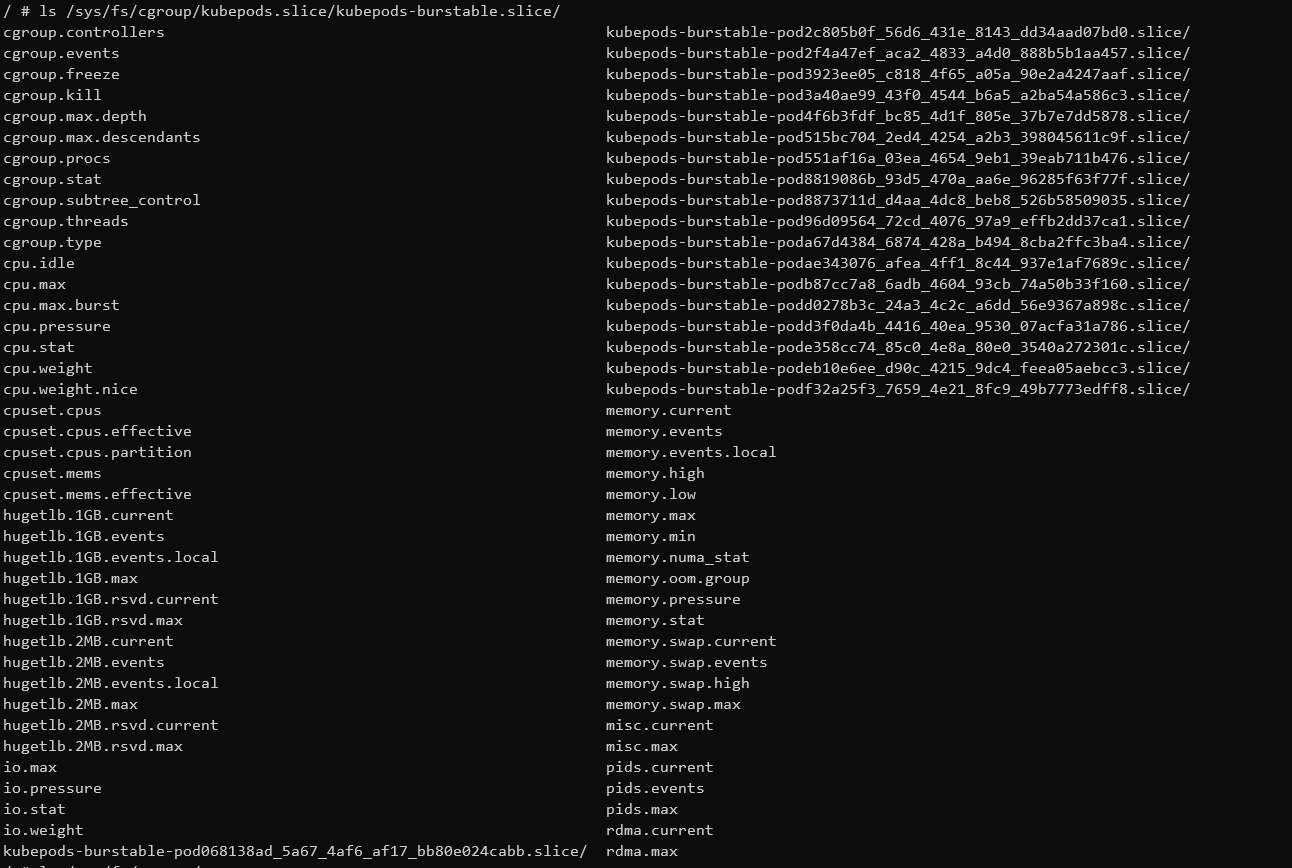
If I understood the cgroupv2 thing correctly, then I would expect that dind is creating it's subprocess (= containers) under /sys/fs/cgroup/kubepods.slice/kubepods-burstable.slice/kubepods-burstable-pod
This could explain, why K8s is not aware of those nested dind containers in cgroupv2
@erichorwath Thanks a lot for the additional info! And yeah, your finding does make sense to me...
Have you already tried our dind-rootless-runners? Although it still require privileged: true, it works a bit differently than the normal dind-runners and runner-with-dockerd-sidecar(your current setup) and I guess it might make some difference. See https://github.com/actions/actions-runner-controller/pull/1644#issuecomment-1194238756 for more info.
@erichorwath In case dind-rootless runners turned out not to provide the resources-related isolation, we might still be able to recommend the usage of the kuberenetes container mode which uses K8s to run containerized workflow jobs/steps.
Thanks for your alternative suggestions, but they all do not help. And additionally, they do not solve the original question.
Currently, I can just use cgroupv1 enabled k8s nodes, but my K8s provider is deprecating cgroupv1 this year. And ARC under cgroupv2-only is currently not usable for our workload (like many many kind clusters). We are constantly experiencing node crashes, leaving us with other strange side effects like non-removable runners from those effected nodes.
@erichorwath Thanks for the feedback! I'm quite confused now.
I presume node crashes are issues in your K8s provider, not ARC, right? I understood that the K8s container mode would enable you to provide desired resource isolation in cgroupv2 env at least. But then you say cgroupv2 is unstable in your environment in the first place.
BTW...
leaving us with other strange side effects like non-removable runners from those effected nodes.
If I'm not terribly confused, I think this is a standard K8s behavior where pods scheduled onto the disappeared node hang for a while, and it takes some time until K8s finally garbage-collect it.
@erichorwath Thanks for the feedback! I'm quite confused now.
I presume node crashes are issues in your K8s provider, not ARC, right? I understood that the K8s container mode would enable you to provide desired resource isolation in cgroupv2 env at least. But then you say cgroupv2 is unstable in your environment in the first place.
No. The resource isolation in cgroupv2 is broken for this docker sidecar container. If you analyze the /fs/sys/cgroup hierarchy, then you see that containers created inside the docker sidecar do not have the right memory.max set.
On cgroupv1 enabled nodes the container created inside the docker sidecar inherents the correct memory.max from the docker sidecar (= which is the value defined in dockerdContainerResources )
On cgroupv2 container created inside the docker sidecar have no limits. This means, that such container can take up all the node memory and then is when the strange things start. Linux kernel will not kill this high-memory consuming process but instead harmless process which have memory limits > memory request until your k8s cluster is left in a broken state. And this is caused by (docker requiring) workflows when ARC is installed on cgroupv2 nodes sooner or later.
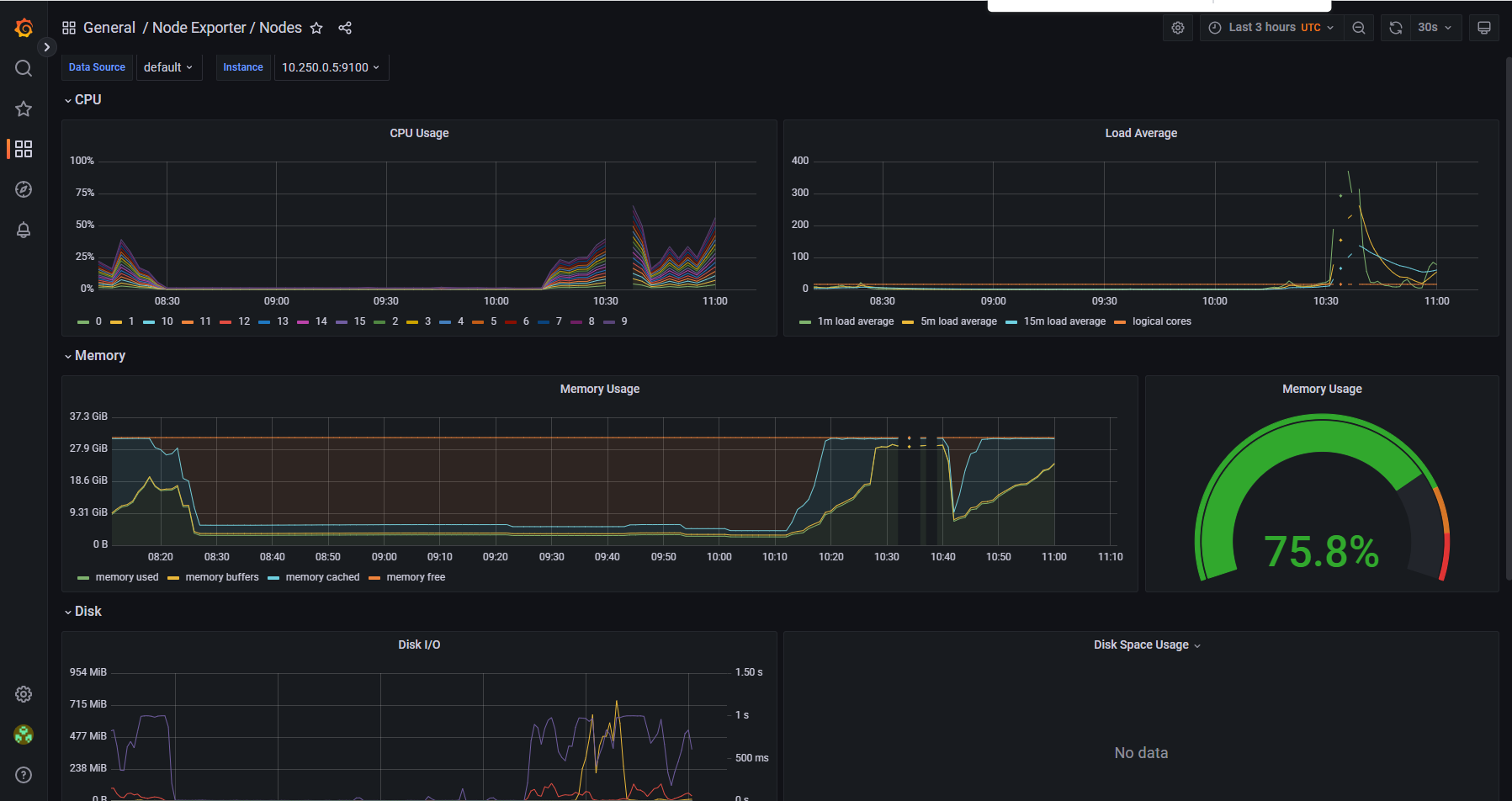
This is easy to reproduce such behaviour. Let me know, if you need more information.
@erichorwath Hey! I'm just saying ARC's kubernetes container mode does not depend on dind. The more you explain the issue, the more I think the k8s container mode would help.
Yes, they don't have the issue, but Kind is for example not running on them. Or is there another way of getting K8s in K8s for doing end to end tests of K8s controller like ARC is doing?
Additionally, I don't see this is a very specific issue only I'm currently facing, but a more far reaching problem the more people go to cgroupv2-only operating systems.
@erichorwath Thanks again for your help! I'll definitely keep researching what we can do to support dind in cgroupv2 properly.
but Kind is for example not running on them. Or is there another way of getting K8s in K8s for doing end to end tests of K8s controller like ARC is doing?
I'm afraid I'm not entirely sure what you're saying here... I tend to E2E test ARC on kind. It works flawlessly with the kubernetes container mode. Could you share the exact steps you used to test ARC with the kubernetes container mode on kind?
Additionally, I don't see this is a very specific issue only I'm currently facing
I believe so! However, the more I read your detailed explanation, the more I think there's nothing we can do in ARC. This looks like an issue in upstream, where their cgroupv2 support does not provide the necessary knob(s) to let a privileged container in a pod use the pod cgroup.
I believe so! However, the more I read your detailed explanation, the more I think there's nothing we can do in ARC. This looks like an issue in upstream, where their cgroupv2 support does not provide the necessary knob(s) to let a privileged container in a pod use the pod cgroup.
Thanks for confirming, I was not sure about this point. But I think that makes sense. Do you know, where I can create an issue for that?
It works flawlessly with the kubernetes container mode.
Wait, really? You mean to run kindest-node directly as k8s pods? (And not as containers inside a dind pod) Do you have a link handy with more details?
We modified our dind container as follows and it set the cgroup correctly allowing for monitoring.
- name: dind
  image: public.ecr.aws/docker/library/docker:dind
  command: # we had to add this command in
    - /bin/sh
    - -c
    - >-
      apk add --no-cache util-linux &&
      unshare --cgroup /bin/sh -c 'umount /sys/fs/cgroup && mount -t cgroup2 cgroup /sys/fs/cgroup && /usr/local/bin/dockerd-entrypoint.sh "$0" "$@"'
      "$0" "$@"
  args:
    - dockerd
    - --host=unix:///var/run/docker.sock
    - --group=$(DOCKER_GROUP_GID)

well, we had to do what @Denton-L did to make this work, seems to be time to add something here in the Controller, not sure how yet, but the whole setup is becoming complex, for just simple runners.
