

 acheong08
[Bug]: Request failed when using email and password with 'accessToken' key error
Is there an existing issue for this?
- [X] I have searched the existing issues and checked the recent builds/commits
What happened?
OpenAIAuth get_access_token will raise 'accessToken' key error because of getting empty dict from "https://explorer.api.openai.com/api/auth/session"
Steps to reproduce the problem
run this code
chatbot = Chatbot({
    'email': <my_email>,
    'password': <mypassword>
})
'accessToken' key error
What should have happened?
should get accessToken with email and password, and chatbot created successfully
Version where the problem happens
Name: revChatGPT Version: 2.2.7 Summary: ChatGPT is a reverse engineering of OpenAI's ChatGPT API Home-page: https://github.com/acheong08/ChatGPT Author: Antonio Cheong Author-email: [email protected] License: GNU General Public License v2.0 Location: /home/ubuntu/anaconda3/envs/chatgpt/lib/python3.10/site-packages Requires: asyncio, httpx, OpenAIAuth, requests, tiktoken Required-by:
What Python version are you running this with?
3.10
What is your operating system ?
Linux
Command Line Arguments
no
Console logs
Traceback (most recent call last):
  File "/home/ubuntu/anaconda3/envs/chatgpt/lib/python3.10/runpy.py", line 196, in _run_module_as_main
    return _run_code(code, main_globals, None,
  File "/home/ubuntu/anaconda3/envs/chatgpt/lib/python3.10/runpy.py", line 86, in _run_code
    exec(code, run_globals)
  File "/home/ubuntu/.vscode/extensions/ms-python.python-2022.20.2/pythonFiles/lib/python/debugpy/adapter/../../debugpy/launcher/../../debugpy/__main__.py", line 39, in <module>
    cli.main()
  File "/home/ubuntu/.vscode/extensions/ms-python.python-2022.20.2/pythonFiles/lib/python/debugpy/adapter/../../debugpy/launcher/../../debugpy/../debugpy/server/cli.py", line 430, in main
    run()
  File "/home/ubuntu/.vscode/extensions/ms-python.python-2022.20.2/pythonFiles/lib/python/debugpy/adapter/../../debugpy/launcher/../../debugpy/../debugpy/server/cli.py", line 284, in run_file
    runpy.run_path(target, run_name="__main__")
  File "/home/ubuntu/.vscode/extensions/ms-python.python-2022.20.2/pythonFiles/lib/python/debugpy/_vendored/pydevd/_pydevd_bundle/pydevd_runpy.py", line 321, in run_path
    return _run_module_code(code, init_globals, run_name,
  File "/home/ubuntu/.vscode/extensions/ms-python.python-2022.20.2/pythonFiles/lib/python/debugpy/_vendored/pydevd/_pydevd_bundle/pydevd_runpy.py", line 135, in _run_module_code
    _run_code(code, mod_globals, init_globals,
  File "/home/ubuntu/.vscode/extensions/ms-python.python-2022.20.2/pythonFiles/lib/python/debugpy/_vendored/pydevd/_pydevd_bundle/pydevd_runpy.py", line 124, in _run_code
    exec(code, run_globals)
  File "/media/ubuntu/disk/repos/chat_gpt_example/main.py", line 40, in <module>
    main()
  File "/media/ubuntu/disk/repos/chat_gpt_example/main.py", line 19, in main
    chatbot = Chatbot(Config.CHATBOT_CONFIG)
  File "/home/ubuntu/anaconda3/envs/chatgpt/lib/python3.10/site-packages/revChatGPT/V1.py", line 69, in __init__
    self.__login()
  File "/home/ubuntu/anaconda3/envs/chatgpt/lib/python3.10/site-packages/revChatGPT/V1.py", line 105, in __login
    auth.get_access_token()
  File "/home/ubuntu/anaconda3/envs/chatgpt/lib/python3.10/site-packages/OpenAIAuth/OpenAIAuth.py", line 352, in get_access_token
    self.access_token = response.json()["accessToken"]
KeyError: 'accessToken'
### Additional information

_No response_

A few ways this could happen:
- You're in China: OpenAI is geo restricted
- You're using a known Chinese VPN or proxy: Also subject to geo restrictions
- You're using a Google/Microsoft account: Those aren't supported
- Other
Solution:
Go to https://chat.openai.com/api/auth/session and use access_token in config (remove email/password)

A few ways this could happen:
- You're in China: OpenAI is geo restricted
- You're using a known Chinese VPN or proxy: Also subject to geo restrictions
- You're using a Google/Microsoft account: Those aren't supported
- Other
Solution: Go to https://chat.openai.com/api/auth/session and use
access_tokenin config (remove email/password)
when i remove config (remove email/password) i got this TypeError: Chatbot.init() missing 2 required positional arguments: 'email' and 'password'

In the
config, setaccess_token.
Did we talk about V2, i didn't find config in V2
I find that when i try chatbot.ask 15 times, i will got CONECTION ERROR. Do you know how to fix it?
logs
Traceback (most recent call last):
  File "/Users/zhz/opt/anaconda3/envs/chatgpt_test/lib/python3.10/site-packages/urllib3/connectionpool.py", line 700, in urlopen
    self._prepare_proxy(conn)
  File "/Users/zhz/opt/anaconda3/envs/chatgpt_test/lib/python3.10/site-packages/urllib3/connectionpool.py", line 996, in _prepare_proxy
    conn.connect()
  File "/Users/zhz/opt/anaconda3/envs/chatgpt_test/lib/python3.10/site-packages/urllib3/connection.py", line 414, in connect
    self.sock = ssl_wrap_socket(
  File "/Users/zhz/opt/anaconda3/envs/chatgpt_test/lib/python3.10/site-packages/urllib3/util/ssl_.py", line 449, in ssl_wrap_socket
    ssl_sock = _ssl_wrap_socket_impl(
  File "/Users/zhz/opt/anaconda3/envs/chatgpt_test/lib/python3.10/site-packages/urllib3/util/ssl_.py", line 493, in _ssl_wrap_socket_impl
    return ssl_context.wrap_socket(sock, server_hostname=server_hostname)
  File "/Users/zhz/opt/anaconda3/envs/chatgpt_test/lib/python3.10/ssl.py", line 513, in wrap_socket
    return self.sslsocket_class._create(
  File "/Users/zhz/opt/anaconda3/envs/chatgpt_test/lib/python3.10/ssl.py", line 1071, in _create
    self.do_handshake()
  File "/Users/zhz/opt/anaconda3/envs/chatgpt_test/lib/python3.10/ssl.py", line 1342, in do_handshake
    self._sslobj.do_handshake()
ConnectionResetError: [Errno 54] Connection reset by peer

During handling of the above exception, another exception occurred:

Traceback (most recent call last):
  File "/Users/zhz/opt/anaconda3/envs/chatgpt_test/lib/python3.10/site-packages/requests/adapters.py", line 489, in send
    resp = conn.urlopen(
  File "/Users/zhz/opt/anaconda3/envs/chatgpt_test/lib/python3.10/site-packages/urllib3/connectionpool.py", line 787, in urlopen
    retries = retries.increment(
  File "/Users/zhz/opt/anaconda3/envs/chatgpt_test/lib/python3.10/site-packages/urllib3/util/retry.py", line 592, in increment
    raise MaxRetryError(_pool, url, error or ResponseError(cause))
urllib3.exceptions.MaxRetryError: HTTPSConnectionPool(host='chat.duti.tech', port=443): Max retries exceeded with url: /api/conversation (Caused by ProxyError('Cannot connect to proxy.', ConnectionResetError(54, 'Connection reset by peer')))

During handling of the above exception, another exception occurred:

Traceback (most recent call last):
  File "/Users/zhz/PycharmProjects/chatgpt_test/run.py", line 70, in <module>
    test(configure(), p, 'save_res/senti_muti_100.txt')
  File "/Users/zhz/PycharmProjects/chatgpt_test/run.py", line 22, in test
    for data in chatbot.ask(
  File "/Users/zhz/opt/anaconda3/envs/chatgpt_test/lib/python3.10/site-packages/revChatGPT/V1.py", line 164, in ask
    response = self.session.post(
  File "/Users/zhz/opt/anaconda3/envs/chatgpt_test/lib/python3.10/site-packages/requests/sessions.py", line 635, in post
    return self.request("POST", url, data=data, json=json, **kwargs)
  File "/Users/zhz/opt/anaconda3/envs/chatgpt_test/lib/python3.10/site-packages/requests/sessions.py", line 587, in request
    resp = self.send(prep, **send_kwargs)
  File "/Users/zhz/opt/anaconda3/envs/chatgpt_test/lib/python3.10/site-packages/requests/sessions.py", line 701, in send
    r = adapter.send(request, **kwargs)
  File "/Users/zhz/opt/anaconda3/envs/chatgpt_test/lib/python3.10/site-packages/requests/adapters.py", line 559, in send
    raise ProxyError(e, request=request)
requests.exceptions.ProxyError: HTTPSConnectionPool(host='chat.duti.tech', port=443): Max retries exceeded with url: /api/conversation (Caused by ProxyError('Cannot connect to proxy.', ConnectionResetError(54, 'Connection reset by peer')))
Why not release a local proxy server? in case the public server failed again.

Why not release a local proxy server? in case the public server failed again.
It is to prevent OpenAI from locking down the method I'm using. I am working towards a private docker container on DigitalOcean so people can run it without seeing the source code or reversing the binary
I just rewrote https://github.com/acheong08/OpenAIAuth. Try out the latest version
This issue is stale because it has been open for 2 days with no activity.
A few ways this could happen:
- You're in China: OpenAI is geo restricted
- You're using a known Chinese VPN or proxy: Also subject to geo restrictions
- You're using a Google/Microsoft account: Those aren't supported
- Other
Solution: Go to https://chat.openai.com/api/auth/session and use
access_tokenin config (remove email/password)
This does not work for me.
I am located in Canada and use outlook email. Does outlook email belong to Microsoft? @acheong08
Also I removed email and password and only feed config with access_token, it shows Exception: Email not found in config!
BTW, I am using revChatGPT==2.3.5 and OpenAIAuth==0.3.2

Exception: Email not found in config!
You might not have formatted it correctly.
{
"access_token": "eyJhbGciOiJSUzI1NiIsInR5cCI6IkpXVCIsImtpZCI6Ik1UaEVOVUpHTkVNMVFURTRNMEZCTWpkQ05UZzVNRFUxUlRVd1FVSkRNRU13UmtGRVFrRXpSZyJ9.....CR8AG2z3oOq8zVs0M_ucPypqV3xHG_9hM9pYv9rsYONDPWs2eXgTlQbh3q7z87LkXHeyrWiQiuQenGK18mN3DVOdmRZK_SLadI4VoqjamuUVoPmO-...-..."
}
{
"access_token": "eyJhbGciOiJSUzI1NiIsInR5cCI6IkpXVCIsImtpZCI6Ik1UaEVOVUpHTkVNMVFURTRNMEZCTWpkQ05UZzVNRFUxUlRVd1FVSkRNRU13UmtGRVFrRXpSZyJ9.....CR8AG2z3oOq8zVs0M_ucPypqV3xHG_9hM9pYv9rsYONDPWs2eXgTlQbh3q7z87LkXHeyrWiQiuQenGK18mN3DVOdmRZK_SLadI4VoqjamuUVoPmO-...-..."
}
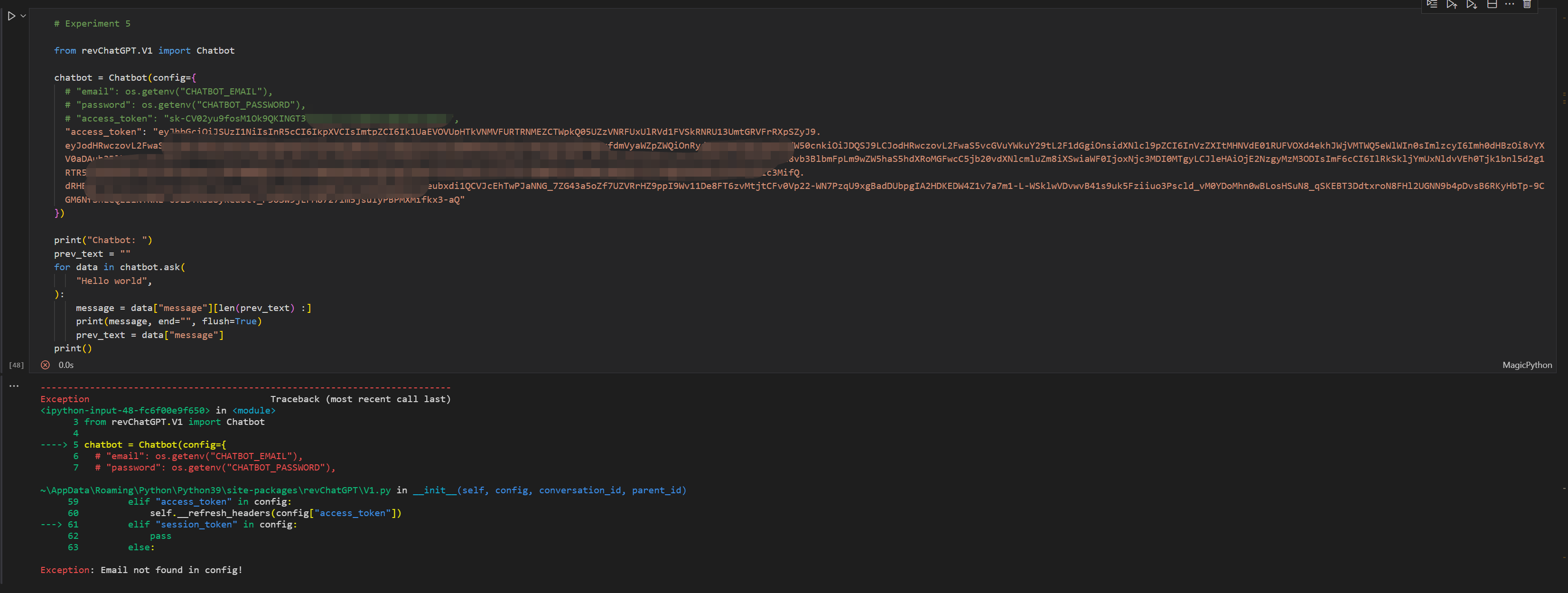
I think I am using the correct way, is that so? @acheong08