

 abenori
Tate mode for using Chinese font punctuation compress
When changing main font to chinese font, there no punctuation compress, how to solve this problem? thanks!


Thanks for reply. There are two screenshot:
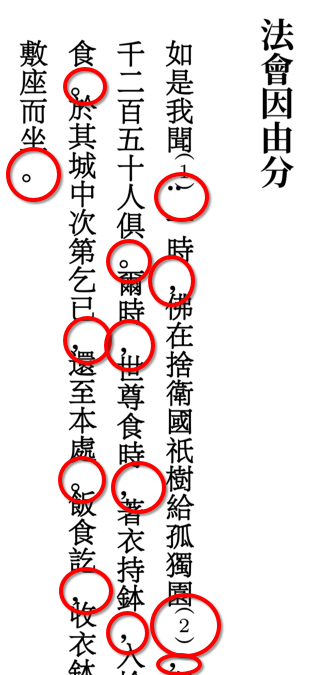
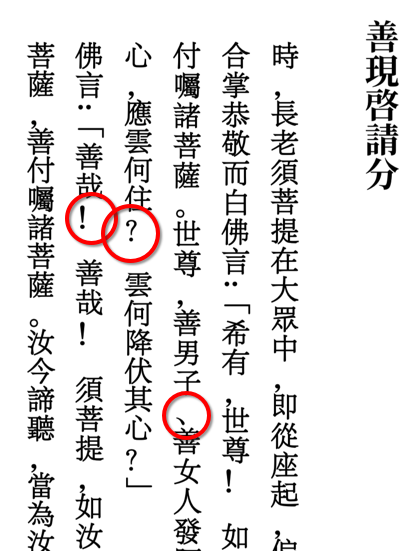
There is code for test:
\setmainjfont{FZPingXianLanTingSong}
FZLanTingSong is chinese font.
I used FZLanTingSong.ttf but I couldn't produce the problem. The code I tried is:
\documentclass[lualatex,tate]{jlreq}
\usepackage{luatexja-fontspec}
\setmainjfont{FZLanTingSong.ttf}
\begin{document}
あ,い。
\end{document}
Probably the same problem happens with `ltjtarticle' class. I guess that some font feature (vert) is not enabled. But usually it is enabled by luatex-ja. Maybe you have to update luatex-ja?
I have updated the latest version of the jlreq class and tested the FZLanTingSong.ttf you mentioned in the post. Most of the punctuation marks are normal and only a few are not displayed correctly. Here's an example:
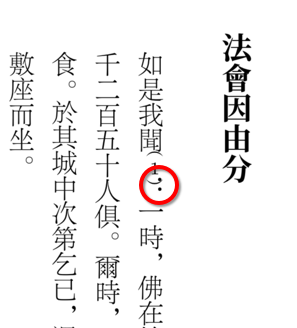
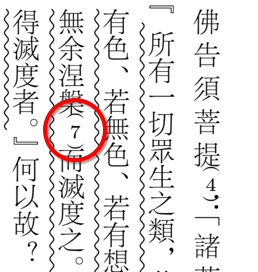
So, basically this problem caused by lack of font features not jlreqclass. Finally, i also checked fzpingxiansong.ttf font features which proved that it didn't have vertical support:

is there any trick to solve this problem?
I saw that the placing of the brackets are strange. Perhaps left' or down' property in JFM is useful. (This may also can apply to punctures in fzpingxiansong.ttf.) Modifying the left property of the character class 1 (resp. 2) to -0.25 (resp. 0.25) in jlreqv-jfm.lua produces the following.
\documentclass[tate,lualatex]{jlreq}
\usepackage{luatexja-fontspec}
% Dont't forget to specify JFM
\setmainjfont[TateFeatures={JFM=jlreqv}]{FZLanTingSong.ttf}
\begin{document}
あ(あ)あ
\end{document}

Is there any guide document for modify JFM? I've been read luatexja document, but still not understand the structure of JFM, the real file is really complicated.
As far as I know, the only existing detailed document about JFM is the document of LuaTeX-ja package.
In the above example, I did the following. First copy jfm-jlreq.lua to some directory. (The JFM used in the example is jfm-jlreqv.lua, but this will be generated from jfm-jlreq.lua.) The JFM is defined as the table jfm. In jfm-jlreq.lua, you can find the code like :
jfm = {
  [1] = {
  ...
  }
 ...
}
Each entry indexed by the natural number gives the JFM for each character class. For example, the table in [1] is the information of characters of class 1, namely opening brackets.
Now we want to add left = -0.25 to class 1. The table is
  [1] = {
    chars = {<characters>},
    width = 0.5,height = 0.88,depth = 0.12,
    align = 'right',
    glue = {<glue table>}
  }
and there is no left property. So you can just add this entry to this table.
  [1] = {
    chars = {<characters>},
    width = 0.5,height = 0.88,depth = 0.12,
    align = 'right',
    left = -0.25, -- added
    glue = {<glue table>}
  }
To produce jfm-jlreqv.lua from this modified JFM, we use make_variant_jfm.lua script. Run this script in the directory where modified jfm-jlreq.lua is. Then the script produces new jfm-jlreqv.lua. (The script also proces other jfms. We do not need them here.) With this new jfm-jlreqv.lua, you will get the above example. (In fact, you also have to add left = 0.25 to class 2 characters. The way to do this is the same.)