
AVR4L
 AVR4L copied to clipboard
 abdalmoniem
AVR4L

About:
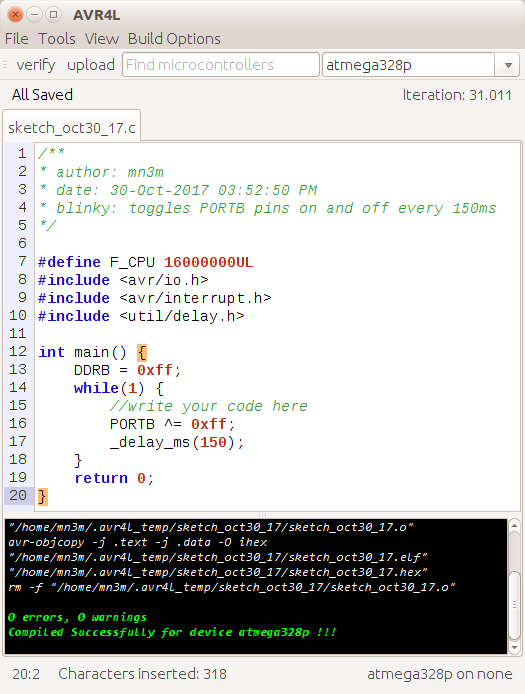
AVR4L aims to deliver an easy to use and user friendly Integrated Development Environment for developing Codes for microcontrollers based on Atmel's AVR families. AVR4L is a Creative coding / Integrated Development Environment for Linux operating systems intended for AVR beginners as well as professionals, it has many features from professional IDEs as well as the simplicity of editing.
Installation and Running:
Linux:
- Make sure
Java JDK / JRE v1.8is installed on your computer.- How to install: https://java.com/en/download/help/linux_x64_install.xml
- Set
JAVA_HOMEenvironment variable, by doing the following:-
Depending on where you installed your Java, you will need to provide the full path. For this example, I installed Oracle JDK 8 in the
/usr/lib/jvm/java-8-oracledirectory. -
Open the file
/etc/environmentand scroll to the end of the file and enter the following:JAVA_HOME=/usr/lib/jvm/java-8-oracle -
Save and source the file by doing:
. /etc/environmentorsource /etc/environment
-
- Clone/download this folder to your computer.
- cd into the
Binaries/Linuxdirectory. - run
sudo -E ./install.shwithin this folder. - you can now type
avr4lin any terminal session or find it in the dash if you haveUbuntuinstalled.
Windows:
-
Make sure
Java JDK / JRE v1.8is installed on your computer.- How to install: https://java.com/en/download/windows_offline.jsp
-
Clone/download this folder to your computer.
-
cd into the
Binaries\Windows\installer project\AVR4L-SetupFilesdirectory. -
(recommended) install
AVR4L Setup.exe -
or run the
AVR4L.exedirectly from theportablefolder.note: windows version is not fully tested and may be unstable, it is intended for cross platform compatability.
note: if you want to use the portable version you must make sure that
portable\avr-tools\binandportable\tools\bindirectories are added to thePATHsystem environment variable.The project's full focus is on the linux version as it aims to be an alternative to Atmel's Studio for linux users.
Features:
- Cross platform (Linux, Windows)
- Creative coding environment with auto-complete, suggestions and many more features.
- Two options for compiling and uploading your code:
- standard mode.
- makefile mode.
- Compiling .c files of various atmega parts or microcontrollers.
- Uploading .hex files to various atmega parts or microcontrollers.
- Supports many programmers:
- AVR-ISP (avrisp)
- Atmel STK500 Version 1.x firmware (stk500v1)
- Arduino (arduino)
- USB-ASP (usbasp)
- Console area shows results of compilation and uploading.
Known Issues:
-
Upload fails with message
permission denied: AVR4L requires super user permissions to upload sketches, you can either:-
sudo avr4lfrom a terminal -
or add your user to the
dialoutgroup, most programmers are listed in this group:sudo adduser YOUR_USER dialoutnote: replace
YOUR_USERwith your linux user
-
-
Upload fails with message
sudo no tty present and no askpass program specified: AVR4L requires super user permissions to upload sketches, but has not been run as root (sudo), so when it tries to issue a command with sudo, there is no way for it to get the root password, so you can either:-
sudo avr4lfrom a terminal -
or prevent sudo commands from requesting passwords:
in a terminal type:
sudo visudoand add the following to the end of the file:
YOUR_USER ALL = NOPASSWD : ALLnote: replace
YOUR_USERwith your linux user
-
 abdalmoniem