abbasfreestyle
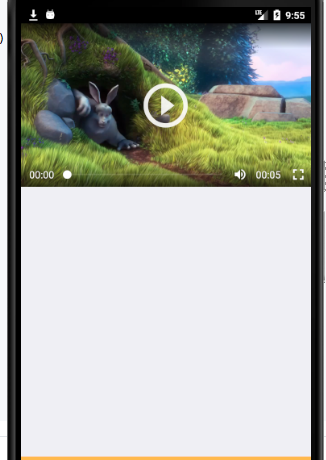
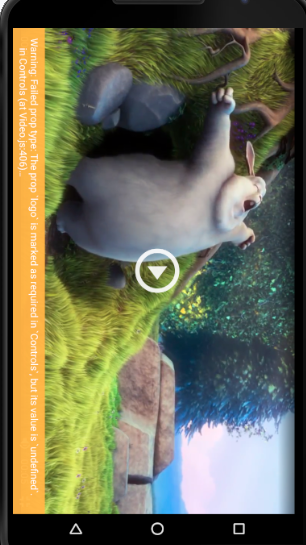
Fullscreen doesn't expand fullscreen, but expands inside the container.
The component is called in here with Video props:
<CardItem>
<View style={{ flex: 1 }}>
<VideoPlayer
video={{
name: 'video file',
poster: 'poster',
videoStyle: styles.backgroundVideo
}}
/>
</View>
</CardItem>
Styles: backgroundVideo: { position: 'relative', top: 0, left: 0, bottom: 0, right: 0, width: null, height: 200 }
The video player:
class VideoPlayer extends Component { render() { return ( <Video url={this.props.video.name} placeholder={this.props.video.poster} style={this.props.video.videoStyle} /> ); } }
export default VideoPlayer;
When I click the fullscreen button in controls, then I get the behaviour you see in the image.
- [ ] react-native-af-video-player version: @0.1.7
- [ ] React Native version:@0.53.3
- [ ] OS: Both Android and iOS


Thanks in advance, really appreciated

Video Player:
      <Video
          url={this.props.video.name}
          placeholder={this.props.video.poster}
          style={this.props.video.videoStyle}
      />
Hello @GSolari79,
Based on the readme, does this solve your issue? https://github.com/abbasfreestyle/react-native-af-video-player#fullscreen-videos-inside-a-scrollview

Hi @abbasfreestyle Thanks for your reply, this doesn't resolve the issue. It does the same thing just rotating the screen :(
Can you provide a video example?
What's your reason for adding position relative styling to the container?
While testing stayed that way, with absolute position on Video I get this image. Expanding in the CardItem without leaving gaps.

My video example is the following:
class VideoPlayer extends Component {
constructor() { super(); this.state = { fullScreen: false }; }
onFullScreen(fullScreen) { this.setState({ fullScreen }); }
render() {
  const { fullScreen } = this.state;
return (
  <View style={{ flex: 1 }} >
    <Video
      url={this.props.video.name}
      placeholder={this.props.video.poster}
      onFullScreen={status => this.onFullScreen(status)}
      fullScreen={fullScreen}
      style={this.props.video.videoStyle}
    />
  </View>
);
} }
export default VideoPlayer;
The issue is that the fullscreen control expands the video not to the whole screen but inside the CardItem that the Video is called from
The CardItem is from nativebase and it is wrapped inside Container, Content like this:
> <Card style={{ flex: 1 }}>
>               <CardItem>
>                 <Left>
>                   <Thumbnail square small source={{ uri: 'link' }} />
>                   <Body>
>                     <Text>Uni Messenger</Text>
>                     <Text note>Unisomnia Social Network</Text>
>                   </Body>
>                 </Left>
>               </CardItem>
>               <CardItem>
>                 <VideoPlayer
>                   video={{
>                       name: 'video Link',
>                       poster: 'poster Link',
>                       videoStyle: styles.backgroundVideo
>                   }}
>                 />
>               </CardItem>
>               <CardItem>
>                   <Text style={styles.textFormat}>
>                              Some Text.................
>                   </Text>
>               </CardItem>
>               <CardItem style={{ height: 'auto', alignSelf: 'center' }}>
>                 <Icon
>                   raised
>                   type="entypo"
>                   name='google-play'
>                   size={25}
>                   color={'#8ac53f'}
>                   onPress={() => Linking.openURL('link')}
>                 />
>                 <Icon
>                   raised
>                   type="font-awesome"
>                   name='photo'
>                   size={25}
>                   color={'#8ac53f'}
>                   onPress={() => this.goToUnisomniaAlbum()}
>                 />
>               </CardItem>
>             </Card>
>         </Content>
>       </Container>
So Based on the readme you should be able to achieve the following: https://github.com/abbasfreestyle/react-native-af-video-player#fullscreen-videos-inside-a-scrollview
<Card style={{ flex: 1 }}>
  <CardItem style={fullScreen ? null : styles.backgroundVideo}>
    <Video
      url={somelink}
      placeholder={someplaceholder}
      onFullScreen={fullScreen => this.setState({ fullScreen }) }
      contentAbove={
        <CardItem>
          <Left>
            <Thumbnail square small source={{ uri: 'link' }} />
            <Body>
              <Text>Uni Messenger</Text>
              <Text note>Unisomnia Social Network</Text>
            </Body>
          </Left>
        </CardItem>
      }
      contentBelow={
      <View>
        <CardItem>
          <Text style={styles.textFormat}>
            Some Text.................
          </Text>
        </CardItem>
        <CardItem style={{ height: 'auto', alignSelf: 'center' }}>
          <Icon
            raised
            type="entypo"
            name='google-play'
            size={25}
            color={'#8ac53f'}
            onPress={() => Linking.openURL('link')}
          />
          <Icon
            raised
            type="font-awesome"
            name='photo'
            size={25}
            color={'#8ac53f'}
            onPress={() => this.goToUnisomniaAlbum()}
          />
        </CardItem>
      </View>
      }
    />
  </CardItem>
</Card>
I dont really have time to test this, but in theory it should work or close to working.
You'll probably need to fork and make amendments to the VideoScrollHandler if you dont want to have the styles affect the ScrollView
I have already tested many things regarding the styles in order to make it function. It has to do with custom styling of NativeBase. The only way to make it work is call a modal and play the video in there, avoiding this ways the code with Container ... etc. Now I am facing an issue where rotateToFullScreen doesn't work for Android...
I had resolve the problem by add
rotateToFullScreen={true}
I find those code in VideoPlayer.js:
this.setState({ fullScreen: true }, () => {
    this.props.onFullScreen(this.state.fullScreen)
    if (this.props.rotateToFullScreen) Orientation.lockToLandscape()
})

I've made some updates in version 0.1.8 to better support container styling with a ScrollView. I've updated the readme :)
I'm looking for a replacement for my actual video controller, but I have the same configuration as @GSolari79 . I'm using a flatlist, and each item is a component which has the video component inside multiple containers. Is there any solution to this?

Not at the moment @hoscarcito. Ultimately the best case scenario would be to strip away from the custom ScrollView. At the moment it's proven difficult to do so because Components are limited and unaware of their Container Components.
If there's an alternative approach to solve this issue i'm open to suggestions.
can we change this portrait view to landscape mode in the beginning? your help is highly appreciated