

 aaron-bond
Highlight all the lines in multi-line comments same as the first one
Thanks for the great extension 🙏
I would like to know if there's a way to highlight multi-lined comments based on the type.
In the below image, I would like to see the second line of the comment to be in the same color as the first one.
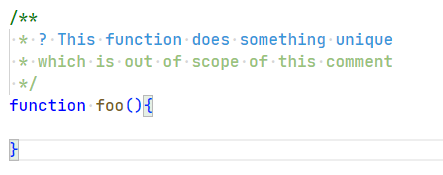
I want to know if there's a work around or way to ensure that the entire multi-line comment is highlighted the same way unless specified other wise, i.e.,
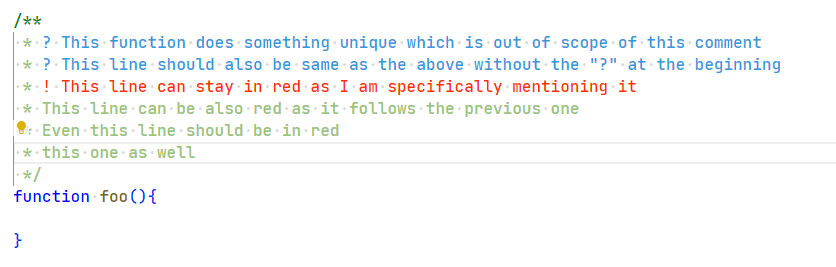
I know it could be little bit hard to parse every line of the comment & could be too power hungry. So, if we can take the first indicator as the anchor to define the highlighting is also fine for me. Let me know if there's a workaround.
Thanks a ton 🙇♂️ 🙇♂️ 🙇♂️

There does not look to be anything in the code that can do this currently as it uses regular expressions to match any individual case. If you have any desire to do so, I would recommend you fork the library and go into parser.ts and play around in the fucntions FindBlockComments and FindJSDocComments. They have regex strings in there called "commentMatchString" which define each match so if you modify them you can see if you can get the right behaviour. You need to make a regex which does not overlap itself and matches the groups of comments as you want it. Once you got that to work in testing you can submit a pull request to see if the creator will make it a feature of the offical version

We might be able to accomplish similar to how we type multi-line commands in a terminal. In a terminal, the often practice for various shell utilities is that we end a line with a backslash (\) so as to enter multi-line mode, and that'll continue for each line you enter the backslash (\) at the end. In our case, we might wanna assign a specific colour in case a backslash (\) is encountered and hence continue to the next line until there's no more backslash (\) for a successive line.
@aaron-bond I'd like to work on this feature. How does my way of thinking about doing it seem to you?

Hey guys, any update to it? I find this pretty useful but it's one of the things I came accross.
