

 ZMYaro
I would like to be able to select by color for example in order to delete a background

@pescamillam: Is there an equivalent MS Paint feature? I am not opposed to the idea, but I am not sure how you envision it fitting into the PaintZ interface. Would it be a tool option for the flood fill tool?

There's an option in the Attributes menu of MS Paint to change from black and white to color and vice-versa that would work nicely to remove backgrounds. it removes all colors except black. it's likely not what this person is asking for, but it would have the same result.

@ParodyVerse: Could you post a screenshot or recording of that function? I can't seem to find it (the machine I am on at the moment only has Win7 Paint). Thanks!
Click the properties menu,
 then, there's an option for Black and White.
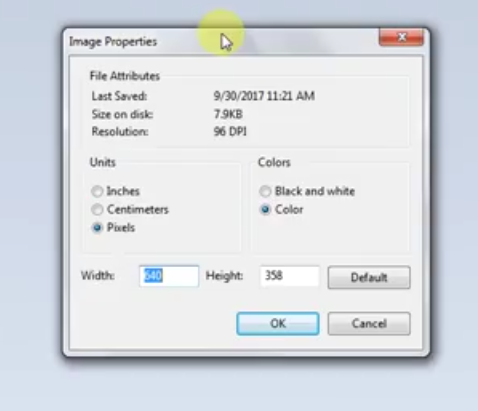 this is on my Windows 7 because I don't have windows 10, but I have used windows 10 before and it's the same. you can also use ctrl+e to access it.
also sorry if the pictures are grey, i can't see them on my computer. video of process: https://www.youtube.com/watch?v=BjtESBOVD9k