

 Yoast
Yoast
IE11: the replaced variables in the snippet editor fields disrupt keyboard navigation
Important: please investigate first whether this is a known Draft.js issue with IE11!
Noticed while working on #542. It happens also before the changes introduced there, but it gets more serious as there's potentially a "keyboard trap", meaning keyboard users can't tab away from the fields.
To reproduce, you need to test with IE 11.
Turns out the text that represents "replaced variables" in the snippet editor fields is actually focusable in IE 11. See in the screenshots below, that's what happens when tabbing within the field:



As you can see, the replaced variables (actually they're text surrounded with some HTML elements) are focusable and get a "resize handle" or just receive focus while tabbing within the field.
In some circumstances, sorry but I couldn't reproduce consistently, tabbing gets "stuck" on one of these elements and there's no way to tab away from the field.
I guess we should investigate why IE11 thinks these elements are focusable in the first place. It's very likely something related to draft.js and could be a known issue. In a way, this remembers me something that happened with SVG icons and was solved adding a HTML attribute focusable="false".

Inspired by this comment found by @IreneStr https://github.com/facebook/draft-js/issues/657#issuecomment-335770848
Seems any CSS property that triggers hasLayout in IE 11 in combination with contenteditable triggers the resize handles.
Removing any CSS that triggers hasLayout fixes it and also fixes the strange behavior with left / right arrows noticed in https://github.com/Yoast/yoast-components/pull/568#issuecomment-395452346
This would require to reset display: inline-block on the "highlighted" words, which makes them look not so nice. Will try to research a bit further.
Worth noting not only the replaced words get a "resize handle" but also the title field itself:
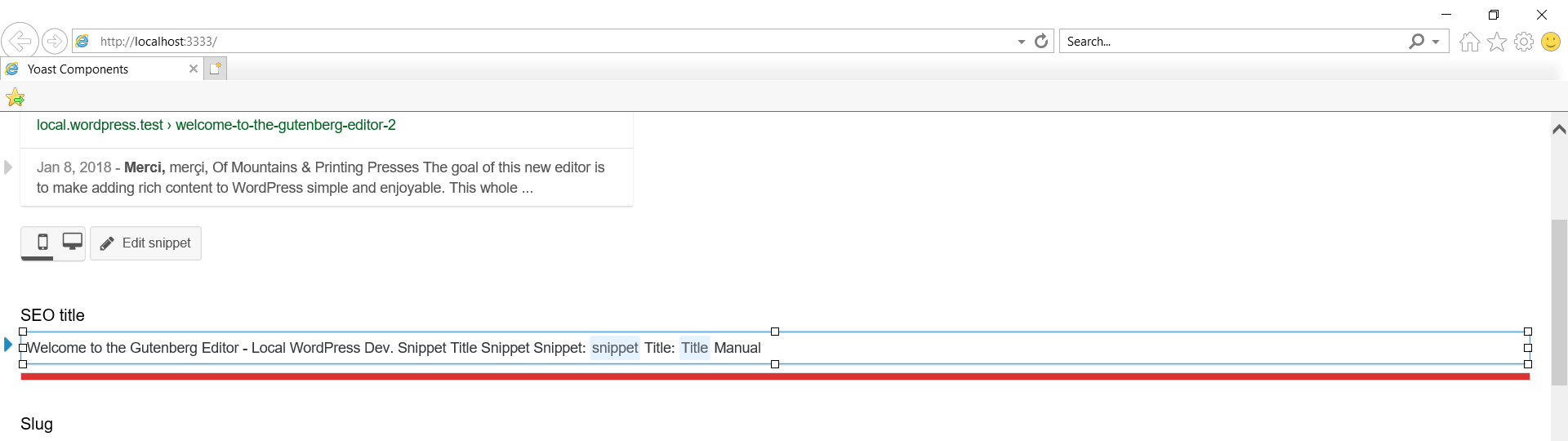
It was decided to handle this in #584 as part of the fixes for the title field.
#584 addresses only the resize-handle on the title-field.
Still to do in this issue: gif the resize-handles on the highlighted replaced variables and the left/right arrow keys behavior. To fix it, we should make the highlighted words not have hasLayout in IE 11 only.