

 Yoast
Yoast
Gutenberg | Primary category switch does not update the permalink
- [x] I've read and understood the contribution guidelines.
- [x] I've searched for any related issues and avoided creating a duplicate issue.
Please give us a description of what happened.
When a default post has category A and B for example and switching the primary between these 2 via the gutenberg editor the permalink does not get updated to the new permalink until a save/reload later.
Please see the attached video https://user-images.githubusercontent.com/10158014/126179844-6ea611d8-ac59-4226-9a4f-42e5de63268c.mov
Please describe what you expected to happen and why.
When a change to the primary category happens the permalink gets updated on the some save event or maybe even directly after changing the category instead of waiting for the gutenberg save
How can we reproduce this behavior?
- Create a default post with 2 category terms A and B for example the default category.
- Save and reload just to be sure.
- Change the primary category from A to B.
- Save / publish the post via gutenberg.
- The permalink does not get updated
Technical info
- If relevant, which editor is affected (or editors):
- [ ] Classic Editor
- [x] Gutenberg
- [ ] Classic Editor plugin
- Which browser is affected (or browsers):
- [x] Chrome
- [x] Firefox
- [ ] Safari (not tested)
Used versions
- WordPress version: 5.7.2
- Yoast SEO version: 16.7
- Gutenberg plugin version: https://developer.wordpress.org/block-editor/contributors/versions-in-wordpress/ 9.9?
- Tested with theme: Twenty Twenty-One

Hi @merlijnvanlent , I was unable to replicate the described issue on 16.7. Have you ran any conflict checks? I also assume you have your permalink structure set to include categories? Because else I wouldn't know why the permalink would change on primary-category change.

Hi @Djennez , Thanks for your response. Yes. the permalink structure does include a category. I should have added that to the issue as well. Sorry about that.
The permalink structure looks like this /%category%/%postname%~%post_id%/
The attached video was recorded on a completely fresh wordpress install with the default theme and only one single active plugin yoast seo so it couldn’t have been a conflict with something else. I couldn’t really test it without the plugin (which you guys recommend here) because the primary category dropdown gets added by the seo plugin.
Thanks!
Right, after watching the video I see what you mean, and why I did not notice any bugs.
To be clear: the permalink does get saved immediately, but it looks like this happens after the permalink is redrawn in the DOM. So that only happens on the next save / reload.
This seems like a trivial bug. I am not sure if / when time will be assigned to fix this.
Bug without video
Initial save of the post:
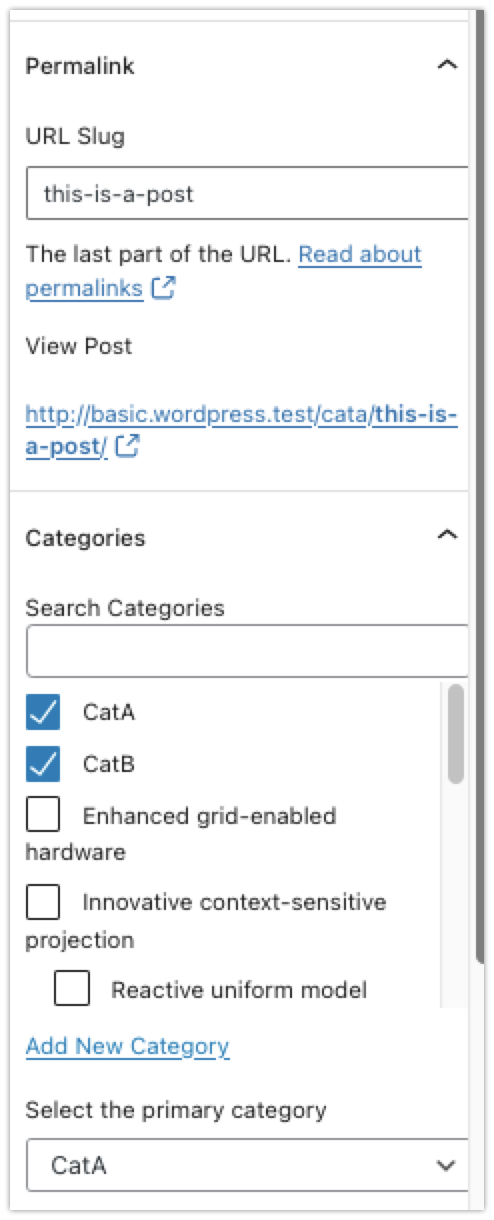
Change the primary category and save, see it does not update the reflected permalink:
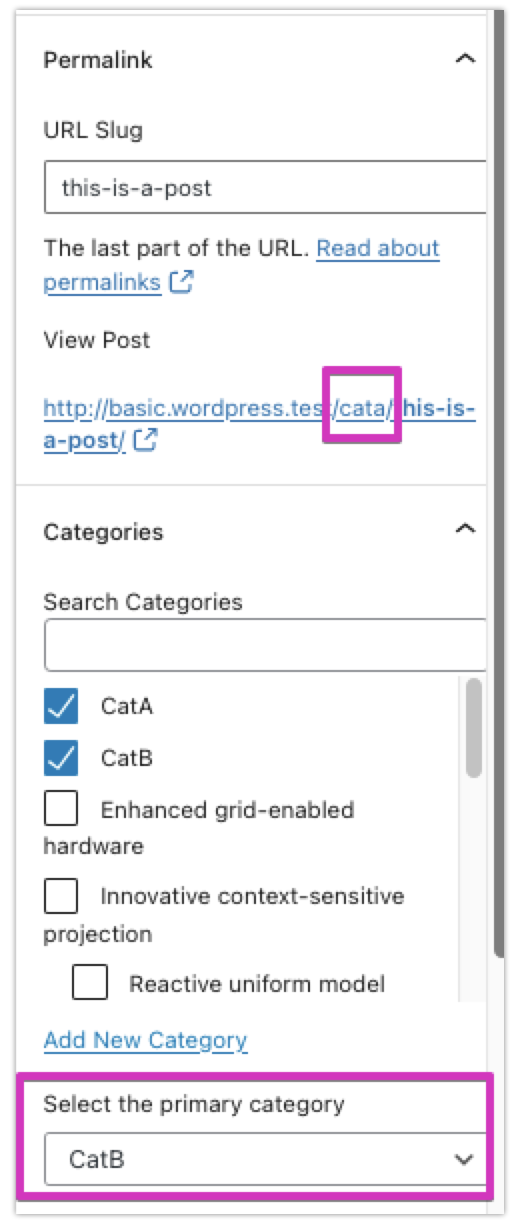
Reload the editor or save the page again without any changes to see the permalink change.
Thanks, @Djennez ! Well see what heppens. It would be nice to have it fixed. I use the url to generate some extra URLs with UTM and other paramaters to share on the socials and stuff which because of this issue are also incorrect.
Maybe I have some spare time to take a look at it. Its open source after all. :)

Please inform the customer of conversation # 1052480 when this conversation has been closed.

Our development team has had a look but unfortunately it's not trivial to fix this problem, some pointers though:
-
packages/js/src/initializers/primary-category.jsadds and process the links for Gutenberg. There, we should probably add something to update the permalink after a new primary category has been selected. -
admin/views/js-templates-primary-term.phpadds the links for the Classic editor, for which this also is a problem (see https://github.com/Yoast/wordpress-seo/issues/7203).
I can confirm that the permalink is still updated after saving.

I noticed refreshAnalysis is not triggered when adding categories and setting primary categories on block editor. It does on classic editor:
Steps to reproduce:
- Go to
packages/js/src/analysis/refreshAnalysis.jsand add a console.log in the beginning on the function (line 31) - Use classic editor and open the console.
- Tick more categories - check you see your console log in the console.
- Set primary category - check you see your console log in the console.
- Switch to block editor and repeat the previous steps.
- The result is that the console log are not triggered.
cc: @mhkuu
