

 Yoast
Yoast
Wrong image width and height when using "wpseo_opengraph_image" filter
When providing custom image using "wpseo_opengraph_image" filter:
<meta property="og:image:width" content="..." />
<meta property="og:image:height" content="..." />
display wrong width and height, i.e. not using the ones from the image provided.

I was able to reproduce this. As a workaround I would normally advise wpseo_opengraph_image_size but that doesn't seem to be working either.
Please note that this behavior is not new in 14.0, but was present in 13.5 as well.
Steps to reproduce:
- Create a post with a featured image.
- Upload a second, differently sized, mediafile to your site and get the URL.
- Use this filter to change the OG Image URL:
add_filter( 'wpseo_opengraph_image', 'filterimage', 10, 1);

function filterimage( $url ) {
	return '<insert url to second image here>';
}
- Check the source of your post and notice the
og:imagehas changed, but theog:image:width/heighttags are the same sizes as the original image.

Tried to fix this in my specific case by creating a class that extends Image_Presenter, overriding the filter() method to set the width and height too (just hard coded to 500x500 for the moment for debugging):
use Yoast\WP\SEO\Presenters\Open_Graph\Image_Presenter;

class MyPresenter extends Image_Presenter {

	protected function filter( $image ) {
		$image_url = \trim( \apply_filters( 'wpseo_opengraph_image', $image['url'], $this->presentation ) );
		if ( ! empty( $image_url ) && \is_string( $image_url ) ) {
			$image['url'] = $image_url;
			$image['width'] = 500;
			$image['height'] = 500;
		}

		return $image;
	}
}
However, this didn't work either.
After debugging, I can see that the Image_Presenter superclass is being called twice (though my subclass just once). The first time, og:image:width and og:image:height are being set to the large values from the default og:image, and the second time they are being set to 500x500.
From this, I think we can deduce that if meta keys are set twice, only the first value is output to the page.

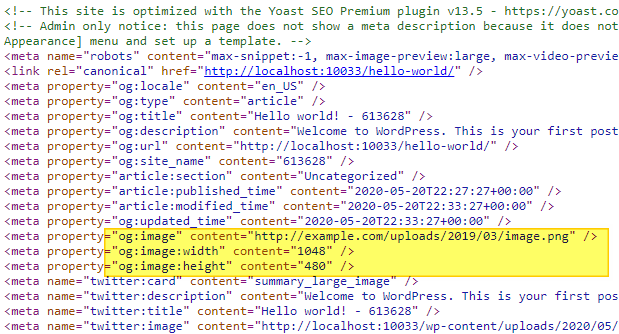
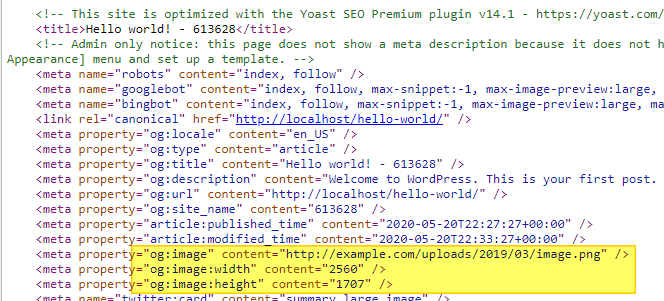
The code below worked in 13.5 but not in 14.1
add_filter( 'wpseo_opengraph_image', 'change_opengraph_image_url' );
add_filter( 'wpseo_og_og_image_width', 'change_opengraph_image_width' );
add_filter( 'wpseo_og_og_image_height', 'change_opengraph_image_height' );

function change_opengraph_image_url( $url ) {
    return 'https://example.com/uploads/2019/03/image.png';
}

function change_opengraph_image_width( $width ) {
    return '1048';
}

function change_opengraph_image_height ( $height ) {
    return '480';
}
13.5 Works
14.1 Doesn't Work

Please inform the customer of conversation # 613628 when this conversation has been closed.
On testing Yoast 14.2, and with my Image_Presenter subclass still in play (see above), I can now see that the og:image tags are being output to the page twice - once for the default image and a second time using my subclass.
If I remove my Image_Presenter, we're back to a single set of og:image tags, but the width and height are always picked up from the default image even if a wpseo_opengraph_image filter is registered.
Multiple og:image tags are defined as arrays so multiple are permitted in OG, but in my use case I only want one to be output to the page - i.e. my overridden one, with correct width and height. I can't see a way to suppress or override the output of the default image.
FWIW, the way I got it to work (which is quite cursed) is to filter the presenter and override the open_graph_images array, like so:
function issue15052_yoast_presentation($presentation) {
    global $post;
    if (isset($post)) {
        $presentation->open_graph_images = [
            [
                'url' => $your_image_url,
                'width' => 1200,
                'height' => 630,
                'type' => 'image/png'
            ]
        ];
    }
    return $presentation;
}
add_filter('wpseo_frontend_presentation', 'issue15052_yoast_presentation', 30);

I am also having this issue. Don't know if it's been solved. For a certain post type, I'm setting the facebook og:image programmatically not using an image in the media library. I've been able to set the og:image but the width and height of the default image is still shown.
add_filter( 'wpseo_opengraph_image', 'change_opengraph_image_url' );

function change_opengraph_image_url( $url ) {
	if( is_singular( 'certificates' ) ) {
		$certificate_number = get_the_title();
		$certificate_png = esc_url( home_url( '/certificates/' ) . $certificate_number . '.png' );
		$image = $certificate_png;
		return $image;
	 }
}
Tried the following with no luck:
add_filter( 'wpseo_og_og_image_width', 'change_opengraph_image_width' );
add_filter( 'wpseo_og_og_image_height', 'change_opengraph_image_height' );
function change_opengraph_image_width( $width ) {
	if( is_singular( 'certificates' ) ) {
		return '1048';
	}
}

function change_opengraph_image_height ( $height ) {
	if( is_singular( 'certificates' ) ) {
		return '480';
	}
}

I modified a @markspolakovs solution to my needs, so I will share it here if it helps anyone.
It fetches the featured image, checks for minimum Facebook dimensions and sets all of the parameters.
function change_yoast_image($presentation)
{
  global $post;
  if (isset($post)) {
    $img_id = get_post_thumbnail_id($post->ID);
    if ($img_id) {
      $image_url = wp_get_attachment_url($img_id);
      // get image sizes and type
      list($width, $height, $type) = getimagesize($image_url);
      // minimum pixels for sharing (Facebook is 200px)
      if ($width > 200 && $height > 200) {
        $presentation->open_graph_images = [
          [
            'url' => $image_url,
            'width' => $width,
            'height' => $height,
            'type' => $type
          ]
        ];
      }
    }
  }
  return $presentation;
}
add_filter('wpseo_frontend_presentation', 'change_yoast_image', 30);

@markspolakovs solution works for me.
In case that you want to change the Twitter image.
$presentation->twitter_image = {your_image_url}
p/s: I don't know why from v14.1 Yoast SEO does not allow developers to filter the open graph image width and height.

+1
Has anyone found the solution for it? @cheba91 solution seems to be working for me, I will run some more tests, but I was wondering if anyone has any other suggestions.

Are there any updates planned?
I noticed that wpseo_opengraph_image_size has been marked as deprecated but there's no new alternative listed in the API docs.
When a developer uses the wpseo_opengraph_image filter to change the used image, yoast will always fall back to the dimensions of the global og-image. As there's no filter to change it, the meta-tags will be wrong in most cases.

After some internal discussion we decided on going for investigating the use of the wpseo_opengraph_image_size filter and if needed updating our documentation. And if the wpseo_opengraph_image_size is not usable for filtering the height and width meta. We will introduce filters to be able to do this.

A solution has been implemented in #21383 and released with the plugin version v 22.9
Hi @Dominic-Marcelino and others,
Yes, we implemented new filters for og:image's height, width, and type in Yoast SEO version 22.9. The filters and other details on how to use the filters can be noticed here under the heading "Test instructions."
