

 Yoast
Yoast
Keyword density eye marker changes image HTML code
Please give us a description of what happened.
When the Caption and Alt Text of an image are the same and contain the focus keyword, the density keyword eye marker makes the caption to disappear and changes the Alt Text to ""<yoastmark". In particular, the image HTML code of the image changes from
[caption id="attachment_249065" align="alignnone" width="450"]<a href="http://my-domain.com/attachment-page/" rel="attachment wp-att-249065"><img class="size-full wp-image-249065" src="http://my-domain.com/wp-content/uploads/2018/09/image.png" alt="this is my focus keyword" width="450" height="286" /></a> this is my focus keyword[/caption]
to
<a href="http://my-domain.com/attachment-page/" rel="attachment wp-att-249065"><img class="size-full wp-image-249065" src="http://my-domain.com/wp-content/uploads/2018/09/image.png" alt=""<yoastmark" /></a>
Please describe what you expected to happen and why.
The eye marker to not modify the image HTML code when highlighting focus keywords in the text.
How can we reproduce this behavior?
- Create a new post
- Define a focus keyword, add text and make sure the focus keyword appears several times in the text
- Add an image to the post whose Caption and Alt Text are the same and contain the focus keyword (see image one below)
- Switch to Visual tab and click on the keyword density eye marker (see image two below)
- Note that the caption of the image disappears and the image HTML code changes as described above.
Image one
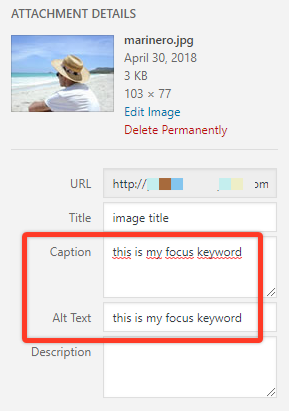
Image Two

Technical info
- WordPress version: 4.9.8
- Yoast SEO version: 8.2
- If relevant, which editor is affected (or editors):
- [x] Classic Editor
- [ ] Gutenberg
- [ ] Classic Editor plugin

Please inform the customer of conversation # 424183 when this conversation has been closed.
Please inform the customer of conversation # 426352 when this conversation has been closed.
I am currently affected by this error aswell. Will there be any fix in the near future. Is there any reason this issue has no assignee yet?

The problem occurs under the following conditions:
- the alt-tag text includes an exact match of the keyphrase
AND
- the alt-tag text is equal to or includes the caption text or another sentence from the text with an exact match of the keyphrase.
This is a known bug and it will be fixed by the new HTML parser.
Until the bug is not fixed, we can advise the users to specify alt-tags which are not copies of caption texts or sentences from the main text, or which do not contain exact matches of the keyphrase to avoid their HTML being broken by the highlights.

Please inform the customer of conversation # 596315 when this conversation has been closed.

A user reported the same issue: https://wordpress.org/support/topic/if-highlite-this-result-in-text-is-clicked-all-captions-are-gone/#post-13291118

Issue happens with v14.8 of Yoast and 5.5 of WordPress and 1.6 of Classic Editor
