

 Ylianst
macOS Big Sur M1 screen recording permission not working
Hi,
I recently bought a M1 MacMini and tried to install MeshAgent as usual. After installing and rebooting I was able to connect to terminal but the screen sharing is not working.
I checked the permission for meshagent_osx64 and added it to the accessibility permission as well.
Also after restarts I only get the warning message on the host that I need to grant permission for screen sharing even though this setting is already set.
Any ideas how to force to set this permission?

I found that big sur asks for two different permissions, but doesn't ask for the second until the first is granted. If you accept both, it should work. (I also test on an M1 mini)

I haven't gotten around to it yet, but I was going to modify the agent so it asks for those permissions on first start instead of when you connect the desktop.
For some reason it is not working for me at all. I tried it with two different Macs (Both latest Big Sur).
1 MacMini 1 MacBook Air
Both have the screenrecording permission checked and I also added the executable to the Accessibility permission.
But still on every connect I get the popup on the host that I should allow screen recording (which I did already) and on the backend I only see the top menu bar of my mac.
One thing you can try, is to go into the permission settings, and remove all the permissions. And try again. I filed a bug with apple a while ago, because I think the UI is keying the permissions by file name, but the security permission is keyed by file hash, as sometimes it seems like the permission is allowed in the UI, but it isn't really set.
I tried this right now with no luck.
Even when I run tccutil reset All or delete the database files manually in order to get a fresh start it will not make any difference.
When I stop the service and run the binary using sudo meshagent_osx64 it asks me to allow permission again (this time for the terminal app) and when allowing it, it will work. But as soon as I restart the original service or my mac it stops working again.
Ah okay I solved the issue now! Before I used the mpkg installer I could download from MeshCentral.
I guess that one is still not an universal app.
I now used the binary wget install method and got it working now!
So maybe you should check the mpkg installer or remove it completely since I might not be the only one who is using that.
Oh, good catch! I'm not sure if the mpkg is using the universal binary or the Intel binary. I think it may be using the Intel binary. I haven't touched that installer in a while.
Yeah I am pretty sure it does. Thats probably the reason for the permission issue. Since Rosetta 2 is changing the binary on the fly, it will not be detected as allowed when your theory of MD5/SHA sums is correct (seems to be the case)
So this should be used?
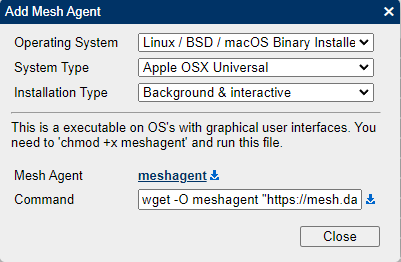
How are you supposed to run it? sh ./meshagent ?

Are you still having this issue? I checked the package installer, and it is actually using the universal binary. But yes, if you download that option above, you just need to chmod 770 the file, and execute it ./meshagent and it should popup a dialog box to install the agent... You can also just run it like this: ./meshagent -install and it will install from the command line.