

 Xtendify
Feature: $calendar/$event: Add 'Y-m-d' format of the current date rendered
Example for List/Grid Views:
$event->date_currently_processing will be '2017-12-19' when rendering event(s) occurring on December 19, 2017, but it will be '2017-12-31' when rendering event(s) occurring on December 31, 2017
This allows custom tags to do something based on a specific date. For example, if an event spans December 20-22, I want to output something only on the December 21 display of this multi-day event.

Thanks for the PR, cliffordp!
We'll add this to the backlog for testing & see if we can get it in an upcoming release.

@cliffordp Apologies on the delay. We appreciate you submitting this PR. I'm taking a look at this today/tomorrow for inclusion in our next release, which should be soon. I'll get back to you once I have a chance to review and we make a decision.

@cliffordp Would you mind submitting (in code, etc.) an example of usage of this requested addition so we're on the same page? I'm not completely sure what you're referring to when mentioning custom tags above. Submitting an example of that would be helpful. Thanks.
Sure thing.
- Install https://wordpress.org/plugins/tk-event-weather/
- Install this unreleased add-on (.zip file: https://cl.ly/2t2C2O3F2Y0k)
- Use this license key to activate it:
sk_EYlisG!MwgU[q>G2M[_h~}IOi<A7k(expires in 1 month) \TKEventWeather\SimpleCalendar\Functions::get_midnight_of_day_rendering()is what uses the code from this PR
- Use this license key to activate it:
- Add the
[tk_event_weather_simple_calendar]shortcode to your Calendar View - Test a multi-day event that has a location
Screenshot without these 2 plugins active (and this PR in effect): https://cl.ly/0Y3O3j2U291G GIF with plugins active: https://cl.ly/3K191Z3i1E2L
Please let me know if anything isn't clear.
@cliffordp Sorry, not at the moment. I haven't had a moment to revisit this yet, but I'll put it on my list for next week.
@cliffordp sorry I missed the window for the api key expiration. can you extend the one provided above or generate a new one for me for testing?
@cliffordp I'm having issues getting this setup locally for testing. getting the following error message...
The Google Maps Geocoding API resulted in an error: REQUEST_DENIED. for the 'tk_event_weather' shortcode to work correctly. (Error message only displayed to users with the 'customize' capability.)
In the Google Cloud console I have both the Geocoding API and the Calendar API keys set up, both APIs activated (the steps to get the API keys up and running changed a bit on Google's end recently), and the geocoding key entered in the customizer. The Calendar works, but the Geocoding does not.
I'm also seeing a fatal error when I attempt to run WP-CLI commands, such as wp transient delete --all locally with your plugin and add-on activated. Do you see this? Not sure if the WP-CLI command issue is related, but wondering if you're seeing the same thing or I have something not set up correctly on my end.
@cliffordp Scratch the first part of that message. I deactivated your plugins, cleared the transients, and now the weather data loads, but the wpcli issues still exists.
@cliffordp this is the fatal error btw, meant to include that...
Fatal error: Uncaught Error: Class 'TKEventWeather\Setup' not found in /Users/damonsharp/Sites/codivated/codivated-dev/wp-content/plugins/tk-event-weather/tk-event-weather.php:147
Stack trace:
#0 /Users/damonsharp/Sites/codivated/codivated-dev/wp-content/plugins/tk-event-weather/tk-event-weather.php(320): TKEventWeather\wp_version_check()
#1 /Users/damonsharp/Sites/codivated/codivated-dev/wp-settings.php(305): include_once('/Users/damonsha...')
#2 phar:///usr/local/bin/wp/php/WP_CLI/Runner.php(1174): require('/Users/damonsha...')
#3 phar:///usr/local/bin/wp/php/WP_CLI/Runner.php(1100): WP_CLI\Runner->load_wordpress()
#4 phar:///usr/local/bin/wp/php/WP_CLI/Bootstrap/LaunchRunner.php(23): WP_CLI\Runner->start()
#5 phar:///usr/local/bin/wp/php/bootstrap.php(75): WP_CLI\Bootstrap\LaunchRunner->process(Object(WP_CLI\Bootstrap\BootstrapState))
#6 phar:///usr/local/bin/wp/php/wp-cli.php(23): WP_CLI\bootstrap()
#7 phar:///usr/local/bin/wp/php/boot-phar.php(8): include('phar:///usr/loc...')
#8 /usr/local/bin/wp(4): include('phar:/ in /Users/damonsharp/Sites/codivated/codivated-dev/wp-content/plugins/tk-event-weather/tk-event-weather.php on line 147
@cliffordp one last thing, I'm also seeing the weather data not contained to the day it represents...
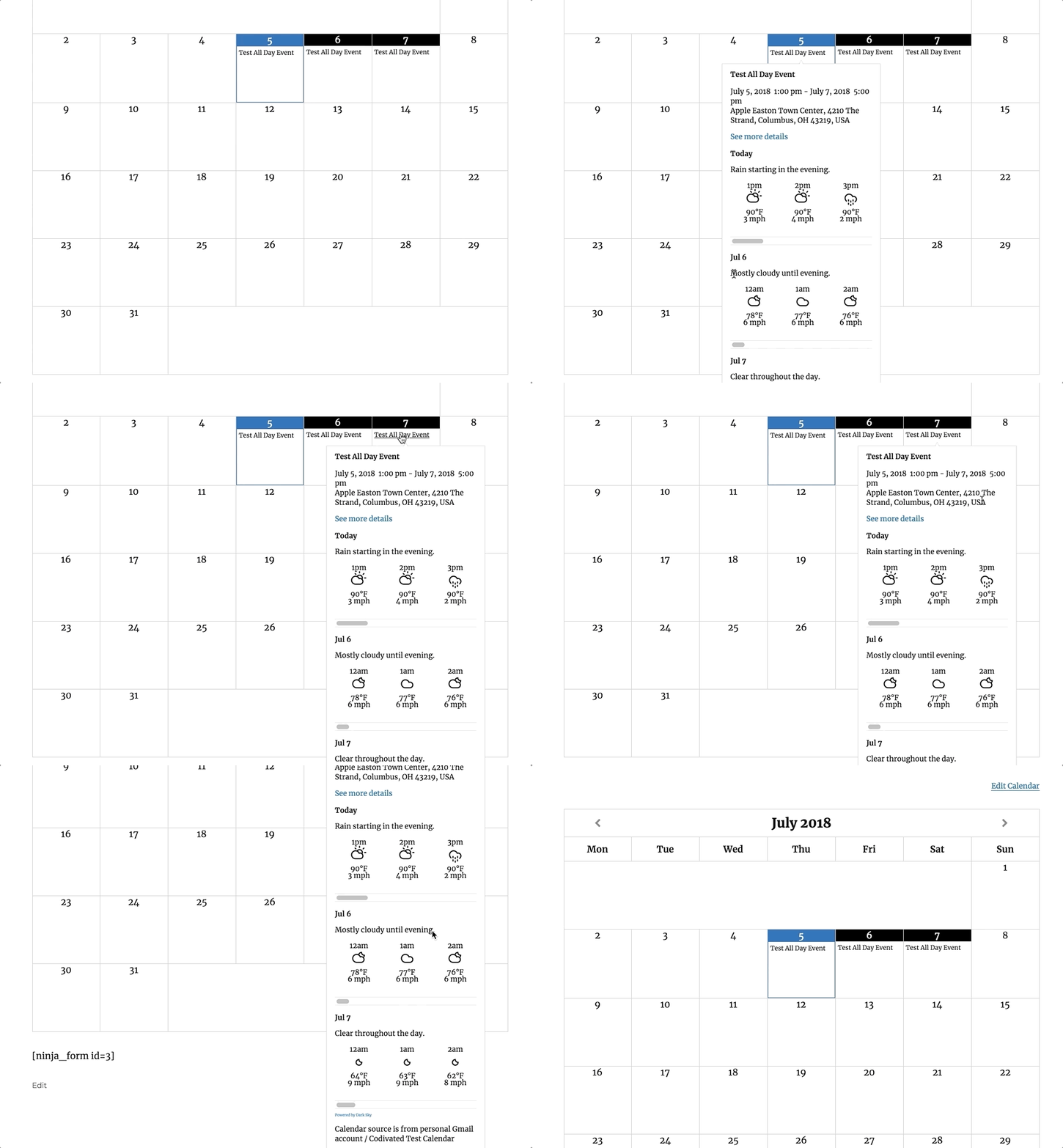
I installed the .zip I gave you + a fresh copy of https://wordpress.org/plugins/tk-event-weather/
Does this file exist on your setup? /wp-content/plugins/tk-event-weather/src/Setup.php
IIRC, I modified the plugin and submitted the PR without actually running from my local git repo because of the different folder name and build process and such... so here's the .zip of Simple Calendar I'm running that's working for me (link expires in 1 month): https://cl.ly/231z1S3q193a
Please see if that version makes the All Day event test work as expected.
If it does work with this zip of your plugin, maybe I missed porting over something to this PR and I can fix.
Thanks for testing!
@cliffordp Apologies. I've not had a chance to get back to this yet due to other priorities. I'm also ooo for a bit, but I will get back to it when I have a chance to revisit.
Hi @cliffordp I just unfortunately haven't had the time to dive back into this yet. My apologies. I'll attempt to get to it soon.
@cliffordp I'm going to take some time to wrap up testing on this tomorrow btw if you can get me another .zip of the files you dropped above in https://github.com/sureswiftcapital/Simple-Calendar/pull/287#issuecomment-402912084. Thanks.
Oh, bummer i didn't get back to you until now... turns out that link didn't expire (I think I forgot to save that setting)... should be good as-is. Here it is again: https://cl.ly/231z1S3q193a
Thanks!
@cliffordp I've given this another test with your 3.1.14 version of Simple Calendar in the above download, and everything checks out, but when I switch to the latest Simple Calendar from the repository (3.1.19), I'm seeing a different output (see attached). There's additional weather data on each day and the weather data shown for each day doesn't line up with the date. Looks like we may have made some updates that broke the functionality you're trying to achieve. Can you take a look and get it working in the latest version and pass me another build to test? When it all tests out okay we'll get this into the next release. Thanks!
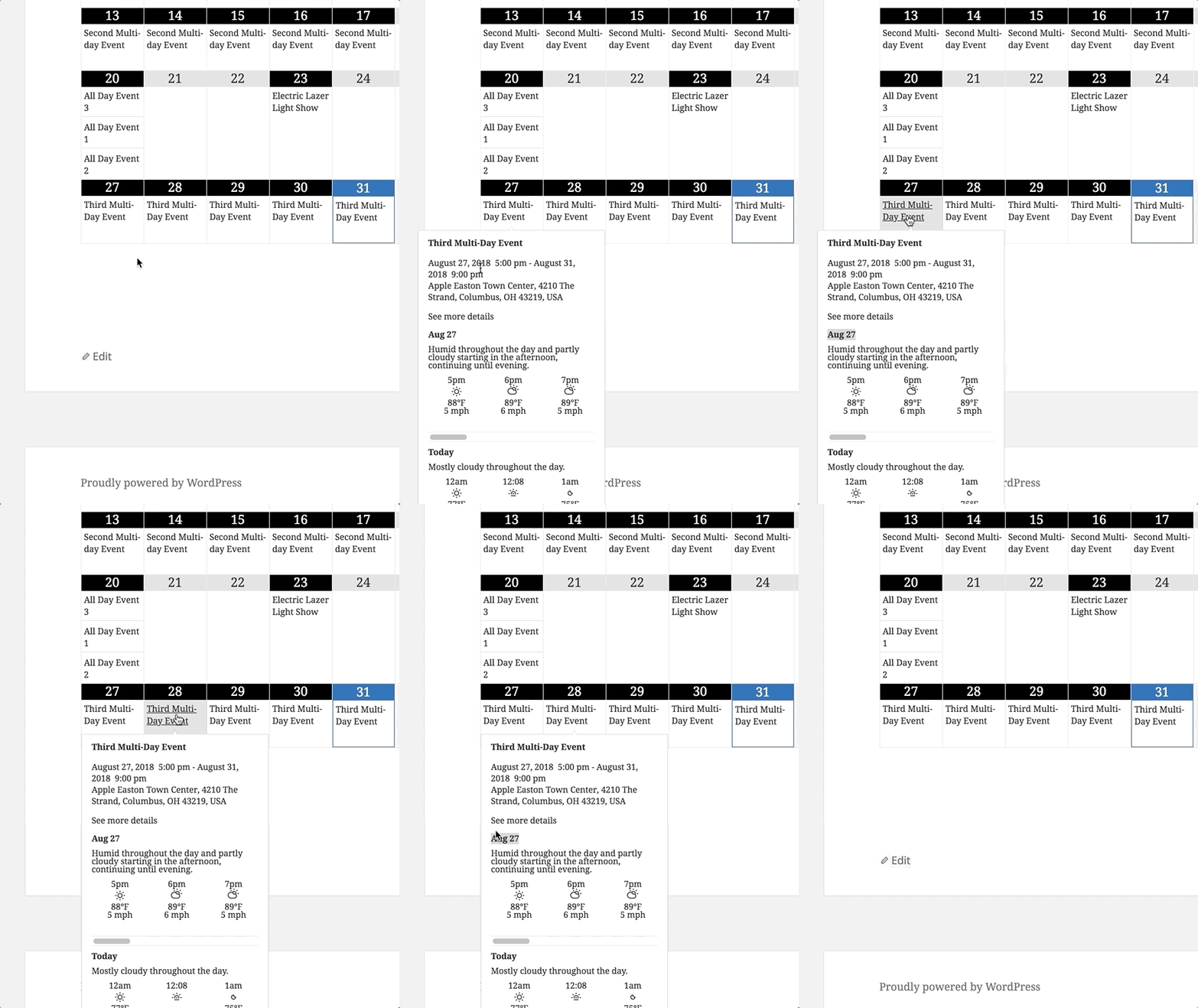
Thanks for testing. Will do! Any deadline for me to get it back to you before the next release?
@cliffordp You've been extremely patient while I've taken a look at this PR, which I really appreciate, so let me know what you're thinking on your end and I'll be sure to work it in. Thanks.
I'll probably get to it late next week or sometime the week after.
When you say "get it working in the latest version"... which branch should I submit a pull request against?
@damonsharp sorry for the delay... but could you please tell me which branch you prefer I do the PR from?
@cliffordp would you be open to check if it works with the latest WP and PHP since this is a very old PR?
Also, the base branch would be dev
