

 Xeio
Xeio
An unhandled error has occurred.
When I access the page I have a banner at the bottom that says "An unhandled error has occurred."
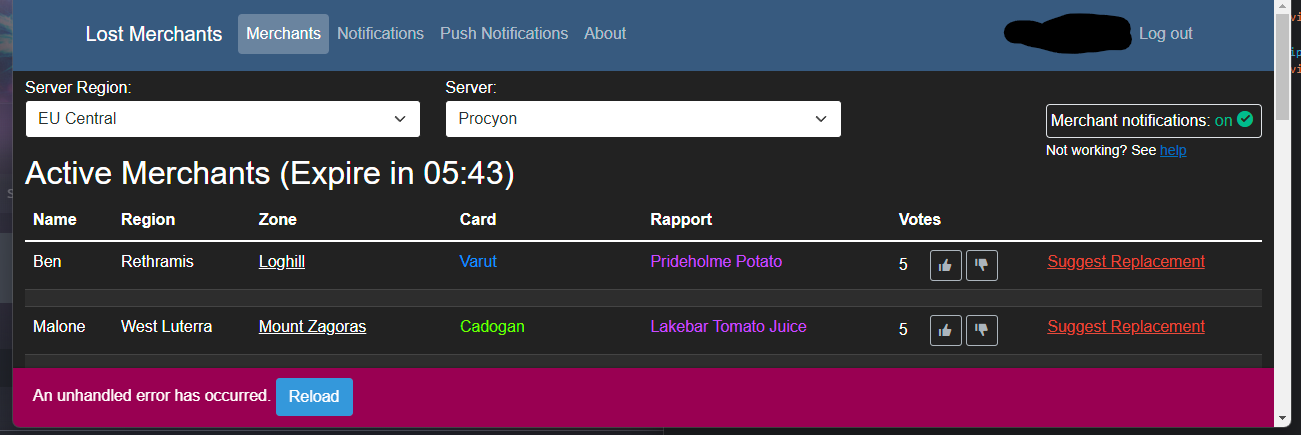
The following errors show up on the console:
-
content.js:2 POST https://o1220318.ingest.sentry.io/api/6452213/store/?sentry_key=fdb4adf2201d407d9318ab472519e554&sentry_version=7 429 -
failed to send post message into internal message -
crit: Microsoft.AspNetCore.Components.WebAssembly.Rendering.WebAssemblyRenderer[100] Unhandled exception rendering component: Cannot read properties of null (reading 'insertBefore') TypeError: Cannot read properties of null (reading 'insertBefore') at x (https://lostmerchants.com/_framework/blazor.webassembly.js:1:16830) at se.insertText (https://lostmerchants.com/_framework/blazor.webassembly.js:1:24159) at se.insertFrame (https://lostmerchants.com/_framework/blazor.webassembly.js:1:22586) at se.applyEdits (https://lostmerchants.com/_framework/blazor.webassembly.js:1:21163) at se.updateComponent (https://lostmerchants.com/_framework/blazor.webassembly.js:1:20447) at https://lostmerchants.com/_framework/blazor.webassembly.js:1:56991 at At.Fe._internal.renderBatch (https://lostmerchants.com/_framework/blazor.webassembly.js:1:57363) at Object.St [as invokeJSFromDotNet] (https://lostmerchants.com/_framework/blazor.webassembly.js:1:60049) at _mono_wasm_invoke_js_blazor (https://lostmerchants.com/_framework/dotnet.6.0.7.a5zcrn8ka2.js:1:195300) at wasm://wasm/00971e46:wasm-function[3306]:0xc6159 Microsoft.JSInterop.JSException: Cannot read properties of null (reading 'insertBefore') TypeError: Cannot read properties of null (reading 'insertBefore') at x (https://lostmerchants.com/_framework/blazor.webassembly.js:1:16830) at se.insertText (https://lostmerchants.com/_framework/blazor.webassembly.js:1:24159) at se.insertFrame (https://lostmerchants.com/_framework/blazor.webassembly.js:1:22586) at se.applyEdits (https://lostmerchants.com/_framework/blazor.webassembly.js:1:21163) at se.updateComponent (https://lostmerchants.com/_framework/blazor.webassembly.js:1:20447) at https://lostmerchants.com/_framework/blazor.webassembly.js:1:56991 at At.Fe._internal.renderBatch (https://lostmerchants.com/_framework/blazor.webassembly.js:1:57363) at Object.St [as invokeJSFromDotNet] (https://lostmerchants.com/_framework/blazor.webassembly.js:1:60049) at _mono_wasm_invoke_js_blazor (https://lostmerchants.com/_framework/dotnet.6.0.7.a5zcrn8ka2.js:1:195300) at wasm://wasm/00971e46:wasm-function[3306]:0xc6159 at Microsoft.JSInterop.WebAssembly.WebAssemblyJSRuntime.InvokeUnmarshalled[Int32,RenderBatch,Object,Object](String , Int32 , RenderBatch , Object , Int64 ) at Microsoft.JSInterop.WebAssembly.WebAssemblyJSRuntime.InvokeUnmarshalled[Int32,RenderBatch,Object](String , Int32 , RenderBatch ) at Microsoft.AspNetCore.Components.WebAssembly.Rendering.WebAssemblyRenderer.UpdateDisplayAsync(RenderBatch& ) at Microsoft.AspNetCore.Components.RenderTree.Renderer.ProcessRenderQueue()
OS: Windows 11 Pro 21H2 Bowser: Chrome Version 103.0.5060.134 (Official Build) (64-bit)

I have same issue from todays morning, reloading not helps. Tried other browsers, same stuff :( U found solution?

No nothing that I tried so far got rid of the message. I don't see any impact though, the site works for me just fine. It mostly obstructs the view on another message that you need to click to enable notifications "Click here to enable notification sounds", but it can still be clicked on the small portion that is not obstructed.
I believe it would be helpful to have a button to dismiss the message, and maybe also one that shows the details about the error, so that the bug reporter can get the info from there and not need to dig into the console window of the browser.
FYI, you don't actually have to click on the "click to enable notifications" banner. You just have to click anywhere on the page, even in the grid or whatever so that the web browser will let the site play sounds. The banner is just a reminder.

i have the same problem, error with my ISP but with my 4G phone internet is not problem, help
