

 Xanashi
UI Feedback
I think we talked about that before but I think the options are a bit confusing, well only one part of it, really. And that is module activation also being the tab with the name on it. I always click the name (ex: Thumbnailing) by mistake when I meant to switch the options category (the picture icon), which would have been a click on the icon instead.

I agree. I will definitely reconsider the layout there. In the meantime if people have ideas or suggestions, I'm all ears. ;)

I'd probably move the enable switches inside the right pane of the options. Ghetto mockups of the basic idea:
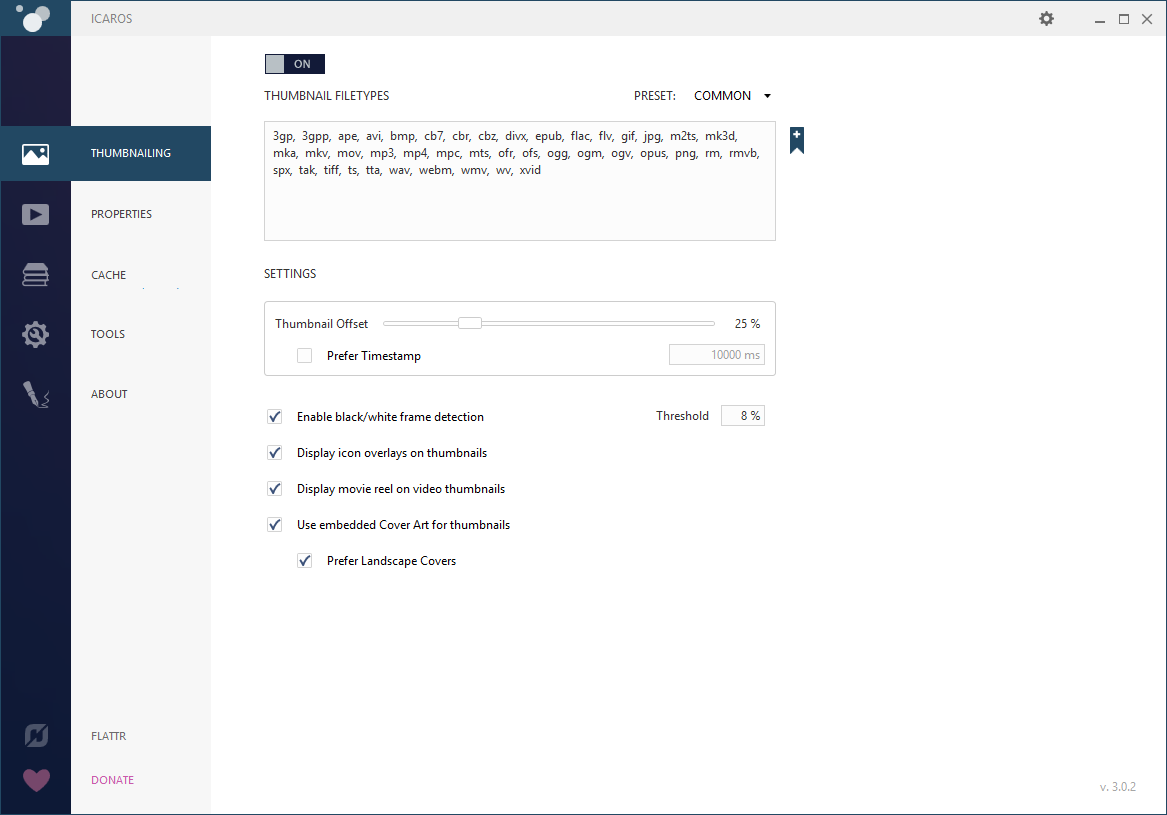

Thanks for the prompt feedback. My only gripe with putting the toggles in their respective pages (and the reason why I didn't initially do it), is that I personally really like to be able to enable/disable each component without browsing to their pages, i.e. opening IcarosConfig and being able to enable/disable everything right then and there with just 3 clicks.
Hrm, not sure there is a good solution then. Put a quick toggle with only half the hit size on the second line? Would probably look bad though :/
Sorry for the bump; but adding a single setting under Tools to allow for toggling the options from the sidebar (clean installs should default to off, on upgrade set to on) could work.
You still keep the visual feedback if a module is on/off/$state and when the setting is enabled you keep the current behaviour for the quick changing with just the 3 clicks.

No apologies needed, all feedback is welcomed. I love the idea of making an optional alternative way to enable/disable the different modules, so users can decide for themselves, which way they like the most.
I'm still unsure about visuals of the alternative view. It's clear the buttons in the left bar should just change the page, but where should the activation toggle buttons be located? The way Stanzilla suggested? A toggle on each page?
(I do still need to look into how to make the buttons on the left bar have multiple functionalities, it may be tricky.)