

 X-Sharp
Add extensive code formatting options to the source code editor
I would like to add extensive code formatting options to the editor. I am thinking of options like:
- indent everything inside begin namespace .. end
- indent methods and instance variables inside class .. end class (and structure, interface)
- indent members inside VOSTRUCT and UNION
- indent members inside Enum
- indent statements inside methods/functions
- indent CASE labels inside DO CASE .. SWITCH
- indent block body inside CASE labels
- indent continuation lines in multi line statements
- add spaces after opening tokens ( left paren, curly, bracket)
- add spaces before closing tokens ( right paren, curly, bracket)
- add spaces after commas
- add spaces after statement separator (semi colon) when a line contains multiple statements
- add spaces inside compile time codeblocks (after first pipe, before and after second pipe)
Ideally I would like to show these options in a separate dialog in the Tools/Options window and then when the focus is on a control with the option show a preview window that shows the effect of the option on a code snippet. A bit like how the C# formatting options are handled.
If and when the .editorconfig support is finished we should also allow these options to be configured in the .editorconfig file.

Will there be a way to execute a re-formatting of all files in the solution? That would be very helpful, because otherwise, new format settings will be applied only when a code file will be modified in the code editor. I've seen, that there is an visual studio extension, that does this, but sadly, it doesn't work with x# solutions.

Volkmar,
That extension has its source in GitHub: https://github.com/munyabe/FormatAllFiles
I noticed that there is an options page for the extension where you can specify the "Inclusion pattern": https://github.com/munyabe/FormatAllFiles/blob/master/FormatAllFiles/Options/GeneralOption.cs#L56
So you should probably be able to add the prg extension there.
Robert
Thanks for the response Robert. I've checked the inclusion pattern, but it is already set to "*.*". When I execute the menu item, i'll get the error:
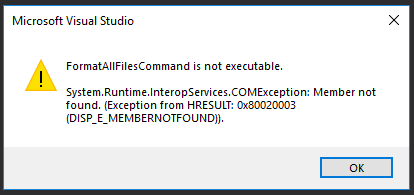
It seems, that the extension tries to call something that doesn't exist. I tried to execute the menu item on a c# solution. There the extension works., It opens the first file of the solution, executes the formatting, saves the file and goes to the next one until all files of the project are re-formatted.
Well, then we must clone the repo, test what it is looking for and then make sure that it also runs on X# projects and send a pull request to the author. Of course we can also build something like this in the X# project system, but I think it will be easier to extend this extension.

Robert, I think this is probably working very well from a VS users' POV, but it's driving myself a little crazy. Some times I want to indent my code a little more or less for whatever reason, but VS keeps reindenting it the way it prefers. I try to put a comment starting in the beginning of the line, VS, then moves it to indent it together with regular code etc etc. I can't stand this in c# either...
Not sure if there are X# VS users who would also be annoyed by this behavior, but in case they are, is there a way to disable this code auto re-adjusting functionality? If not, can it be added? But please keep in mind that I do want to keep the auto indent/outdent of IF/ENDIF etc statements, this is very helpful. What annoys me is indenting regular code every single time I press [Enter]. But if you think that VS users actually like this behavior, then please ignore me!
Apart from this, Format Document, regular indenting etc indeed works very well, good job!
Hmm, this doesn't happen ALWAYS as I originally thought. Sometimes it happens, but some times it leaves the code where I put it. Can't figure out the pattern when this happens, but seems that usually the re-indentation happens after the first time I type my code and press Enter, while it happens much less often when I press Enter on a line with already existing code.
Robert, I think better ignore me on this, let's hear from beta testers how they like it instead!