

 WrathChaos
Unable to get an AXIS IP cam to work in the home network
Hello @WrathChaos:
Thank you profusely for this example app and library.
Although I was able to build and download your example app into my iPhone, I have no experience in ios/Swift development.
Now I need your help to get it to work.
The only substitution I made was the IP address of the form http://<user>:<passwd>@<naked-ip-address>/view
The authenticated IP address (plus view command) works form a browser (I get a mjpeg stream in the browser).
That got my hopes high, perhaps, it may work from your app.
All I get is a wait spin.
-Auro
thank you for pointers

Hello @aurotripathy Thank you for kind words.
Can you share an example how do you try to implement it? I could not reproduce it without any details

Thank you @WrathChaos
I've shown a picture of how it works from a Chrome browser.
To stream MJPEG from the camera, I point the browser to:
http://<user>:<passwd>@<ip-address>/view
And I get this (Is it possible to get the same from your app?)
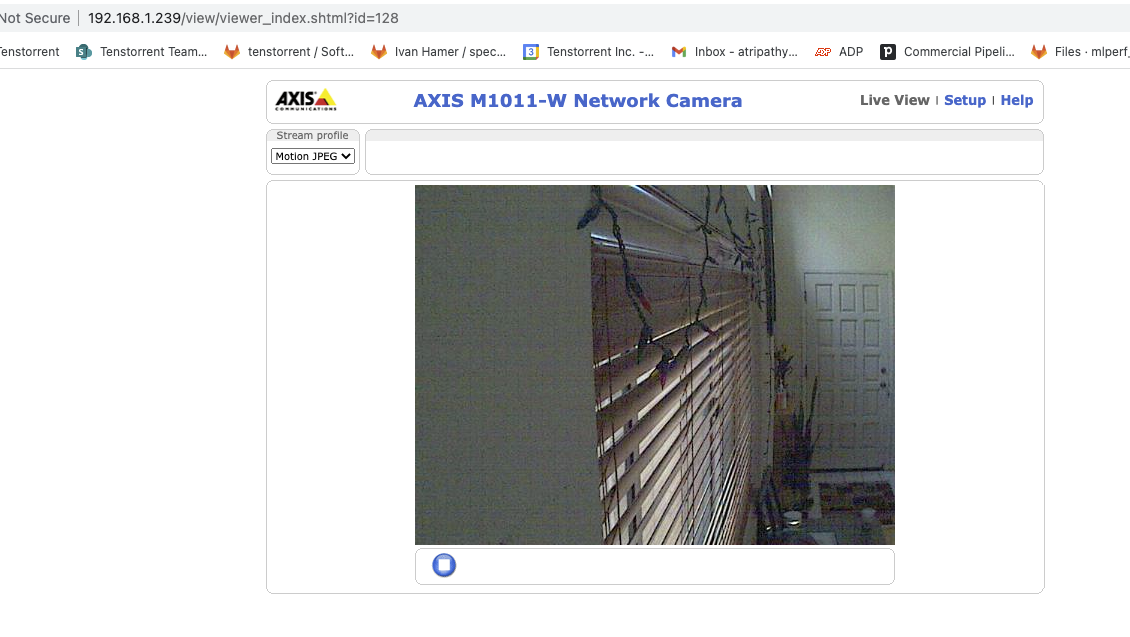
Using a different URL string is the only change I made to your example app.
error messages on console:
2022-01-03 21:23:33.603516-0800

MJPEGStreamLib_Example[11628:823580] Connection 1: received failure notification
2022-01-03 21:23:33.603589-0800 MJPEGStreamLib_Example[11628:823580]
Connection 1: failed to connect 1:50, reason -1
2022-01-03 21:23:33.603620-0800 MJPEGStreamLib_Example[11628:823580] \
Connection 1: encountered error(1:50)
2022-01-03 21:23:33.605056-0800 MJPEGStreamLib_Example[11628:823580] \
Task <D98F7AF0-1838-4291-92BD-3CC0840D2678>.<1>
HTTP load failed, 0/0 bytes (error code: -1009 [1:50])
2022-01-03 21:23:33.609427-0800 MJPEGStreamLib_Example[11628:823581] \
Task <D98F7AF0-1838-4291-92BD-3CC0840D2678>.<1> finished with error [-1009] \
Error Domain=NSURLErrorDomain Code=-1009
"The Internet connection appears to be offline."
UserInfo={_kCFStreamErrorCodeKey=50, NSUnderlyingError=0x280d9cf00
{Error Domain=kCFErrorDomainCFNetwork Code=-1009 "(null)"

UserInfo={_NSURLErrorNWPathKey=unsatisfied (Local network prohibited),
interface: en0, ipv4, ipv6, _kCFStreamErrorCodeKey=50, _kCFStreamErrorDomainKey=1}},

_NSURLErrorFailingURLSessionTaskErrorKey=LocalDataTask <D98F7AF0-1838-4291-92BD-3CC0840D2678>.<1>, _NSURLErrorRelatedURLSessionTaskErrorKey=(
    "LocalDataTask <D98F7AF0-1838-4291-92BD-3CC0840D2678>.<1>"),
NSLocalizedDescription=The Internet connection appears to be offline., NSErrorFailingURLStringKey=http://192.168.1.239/,
NSErrorFailingURLKey=http://192.168.1.239/,
_kCFStreamErrorDomainKey=1}
Hi, I tried a local network privacy settings in the info.plist. Did not work :-(
I guess this is about the local network issue. I think you're streaming your webcam with local network am I right?
@WrathChaos , thanks, yes, the camera is on the local home network. The private IP is given by a DHCP server from the pool, 192.168.x.x.
@aurotripathy,
I updated the Example project with the new build system and new working URL. It is still working without any problem. It is probably all about the local home network. Can you try it on release mode with a physical device?
I work alot with AXIS Products and can tell you that the URL (http://<user>:<passwd>@<naked-ip-address>/view) will not give you the mjpeg stream needed for this lib.
Click with the right mouse on the MJPEG in the browser view and inspect the <image src="?" />.
It should be something like http://<user>:<passwd>@<naked-ip-address>/mjpg/video.mjpg with some more parameters. You can try without the URL parameters if it works.

I work alot with AXIS Products and can tell you that the URL (http://:@/view) will not give you the mjpeg stream needed for this lib. Click with the right mouse on the MJPEG in the browser view and inspect the . It should be something like http://
: @ /mjpg/video.mjpg with some more parameters. You can try without the URL parameters if it works.
@aurotripathy Can you take a look at this please?
@frankble thank you so much tho