
Learn
 Learn copied to clipboard
 WordPress
Block Locking - Lesson Plan
Topic Description
What is block locking? What parts of the site editor have locks? (list view, templates, reusable blocks, patterns??)
Related Resources
Links to related content on Learn, HelpHub, DevHub, GitHub Gutenberg Issues, DevNotes, etc.
- https://github.com/WordPress/gutenberg/pull/39183
Guidelines
Review the team guidelines
Development Checklist:
- [ ] Gather links to Support and Developer Docs
- [ ] Consider any MarComms (marketing communications) resources and link to those
- [ ] Review any related material on Learn
- [ ] Define several SEO keywords to use in the article and where they should be prominently used
- [ ] Description and Objectives finalized
- [ ] Create an outline of the example lesson walk-through
- [ ] Draft lesson plan
- [ ] Copy edit
- [ ] Style guide review
- [ ] Instructional Review
- [ ] Final review
- [ ] Publish
- [ ] Announce to the Training team
- [ ] Announce to lesson plan creator
- [ ] Announce to marketing
- [ ] Gather feedback from lesson plan users about the quality
Repo Structure and Lesson Plan Template
Please remove all blockquote comments such as this before publishing.
Description
A short paragraph explaining what is covered in the lesson plan. This should be text that can be copied and used in a meetup or workshop description.
Objectives
After completing this lesson, participants will be able to:
- Objective 1
- Objective 2
It’s required that you include a bulleted list of objective(s) for each lesson plan. Objectives should be worded as actions that the participant can do once they’ve finished. See Bloom's Taxonomy of Action Verbs (PDF) as a reference. Avoid using words like "know," "understand," "be introduced to," etc. There should be one assement item for each objective (see below).
Target Audience
Who is this lesson intended for? What interests/skills would they bring? Put an "x" in the brackets for all that apply.
- [ ] Users / Content Writers
- [ ] Designers
- [ ] Developers
- [ ] Speakers
- [ ] Organizers
- [ ] Kids
Experience Level
How much experience would a participant need to get the most from this lesson? Put an "x" in the brackets for all that apply.
- [ ] Beginner
- [ ] Intermediate
- [ ] Advanced
Type of Instruction
Which strategies will be used for this lesson plan? Put an "x" in the brackets for all that apply.
- [ ] Demonstration
- [ ] Discussion
- [ ] Exercises
- [ ] Feedback
- [ ] Lecture (Presentation)
- [ ] Slides
- [ ] Show & Tell
- [ ] Tutorial
Time Estimate (Duration)
How long will it take to present this lesson? Put an "x" in the brackets for the one that applies.
- [ ] 1 hour or less
- [ ] 2-4 hours (half-day)
- [ ] 5-8 hours (full-day)
- [ ] 2 days
- [ ] 3 days or more
Prerequisite Skills
Participants will get the most from this lesson if they have familiarity with:
- Skill 1
- Skill 2
For example:
- Experience with HTML and CSS
- Completed the Basic WordPress Concepts lesson
Readiness Questions
- Question 1
- Question 2
A list of questions for participants to see if they have the background and skills necessary to learn and understand the lesson.
For example:
- Do you want to makes changes to your theme yourself?
- Do you know how to write CSS?
Slides
Change the
/repo-name/in the link to match the URL name of this repo.
- Slides (files included in this repo)
Materials Needed
- Item 1
- Item 2
A list of files, resources, equipment, or other materials the presenter will need for the lesson.
For example:
- A local install of WordPress
- The files for the TwentySixteen theme
Notes for the Presenter
- Note 1
- Note 2
A list of any handy tips or other information for the presenter.
For example:
- Participants may need to download the TwentySixteen theme before beginning
- What to do if there’s no projector or internet available
- What to do if a participant doesn’t have the necessary set up
- How to handle different opinions about the topic
Lesson Outline
- First do this
- Then move on to this
- Finish with this
The plan for the lesson. Outline form works well.
For example:
- Talk about what a theme is
- Demonstrate how to install and activate a theme
- Practice exercises to have participants find and install a theme on their own site
Exercises
Exercise name
Short description of what the exercise does and what skills or knowledge it reinforces.
- Short point or step of the exercise
- And another one
These are short or specific activities that help participants practice certain components of the lesson. They should not be fully scripted exercises, but rather something that participants could do on their own. For example, you can create an exercise based on one step of the Example Lesson.
Assessment
There should be one assement item (or more) for each objective listed above. Each assessment item should support an objective; there should be none that don't.
Write out the question.
- Option
- Option
- Option
- Option
Answer: 3. Correct answer
A few questions to ask participants to evaluate their retention of the material presented. They should be a measure of whether the objectives were reached. Consider having a question for each objective.
Additional Resources
- Resource 1
- Resource 2
An optional section which can contain a list of resources that the presenter can use to get more information on the topic.
For example:
- Link to information on the Codex
- Theme Review Team's Handbook
Example Lesson
An example of how the lesson plan can be implemented. Written in script form as one possible way an presenter might use this lesson plan at an event, with screenshots and instructions if necessary.
Section Heading for Example Lesson
You will likely need to break the Example Lesson down into multiple sections.
Lesson Wrap Up
 Follow with the Exercises and Assessment outlined above.


Under things like 'Experience level', it says put an 'x' in the boxes. In GitHub and on Learn WP, it is a tick. So we will need to change this on this and other lesson plans.


@azhiya
https://learn.wordpress.org/wp-admin/post.php?post=18084&action=edit
Looking good @caraya. Thank you so much for adding alt text to the images. You might want to highlight the menu items like this for example: https://learn.wordpress.org/lesson-plan/templates/ in the screenshots for the:
- Group block under preparing content
- Lock option for the first screenshot under Locking movement
- Lock and Drag handles in Testing movement lock
Question, do we add the images to the media library in the learn.wordpress repo? Right now they are linked to an external site
Please add it to the media library and set to full size for optimal display.
It is looking good.
Under presenters notes, suggest a slight tweak of the first two bullet points:
-
from "While we can lock specific blocks in the theme, it should be possible for other developers working on the same theme to undo the locks" to "We can lock specific blocks in the theme, it should be possible for other developers working on the same theme to undo these locks."
-
from "We ask for a specific theme so we can all be on the same page rather than having to figure out what each theme is doing" to "In this lesson plan, we ask for a specific theme so that we can all work on the same theme for ease."
-
There is a dev note on block locking, can this be linked from the lesson plan? Apologies if it is already and I missed it.
Hi @caraya,
It looks excellent and very well explained. However, I think we can remove the Q&A point from the lesson outline, as you are covering this under assessment. Is there anything else regarding the Q&A section that I am missing?
The lesson outline section is not clear to me. Few points are short written and not self-explanatory. I think It needs more explanation to avoid confusion.

Hi @caraya,
It looks excellent and very well explained. However, I think we can remove the Q&A point from the lesson outline, as you are covering this under assessment. Is there anything else regarding the Q&A section that I am missing? It is a place for people to ask questions if they still have any. I make it explicit at the end of all the sessions I create to tell participants that we've set time aside at the end. This is different than assessments but I can see where it would be confusing
The lesson outline section is not clear to me. Few points are short written and not self-explanatory. I think It needs more explanation to avoid confusion. Which of the outline points do you think needs further expansion?
@caraya, I think the introduction points need more clear explanation. What does it cover and why do we include this in the outline section. It would be great if we can do something to make it more clear. As I think if I am getting confused by these points, someone may get the same confusion.
@caraya, I think the introduction points need more clear explanation. What does it cover and why do we include this in the outline section. It would be great if we can do something to make it more clear. As I think if I am getting confused by these points, someone may get the same confusion.
Does it make more sense now? Is this the change you had in mind?

https://github.com/WordPress/gutenberg/pull/40263 - nested or inherited block locking
Include https://make.wordpress.org/core/2022/07/20/whats-new-in-gutenberg-13-7-20-july/#lock https://github.com/WordPress/gutenberg/pull/41876
Visuals: video of exploring a pattern with content lock.
Code example: Example of code found here under Testing Instructions.
Adoption approach: Opt-in. Please review the documentation here.
Initial Add: Content lock ability which introduces the ability to lock blocks in this way. Follow up PR that changed the value to use from noContent to contentOnly. Post from Rich Tabor about how to use this feature.
To learn more about locking, please review this broader resource on curating the editor experience.
Visuals: image showing the option to apply to all inner blocks.
Adoption approach: n/a
Key Make Posts/GitHub/Trac Issue(s): Block Locking: Add the 'Apply to inner blocks' option
I see @caraya is noted as the assignee-- will they be working on these revisions or do we require re-assigment here?

I see @caraya is noted as the assignee-- will they be working on these revisions or do we require re-assigment here?
I'll work on this after I get done with theme.json
@courtneyr-dev
I don't have access to the extended draft plugin for this post. Should I revert it back to draft? or post the update here as an attachment?
I've copied the text of the updated content and attached it to this comment for review. Don't want to make changes to the published content until the updates have been approved.
Block Locking Updates WordPress 6.1
The following features related to block locking were introduced in WordPress 6.1.
Block Locking UI Changes for group block
Locking all children of a group element means that the UI for locking group blocks changed slightly to accommodate the new functionality in blocks that need it.
When locking content in a group or other container, you now have the option of applying the same settings to all the children blocks inside the container

Locking content inside container block

Because now we can choose whether to apply the locks to a group's child elements, there are additional considerations that we need to keep in mind
Where you make the changes matter
If you make the changes to an individual block then the blocks apply only to that block, regardless of the parent container.
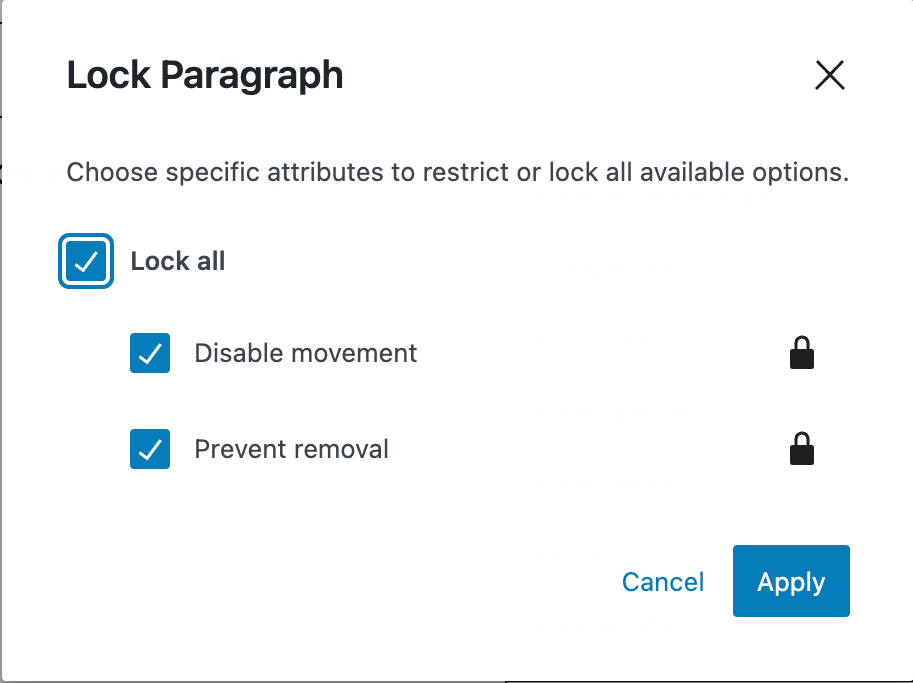
Likewise, if you lock the containing group block and apply the lock to all blocks inside, the same settings will be applied to all blocks.
To change the behavior of individual items inside a group, you need to work on the block you want to change individually either in the list view or in the editor.
Block Lock Status in List View
You can see whether a block is locked in the list view. Locked blocks have a padlock icon to the right.
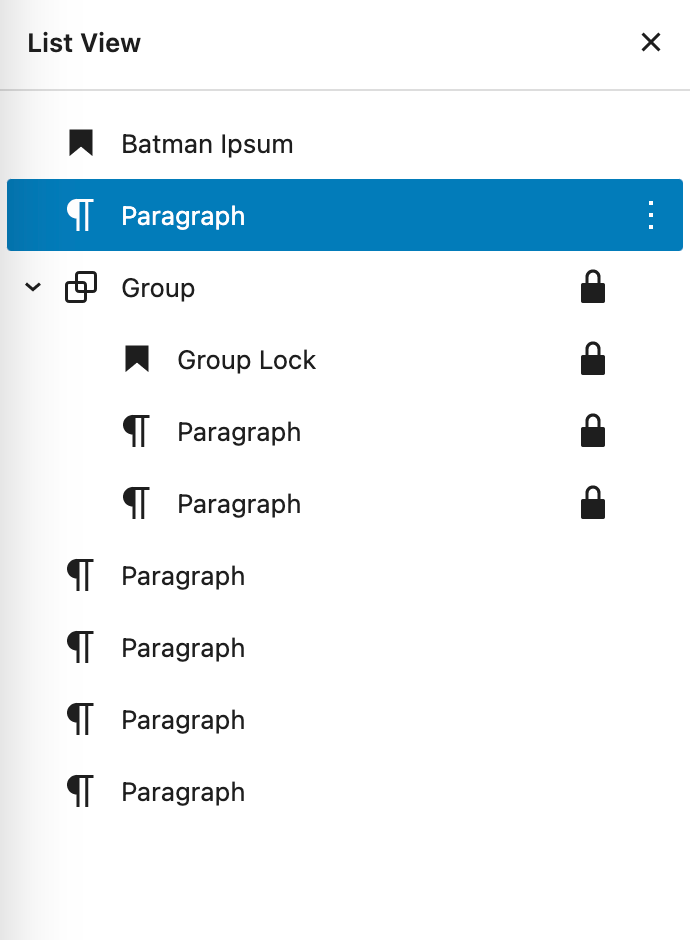
However, we only know that the block is locked. We can't tell if the block was part of a group block that was locked together with the parent or if it was locked independently.
Benefits for theme developers
The ability to lock blocks from being moved or deleted presents an interesting possibility.
Locking blocks means that people with fewer permissions cannot change or remove the locks but they can edit the content of the blocks but not move or delete them.
There is also an option for content-only editing that would combine locking the status of child blocks with removing styling options. Rich Tabor documents it in How to simplify WordPress patterns with content-only block editing but it is offered as additional material for your review since it's beyond the scope of this lesson plan.
block-locking-updates-wordpress-61.md
@caraya I've reviewed these changes, and they look good to me. Feel free to publish the changes and close this issue 👍
