

 WomenInSoftwareEngineeringJP
Disallow blank submissions
Describe the bug The form should not be accepting content like this:
This is an automated message indicating a new speaker nomination:

Time: 2020-09-01T08:04:28.000Z
Name: /
Email:
Company:
Bio:
Submitted by:
Submitter Email:
To Reproduce Steps to reproduce the behavior:
- Go to https://speakher.jp/nominate-speaker
- Fill out the form... more investigation needed, because I can't get this to validate.
- Check the Airtable for a mostly-blank row
Expected behavior We shouldn't allow invalid, blank submissions
Additional context Add any other context about the problem here.

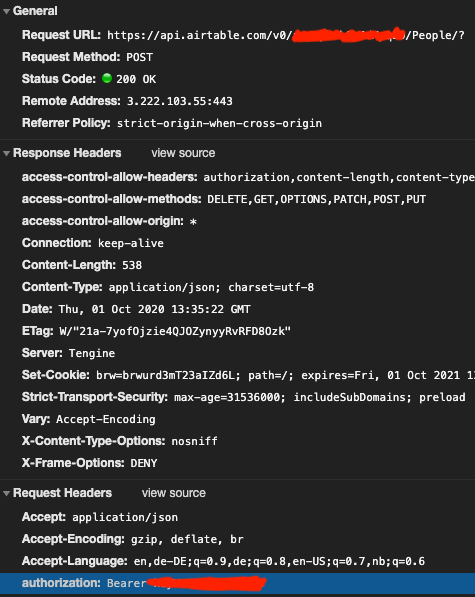
So I could reproduce this. If you check the network tab while sending in the form, both the database ID and the token are visible. (Don't want to create some test entry on production so I didn't check there, this is on my local)
I then copy pasted all of that into Postman, copy pasted the request body, set all fields to empty and I could create an entry with all fields empty.
I saw you want to add a backend for airtable access already, so maybe it should be prioritized? :)
Airtable dev db:


Yes we are aware of that in #15. Thanks for the helpful reproduction notes!
oh sorry I missed that issue somehow 😅 I can help with setting up a backend if necessary :)