

 WinMerge
Unexpected behavior copying files (e.g L to R)
WinMerge 2.16.4.0
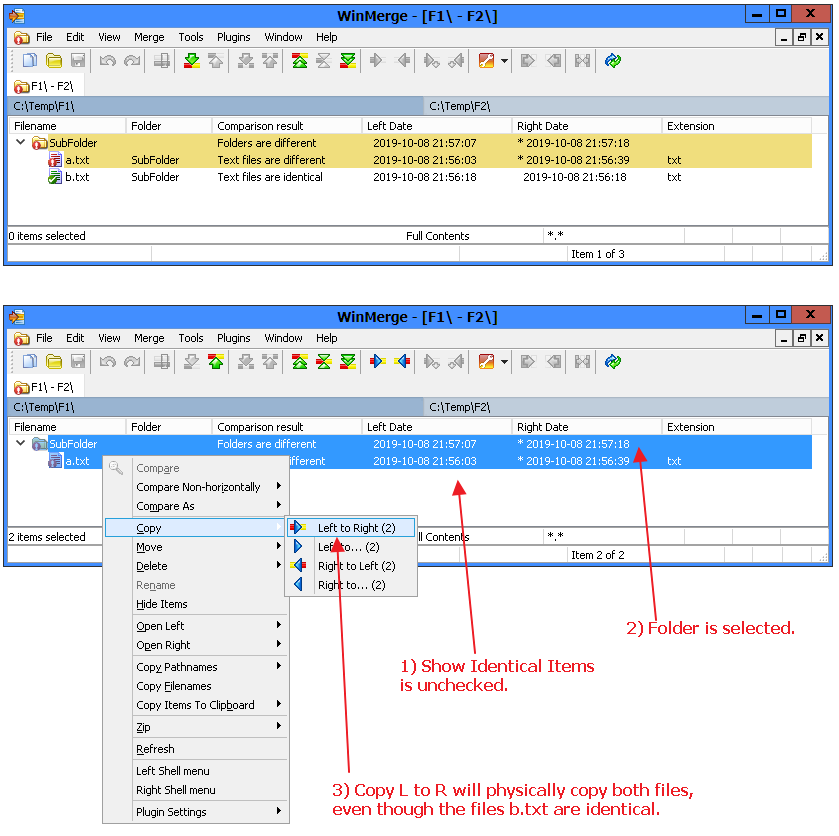
Reproducing the issue:
- Compare two folders, containing files in sub-folders. Most of the files are identical, only few files different.
- Hide identical items. This will show a tree list of file differences, grouped by their contained sub-folders. These containing sub-folders are also marked as different.
- Select the individual files, but also the sub-folders and execute copy (e.g L to R)
Expected behavior: Only the few files with the differences are copied.
Observed behavior: All files in the sub-folders are physically copied, overwriting their identical destination files.
Workaround: select individual files one-by-one, and do not select sub-folders.
This is odd behavior, because I do not expect the identical files to be copied/touched, as this is having side-effects.
In real-world scenarios I have 1000's of files in 100's of folders and 50's of files to be copied. I prefer to select all lines, including the sub-folders, instead of hunting down the individual files with Ctrl+Click.

I agree. Also, files within a folder that I have chosen to hide should not be copied when copying at the folder level.
