Pengwin
 Pengwin copied to clipboard
 WhitewaterFoundry
Filepermission are 777 for folders and 666 for files
Describe the bug Sorry, I am sure it is not really a bug but I can't find a better support category :)
I just re-installed windows leaving the insider preview and going back to WSL1 as WSL2 seemed very slow and unreliable. Now when I create a folder in Pengwin, it gets permissions 777 and files get 666. I believe it was not like that before? The strange thing is if I create a folder in Windows Explorer, it gets 755 permissions in Pengwin. Where can I check/change that?
Thanks :) This is the content of my wsl.conf:
[automount] root=/ enabled = true options = "metadata,uid=1000,gid=1000,umask=22,fmask=11,case=off" mountFsTab = true crossDistro = true
[network] generateHosts = true generateResolvConf = true
[filesystem] umask = 22

Hello,
It happens in your Linux home or in Windows directories?
We will make some tests and get back to you.
Regards

It happens everywhere. e.g cd ~ brings me to "/home/elmima" then mkdir Test -> Folder has 777 permission
cd /mnt/p/Projects mkdir MineFromLinux -> MineFromLinux has 777
open windows explorer to P:\Projects Right click to create a new folder -> MineFromWindows
back to Pengwin cd /mnt/p/Projects ls -la MineFromWindows has 755 permission.
I wonder if it is just some wrong configuration on my machine because Pengwin has so far been my favourite and most often used distribution in WSL and I believe I would have noticed it sooner.
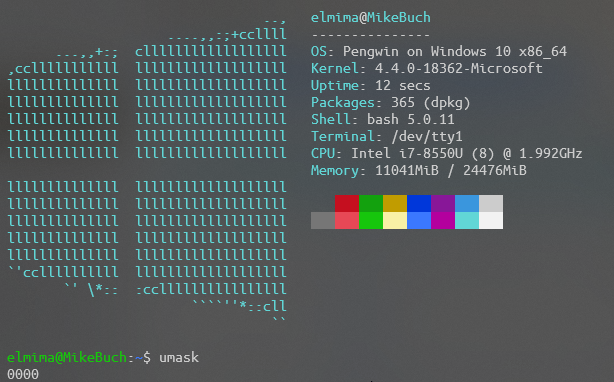
I think umask is not working properly during startup/mounting because when I enter umask the return value us 0000
But that's no biggie, I can just set it in my bashrc I guess?!